
Epson EcoTank Photo ET-8550
4.0Editor score
Wide-format wireless printing
Cartridge-free ink system
Six-color Claria ET inks
Printer scanner copier functions
A printer for film positives must combine sharp line definition, dense black areas, and dependable handling of transparent or translucent media. For screen printing, the real objective is a film positive that blocks ultraviolet light cleanly while preserving the smallest openings and intricate artwork. Ink, film, and printer compatibility must therefore be considered together.
This guide compares ten supplied products across wide-format inkjet printers, dedicated instant-photo printers, waterproof screen-printing film, and UV-blocking blackout ink. The evaluation focuses on stated resolution capabilities, media support, maximum optical density, film handling, printer compatibility, and suitability for creating exposure-ready positives rather than ordinary photo printing.
The rankings reveal an important distinction: some entries are complete printers, while others are essential film or ink companions needed to produce reliable positives. Each review explains what the product contributes to the workflow and who may benefit from it. Prices and availability can change, so check the current listing before purchasing.
4.0Editor score

3.9Editor score

5.0Editor score
As an Amazon Associate we earn from qualifying purchases.
The comparison below separates complete printers from the film and blackout ink needed to create screen-printing positives. It highlights the most decision-relevant differences in media size, output technology, opacity, and intended use.



This is not a standalone printer, but it is the most directly aligned product in the supplied group for producing film positives. Its 4.7 rating reflects a purpose-built blackout ink system designed to create high-opacity stencil films for screen-printing plate and stencil work. The key benefit is dense black coverage with the sharp, defined lines that exposure quality depends upon.
We may earn a commission when you buy through this link, at no additional cost to you.
The 500ml refill capacity is practical for screen-printing businesses or serious hobbyists who expect to produce more than an occasional positive. The formula is advertised for selected SureColor SC-F100, F100, 7600, 9600, 7800, 9800, 7880, and 9880 models. That makes model confirmation essential, because compatibility is more restrictive than the word universal in the title might initially suggest.
The trade-off is that this ink works only with compatible printers and suitable waterproof film. Users who already own one of the listed models may find it more relevant than a general-purpose printer. The product description also claims smooth printing without printhead clogging, but correct setup, storage, and regular use remain important for maintaining that result.
This is the strongest recommendation for operators whose central goal is a true UV-blocking screen-printing positive. It is especially appropriate when dense black areas and clean line definition matter more than general-purpose photo features. Confirm the exact printer model, select the correct film, and follow the ink and film maker's settings before producing a full production run.
Exposure reliability depends on the positive blocking unwanted ultraviolet light in solid areas while preserving the designed openings. This ink is specifically formulated for that high-opacity task, making it more relevant than standard photo black ink for a dedicated screen-printing workflow.
The 500ml container reduces the frequency of refill purchases compared with working from small cartridge volumes. That makes the option useful for regular exposure work, provided the printer appears on the compatibility list and the ink is used according to the manufacturer's guidance.
We may earn a commission when you buy through this link, at no additional cost to you.
This 100-sheet package of Screen Print Direct waterproof inkjet film is designed specifically for screen printers, rather than being repackaged ordinary photo paper. It carries a 4.7 rating and emphasizes clean, dark images, excellent line definition, and consistency across a substantial run of positives. The 5 mil PET base also provides more substantial handling characteristics than lightweight acetate.
We may earn a commission when you buy through this link, at no additional cost to you.
A proprietary microporous top coating is central to the product's performance. It supports a high ink load and is intended to produce sharp line work and acuity, while a slight haze helps distribute light evenly. The listed compatibility includes Epson, Canon, HP, Kodak, and many other inkjet printers, giving the material broader system potential than the more narrowly compatible blackout ink.
The main limitation is the 8.5-by-11-inch sheet size. This is a strong choice for letter-size artwork, repeated smaller positives, and workflows that do not need a 13-by-19-inch sheet. Users must identify the printable side before imaging because the manufacturer states that prints can smear on the wrong side. A wet fingertip test is included as a practical method for locating it.
Choose this film when repeat volume, dark line definition, and dependable flat handling are priorities. It pairs especially well with a standard inkjet printer in a home or small-shop screen-printing setup. It is less appropriate for large-format jobs, but the larger sheet count can make it convenient for batches of smaller stencils.
The microporous coating is intended to accept a substantial ink load without sacrificing line definition. For film-positive work, that combination supports both dense solid regions and finer openings that must remain clearly defined through exposure.
With 100 sheets, this option simplifies restocking for repeat screen-printing runs. It is more convenient for a busy small studio than a short pack, while still using the familiar letter-size dimensions supported by many desktop inkjet printers.
We may earn a commission when you buy through this link, at no additional cost to you.
This 25-sheet version of Screen Print Direct waterproof inkjet film offers the same core materials and imaging approach as the larger 100-sheet package, but in a more manageable quantity. Its 4.7 rating indicates a well-regarded screen-printing medium, and the product is aimed at users who need clean, dark, high-quality positives with good line definition and acuity.
We may earn a commission when you buy through this link, at no additional cost to you.
The film is made from 5 mil PET with a proprietary microporous top coating. That structure gives it high ink-load capacity and durable handling, while the slight haze is described as supporting even light distribution. Anti-curl, anti-yellowing, and fast-drying technologies further improve the experience of handling positive transparency sheets through a production workflow.
Its primary drawback is simply the lower count. A studio printing many stencils every week may run through the package more quickly than a hobbyist or occasional user. The letter-size format also means a large design must be tiled or reduced rather than imaged as one 13-by-19-inch positive. Printer-side limitations may impose additional constraints depending on the selected model.
This is a sensible first purchase for someone building a screen-printing setup with a compatible desktop inkjet printer. It offers the essential dark-image and line-definition characteristics of purpose-made film without committing to a larger sheet count. Confirm the printable side, use suitable ink, and allow the image to dry before exposure to avoid handling artifacts.
Letter-size sheets fit ordinary desktop workflows, making the film convenient for small positives, labels, apparel graphics, and repeat stencil work. The result is especially accessible for users who do not need a dedicated wide-format screen-printing printer.
Anti-curl and fast-drying features help the film remain flat and move more efficiently from the printer to the exposure unit. These practical attributes matter because wrinkles, slow drying, and yellowing can complicate handling and storage.
We may earn a commission when you buy through this link, at no additional cost to you.
This 13-by-19-inch waterproof transparency film is a media product for producing screen-printing positives, not a printer itself. It has the highest rating in the supplied set at 5.0 and directly targets professional silk-screen workflows. Its major advantage is the combination of wide-format dimensions, dense black areas, a 5 mil PET base, and a coating designed to absorb ink quickly.
We may earn a commission when you buy through this link, at no additional cost to you.
The stated high ink-load capacity and strong optical density are especially important for screen exposure. Dense black is necessary where the design requires full UV blockage, while clean edges preserve fine openings. The lightly milky matte surface is intended to limit light scatter, and the anti-static construction helps maintain dimensional stability from printing through exposure.
Its limitations are inherent to the category. A compatible printer must be able to handle 13-by-19-inch film, and the product cannot itself provide scanning, copying, or image management. Although it is described as compatible with the vast majority of inkjet brands, actual results can vary with printer models, inks, driver profiles, and settings. Users should follow the supplier's recommended media configuration.
This is the top pick for shoppers who already have a suitable wide-format printer and need a professional positive medium. It is especially attractive for large screen-printing artwork, detailed designs, and workflows where a letter-size film would require tiling. Pair it with compatible black ink, clean the printer path, and test a small exposure before committing to a production batch.
The 13-by-19-inch format supports larger positive artwork in a single sheet. This can simplify registration and eliminate seams that might occur when a wide design is assembled from several smaller films.
The lightly milky matte surface is designed to reduce unwanted light scatter while supporting photo-quality output. Combined with dense black, that construction targets cleaner edges and more predictable exposure results.
We may earn a commission when you buy through this link, at no additional cost to you.
The Fujifilm Instax Mini Link 3 is a compact smartphone printer designed for instant photos rather than screen-printing positives. Its 4.7 rating and clay-white design make it a polished choice for personal photography, event prints, scrapbooking, and gifting. It prints on Instax Mini film, which is sold separately for the standalone model.
We may earn a commission when you buy through this link, at no additional cost to you.
Its strongest qualities are portability and an approachable phone-based workflow. Bluetooth connectivity removes the need for a direct cable, while the associated app supports frames, filters, sketches, stickers, and images captured from video. Features associated with the Mini Link family also include a photo-booth-style collage mode, QR-code printing, and augmented reality effects that add depth to selected images.
This printer is not suitable for producing UV-blocking film positives for screen printing. Its small Instax format and instant-photo dye process do not match the optical-density and transparency requirements of stencil film. Even with the 13×19 film elsewhere in this guide, the Mini Link 3 cannot be paired with it as if it were a conventional inkjet printer.
Choose it for portable event photography or creative social prints, not for a screen-printing exposure workflow. Its compact form is useful when a fixed printing station is unavailable. For film-positive work, choose an inkjet model with suitable media support or one of the compatible SureColor models associated with the blackout ink.
The small body and wireless smartphone connection make the printer easy to carry to parties, gatherings, and other informal events. It offers a more social output format than a conventional home inkjet.
Frames, filters, text, stickers, collages, and augmented reality tools allow images to be prepared before printing. These features suit memory sharing and decorative projects, though they are outside the technical needs of exposure film.
We may earn a commission when you buy through this link, at no additional cost to you.
The Epson EcoTank Photo ET-8550 is a wireless wide-format all-in-one printer aimed at photo, graphics, and creative-project output. Its 4.0 rating reflects a capable, feature-rich machine, although it is not explicitly described as a dedicated screen-printing film printer. The key buying consideration is whether its media path and ink configuration support the particular transparency film in your chosen workflow.
We may earn a commission when you buy through this link, at no additional cost to you.
It uses Epson's Claria ET Premium six-color ink system and offers substantial wide-format output, making it more practical for large artwork than a standard desktop printer. The tank-based system replaces conventional cartridges with refillable ink bottles, reducing cartridge waste and reducing the frequency of replacement. Wireless operation adds flexibility, while the scanner and copier expand it beyond a single-function output device.
For film-positive work, the printer's strength is its wide-format capability and six-color image system rather than a documented UV-blocking formula. Black density must be evaluated against the selected film, and users should avoid assuming that all pigment or dye combinations will produce the same opacity. A short test print and exposure test are advisable before production use.
The ET-8550 is best for creators who want a premium, general-purpose wide-format printer with strong photo output, convenient wireless operation, and an efficient ink system. It is a sensible choice for a mixed creative studio that will produce film positives occasionally alongside graphics, photographs, and other projects. Confirm the film supplier's printer guidance and printer settings before ordering.
Supporting wide-format output makes the ET-8550 useful for larger positive artwork and a broader range of graphics. It can serve as the central printer in a studio that handles screen printing, photography, proofs, and other visual production tasks.
Ink bottles reduce the need to replace small cartridges and help limit cartridge waste. The system is particularly appealing to high-volume creative users who value uninterrupted operation and straightforward replenishment.
We may earn a commission when you buy through this link, at no additional cost to you.
The Fujifilm Instax Mini Link 2 is a lightweight Bluetooth printer for producing 2-by-3-inch photos from a smartphone. It has a 4.7 rating and a distinctive space-blue finish. The printer bundles a USB cable and a one-year limited product warranty, while the required Instax Mini film is sold separately.
We may earn a commission when you buy through this link, at no additional cost to you.
Its editing tools add frames, filters, sketches, and stickers before output. Users can also print photos captured from video and use the Instax AiR feature to add doodles, shapes, a recorded drawing, or a QR code. Those functions make it useful for scrapbooks, journals, party favors, and quick personal prints.
It is not a film-positive printer in the screen-printing sense. The fixed small format, instant-film workflow, and color-oriented output do not provide a transparent PET sheet suitable for UV exposure. It also cannot accept the 13×19 transparency film or use the listed SureColor blackout ink.
Pick this model for compact instant-photo use and creative sharing rather than production exposure work. It is well suited to travel, celebrations, and lightweight creative kits. If the goal is to expose screen-printing film, use a conventional inkjet printer with compatible screen-printing media and follow the film supplier's setup instructions.
The companion app expands the printer beyond direct image output with frames, filters, sketches, and stickers. This makes it convenient for creating personalized instant photos without using a desktop editing workflow.
Its compact, lightweight body makes the Mini Link 2 easy to carry and quick to set up around a phone. It is particularly useful where a full-size inkjet printer would be impractical.
We may earn a commission when you buy through this link, at no additional cost to you.
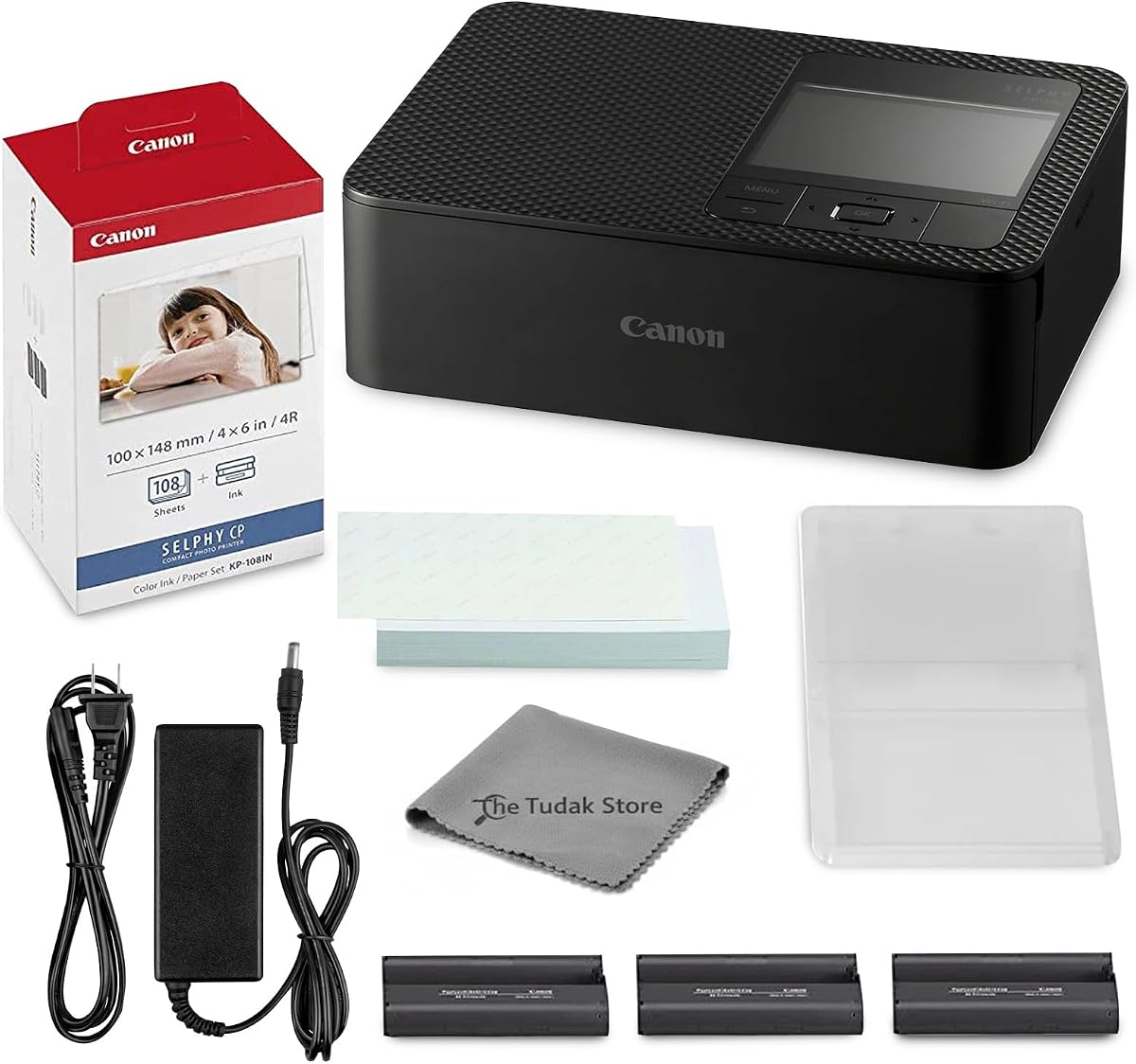
The Canon Selphy CP1500 bundle is a complete photo-printing kit built around dye-sublimation technology. Its 4.4 rating reflects a well-regarded package containing the printer, 108 sheets of KP-108 paper, three full-size color ink cartridges, and a Tudak microfiber cleaning cloth. It is designed to make 4-by-6-inch photos from a phone, tablet, or computer.
We may earn a commission when you buy through this link, at no additional cost to you.
Dye-sublimation output is described as vibrant and professional quality, with water-resistant and fingerprint-resistant properties. The pre-matched paper and ink are presented as a way to simplify setup, while wireless connectivity and a compact body suit event tables, scrapbooking, journaling, and gift preparation.
The printer cannot produce screen-printing film positives. Dye sublimation works with specialized photo paper and cartridges rather than transparent inkjet film, and it does not create the opaque black image required for UV blocking. It also lacks the large sheet dimensions that make wide-format inkjets useful for full-size screen stencils.
This bundle is best for users who want a ready-to-use compact photo system and do not need exposure film. The included supplies make setup convenient, and the dye-sublimation process is well suited to durable keepsake prints. Buyers interested in screen-printing positives should instead choose an inkjet printer and compatible high-opacity film.
The package includes 108 sheets of KP-108 paper, three color ink cartridges, and a cleaning cloth. This removes the need to assemble the basic system separately and supports an easier first-use experience.
The stated water-resistant and fingerprint-resistant characteristics suit photos that will be handled often. That durability makes the format appealing for event prints, gifts, journals, and scrapbook projects.
We may earn a commission when you buy through this link, at no additional cost to you.
This Mini Link 3 bundle combines a compatible smartphone printer with 20 sheets of Instax film and a substantial collection of presentation and creative accessories. Its 4.8 rating is the second-highest in the supplied set, reflecting the appeal of an extensive, ready-to-give package. The accessories include an album, five plastic desk frames, paper frames, stickers, hang clips, and a fitted carrying case.
We may earn a commission when you buy through this link, at no additional cost to you.
The printer connects by Bluetooth to a phone or tablet and supports frames, filters, text, stickers, QR codes, collages, and augmented reality effects. A six-image photo-booth sequence can be created in three-second intervals, and a tilt gesture can adjust the viewed image's zoom. Colorful LED lights add visual feedback while the built-in rechargeable battery supports portable use.
Although the bundle contains film, it is instant-photo film for 2-by-3-inch prints, not transparency film for screen-printing exposure. It should not be mistaken for the 13×19 waterproof inkjet transparency media elsewhere in this guide. The printer cannot accept standard inkjet film, and the supplied accessories are intended for displaying and decorating finished photographs.
This is a strong option for an event, gift, scrapbook, or family-memory kit where portability and presentation matter. It also suits buyers who want a complete creative package rather than a bare printer. For a screen-printing positive, however, select a conventional inkjet model and film with verified printer and ink compatibility.
The album, frames, clips, stickers, and carrying case make the bundle more useful straight out of the box. It is designed for presenting, displaying, and gifting instant photos rather than exposing production stencils.
A built-in lithium-ion battery and compact body support portable printing, while the 15-second print speed suits active gatherings. LED lighting adds atmosphere around the moment of output.
We may earn a commission when you buy through this link, at no additional cost to you.
The Epson Expression Photo HD XP-15000 is a wireless wide-format inkjet printer capable of borderless photos up to 13 by 19 inches. Its 3.9 rating is the lowest in this group, but the product remains relevant to film-positive users because it combines large-format capability, a six-color photo ink system, and a dedicated 50-sheet rear tray for specialty media.
We may earn a commission when you buy through this link, at no additional cost to you.
The individual Claria Photo HD inks include red and gray in addition to black, cyan, magenta, and yellow. The printer supports various paper finishes and borderless sizes from 4 by 6 inches through 13 by 19 inches. Automatic two-sided document printing and a 200-sheet front tray add convenience for general creative work beyond photo output.
Its cartridge-based system is the largest drawback for intensive production. Epson specifies use with genuine cartridges and warns that non-genuine ink may cause damage not covered by the limited warranty. The software and driver workflow is also more substantial than that of a basic dedicated photo printer. Exact transparency-film performance should therefore be confirmed with the film supplier before a large run.
The XP-15000 is best viewed as an entry point into large-format inkjet production. It is well suited to a creator who wants to print large photographic artwork, proofs, and potentially positives on compatible film. The rear specialty-media tray and 13-by-19-inch capability are the most important features to compare against the 13×19 transparency film in this guide.
The ability to print borderless images up to 13 by 19 inches provides useful scale for posters, photographic compositions, and wide positive artwork. A single large sheet can also avoid the seam issues associated with tiled positives.
A dedicated 50-sheet rear tray makes it easier to feed cardstock, photo media, and compatible specialty stocks. Users creating film positives should still follow printer and film instructions, because unusual transparency materials can require careful configuration and clean handling.
We may earn a commission when you buy through this link, at no additional cost to you.
Choosing a printer for film positives means balancing printer format, ink density, film compatibility, and the amount of screen-printing work you expect to complete. The most important principle is to evaluate the printer, ink, and film as one tested system rather than choosing each component independently.
Sheet size determines whether a design can be printed as one continuous positive. Letter-size film works with many desktop inkjets and is economical for small artwork, but larger garments, signs, and posters often require a 13-by-19-inch positive. A wide-format model also prevents visible seams that can appear when multiple smaller sheets are tiled.
Screen-printing film must block ultraviolet light in solid areas. Standard photo black can print dark images without providing the opaque coverage required for dependable exposure. A product specifically formulated as UV-blocking or blackout ink is the more relevant choice when repeatable exposure results are the priority.
A screen-printing positive needs a coating that accepts a high ink load, maintains sharp edges, and dries quickly enough to handle without smearing. Microporous and matte coatings are common approaches to controlling these variables. The printer and ink should be matched to the film's stated compatibility because ordinary glossy photo paper is not a substitute.
Check the exact printer model before ordering ink or film. The blackout ink in this guide lists selected SureColor SC-F100, F100, 7600, 9600, 7800, 9800, 7880, and 9880 models, while the film products are described as compatible with many major inkjet brands. These statements are not interchangeable, and a general inkjet listing does not guarantee every driver, ink, and media combination.
The Epson ET-8550 and XP-15000 both support wider output than ordinary desktop models, making them more relevant to large film-positive projects. The ET-8550 adds refillable tank inks and wireless all-in-one functions, while the XP-15000 uses six-color cartridges. The ideal choice depends on production volume, general creative needs, and confirmed media handling.
Positive artwork often contains fine lines, small openings, and sharp transitions. The useful metric is not simply whether a printer can produce a dark image, but whether it can preserve those details while filling large areas with even density. Purpose-built screen-printing film emphasizes line definition, sharpness, and acuity, making it more relevant than generic photo paper.
A wide-format all-in-one can also produce photographs, proofs, graphics, and general documents, which may justify its footprint in a mixed studio. Dedicated instant-photo printers are compact and engaging but are not substitutes for an inkjet printer capable of handling transparent film. Consider how often the machine will produce positives versus other creative work.
Film-positive production consumes both ink and media, so yield and refill logistics matter. A 500ml blackout ink refill can suit regular work, while the ET-8550's tank system reduces cartridge replacement. By contrast, the XP-15000's cartridge format may demand closer attention to ink levels. Purchase only the ink and film explicitly supported for the chosen printer.
Begin by confirming that the printer, ink, and transparency film are listed as compatible. Install the correct driver, select the film's media or transparency setting, and select a compatible high-quality black ink profile. Make a small test containing both fine lines and a solid black area, then allow the print to dry fully before checking density and edge definition.
Load the film carefully by keeping the printable side identified and avoiding fingerprints on the image area. Some Screen Print Direct films can be checked with a wet fingertip at a corner, where the sticky side is the printable side. Do not bend the sheet sharply, and avoid placing unprotected prints where they may rub together before the ink has set.
For a new combination of printer, ink, and film, conduct a small exposure test before producing a full run. Inspect the exposed stencil under suitable safe lighting conditions, check for pinholes in solid black regions, and verify that small openings remain open. If the result is weak, revisit the film setting, ink saturation, drying time, and exposure process before changing equipment.
The best choice depends on the size and quantity of your work. A compatible wide-format inkjet paired with UV-blocking ink and purpose-made transparency film is the most practical combination. The Epson ET-8550 and XP-15000 offer wide-format output, while the listed blackout ink is specifically formulated for selected SureColor models and screen-printing film.
A general photo printer may produce an image on transparent inkjet film if its media path, ink, and driver support it. However, ordinary photo black does not necessarily provide the UV opacity needed for dependable exposure. Purpose-made film and a compatible dense-black ink are safer choices for professional results.
Waterproof screen-printing film is designed with a PET base, specialized coating, and properties intended to support dark, high-definition positives. Ordinary transparency film may be too light, prone to ink bleeding, or unable to maintain the flatness and durability needed for exposure. Always follow the film supplier's printer and ink instructions.
No. The Mini Link 2 and Mini Link 3 print small instant photos on proprietary Instax film rather than transparent inkjet stencil media. Their filters, frames, and augmented reality effects are designed for personal photos. They are useful for events and memories but cannot create UV-blocking screen-printing stencils.
The ET-8550 is a wide-format all-in-one, but the supplied product information does not explicitly confirm acceptance of the 13×19 film featured in this guide. Check Epson's current media specifications and the film supplier's compatibility guidance before purchasing. A trial sheet can reveal whether the printer's feed path handles the material cleanly.
Black areas should block the ultraviolet light used during screen exposure without producing pinholes or thin spots. Even small gaps can expose the screen and affect the final print. Evaluate density on a test positive after the ink has dried, and make a small exposure test using the complete film and ink combination.
The product guidance suggests lightly wetting a fingertip and touching a corner of the transparency sheet. The side that feels sticky is the printable side. Printing on the wrong side can cause the image to smear, so identify the correct side before loading the sheet and handle it without touching the imaging area.
It is possible to assemble a larger image from multiple sheets, but registration errors, overlaps, and visible seams can affect exposure quality. A 13-by-19-inch printer-and-film combination is preferable for large artwork because it produces a single, more consistent positive. If tiling is unavoidable, align the pieces carefully and test the assembled exposure.
The Epson Expression Photo HD XP-15000 is the most straightforward entry into wide-format creative printing, while the EcoTank Photo ET-8550 offers the more premium, refillable-ink workflow. For the actual positive medium, the 13×19 waterproof transparency film stands out with dense black, fast absorption, and wide-format flatness. The UV-blocking blackout ink is the most purpose-built choice for selected SureColor users.
Prioritize compatibility before any other feature. Verify the exact printer model, choose film with the required optical density and physical durability, and match the ink to both products. Fine line reproduction, solid black coverage, flat feeding, and a proven media profile matter far more to screen-printing quality than features designed for instant photos or ordinary document printing.
Finally, check current prices and availability before purchasing because costs and product configurations can change. If the printer is new to you, order a small test quantity, inspect the print, and complete a small exposure test. That practical validation helps prevent a full production run from being compromised by an overlooked compatibility issue.