
HT202P HDMI over Ethernet
4.4Editor score
1080p60 over 164 feet
Power over cable
EDID copy function
No software required
Our HDMI over Ethernet guide compares 10 extenders for resolution, range, power delivery, IR control, EDID, and installation needs.
HDMI over Ethernet kits make it possible to carry a conventional HDMI source across longer cable runs using Cat5e, Cat6, Cat6A, or Cat7 wiring. The right extender can simplify wall-mounted displays, conference rooms, home theaters, digital signage, classrooms, and installations where a long HDMI cable would be inconvenient or impractical.
The products in this guide were compared using their stated resolution limits, supported distance, power arrangement, IR capabilities, loop-out functions, EDID behavior, included accessories, and intended installations. The list covers basic Full HD extenders, 4K@30Hz models, 4K@60Hz professional options, a four-display distribution kit, and an HDBaseT system with longer reach and more control features.
Each review highlights the use cases best suited to the product while also calling out meaningful limitations such as reduced 4K range, one-way IR, lack of network compatibility, or the need for a matching receiver. Ratings and product details reflect the supplied information, and current prices, availability, and retailer listings can change over time.
4.4Editor score

4.2Editor score
4.2Editor score
This side-by-side comparison organizes the ten extender kits by their most consequential technical differences, including maximum resolution, stated range, IR control, EDID or loop-out functions, and the scale of the installation they are designed to support.


The OREI HDMI Extender Over Cat5 165ft is a versatile point-to-point extension kit rated 4.6 by Amazon shoppers. It supports resolutions from standard-definition formats through Full HD and 4K at 30Hz, making it a practical choice for users who need a dependable signal over building cable runs without requiring the full bandwidth of a 4K@60Hz system.
We may earn a commission when you buy through this link, at no additional cost to you.
Its combination of IR pass-through, EDID support, loop-out, and power over cable gives it more flexibility than a basic extender. The local loop-out allows a nearby display to mirror the extended source, which is useful for monitoring, presentations, and installations where the source equipment is not physically accessible. The package also includes transmitter, receiver, IR cables, a power adapter, and a manual.
The most important compromise is resolution. This kit explicitly does not support 4K@60Hz, and it is not designed for HDMI ARC or IP-based streaming. The stated 165-foot figure is also not a guarantee for every 4K mode; performance depends on the cable, installation, and attached devices, while the longer distance is more forgiving at 1080p.
This is a good fit for residential AV, offices, conference rooms, security monitoring, and digital signage where 4K@30Hz is enough and the infrastructure already contains Cat5e, Cat6, or Cat7 wiring. Buyers who need 4K@60Hz, high-bandwidth HDR workflows, or ARC audio should choose a more advanced model instead.
The transmitter's HDMI loop-out lets a local monitor show the same content being sent to the remote display. That makes the extender suitable for live monitoring, confidence displays, and installations where operators need immediate visual feedback.
The included IR transmitter and receiver cables extend remote-control access to a source placed elsewhere. This is especially valuable for a media player or set-top box hidden inside a cabinet, although the source must be able to respond through its IR sensor.
We may earn a commission when you buy through this link, at no additional cost to you.
The HT202P HDMI Extender Over Ethernet is a focused Full HD solution rated 4.4. It carries 1080p at 60Hz, including 3D, as far as 164 feet or 50 meters over one Cat5e, Cat6, or Cat7 cable. That makes it a sensible option when the display, projector, or presentation target does not require 4K.
We may earn a commission when you buy through this link, at no additional cost to you.
The kit is designed around uncomplicated installation. A single power adapter is connected to the transmitter, with power delivered to the receiver through the Ethernet cable. EDID copy helps the source negotiate a compatible resolution, while the point-to-point arrangement avoids software, drivers, streaming services, and network configuration.
Its limitations are equally clear. There is no listed 4K capability, loop-out, or IR pass-through, so it cannot extend a 4K presentation, provide local source monitoring, or permit remote control of a source device. It is an extension kit rather than a network device, and a router or switch is not part of the transmission path.
Choose the HT202P when a reliable 1080p60 link is the main requirement, particularly for a classroom, office, conference room, or wall-mounted display using existing network cable. It offers a clean installation and useful EDID handling without unnecessary extras, while buyers expecting 4K or remote-control support should move up to a more capable kit.
Power over cable reduces the amount of power wiring at the remote display. Only the transmitter needs the included adapter, and the receiver receives power through the same Cat cable used for video and audio.
The built-in EDID copy function stores display information and helps the source identify a suitable output mode. This is useful in installations where a source otherwise has trouble offering the expected Full HD resolution.
We may earn a commission when you buy through this link, at no additional cost to you.
The OREI HDMI Over Ethernet Extender via CAT6 is one of the strongest high-performance options in the guide, with a 4.6 rating. It supports uncompressed UHD 4K at 60Hz in YUV 4:4:4, 18Gbps bandwidth, HDCP 2.2, HDR10+, Dolby Digital, and HLG. That specification set gives it broad appeal for modern home theaters, media rooms, and professional AV installations.
We may earn a commission when you buy through this link, at no additional cost to you.
It can send the signal as far as 230 feet or 70 meters over Cat6, Cat6A, or Cat7. Power over cable means only the transmitter needs a power connection, while the compact metal enclosure is designed for heat dissipation and durability. The package includes both units, a 5V 2A adapter, and an instruction manual.
IR control is limited to one way, meaning the receiver location can send commands toward the source but cannot receive commands from the remote display. The long 230-foot claim also deserves careful context: for the most demanding 4K60 mode, a high-quality cable and a clean installation are essential, and actual range can vary.
This kit is recommended for buyers who need genuine 4K60, full chroma sampling, HDR, and extended reach rather than merely a 4K label. It is particularly suitable for Blu-ray players, game consoles, media players, PCs, and laptops, provided the cable quality and installation support the selected resolution.
YUV 4:4:4 support preserves full chroma information rather than relying on heavier subsampling. That can produce cleaner text, sharper desktop output, and more detailed 4K imagery on compatible displays.
The metal housing is more than a cosmetic detail in a professional installation. It helps protect the internal components and assists heat dissipation, supporting a tidy setup that can live in an equipment rack or behind a display.
We may earn a commission when you buy through this link, at no additional cost to you.
The OREI HDMI Splitter Extender 1×4 is built for installations that need to distribute one HDMI source to four remote displays. It holds a 4.6 rating and includes a transmitter, four receivers, a power adapter, one IR blaster cable, four IR receiver cables, and a manual. The design targets exhibitions, video conferences, meeting rooms, hospitality spaces, and similar environments.
We may earn a commission when you buy through this link, at no additional cost to you.
Each of the transmitter's four Cat6 outputs serves a separate receiver, so the system requires four individual cable runs to the remote screens. Power over cable eliminates the need for a local power adapter at each receiver. A fifth HDMI output on the transmitter provides a local loop-out for a nearby monitor, while the receivers support IR forwarding for source control.
The listed maximum resolution is 4K at 30Hz, although the product information also identifies 1920 by 1080 at 60Hz as its highest resolution in another part of the description. Buyers should therefore confirm the exact display mode and cable requirements for the installation. The four-output architecture also adds complexity and cost compared with a single point-to-point link.
This kit is the natural choice when one presentation or media source must appear on four separate screens. It is less appropriate for a single display, a home theater that prioritizes 4K60, or a building where running four certified cables is impractical. For those applications, a simpler one-receiver extender will be easier to install and maintain.
The four-output transmitter provides a practical way to distribute live content, monitoring feeds, or presentations across a room. Each receiver connects to its own display, allowing the same source to be visible in multiple locations.
Power over cable means the four remote receivers do not each require a local outlet or power brick. A single transmitter-side adapter powers the complete kit, simplifying both installation and cable management.
We may earn a commission when you buy through this link, at no additional cost to you.
The OREI 4K@60Hz HDMI Over Cat6 Balun combines high-resolution performance with the conveniences expected from a polished AV installation. It supports 4K at 60Hz, RGB or YCbCr 4:4:4 video, 18Gbps bandwidth, HDR, HDMI 2.1, HDCP 2.2, and up to 12-bit color. Its 4.2 rating reflects a capable package with room for the usual installation caveats.
We may earn a commission when you buy through this link, at no additional cost to you.
The transmitter and receiver can carry video and audio over one Cat6 or Cat7 cable for up to 165 feet. A loop-out on the transmitter allows local viewing, EDID management helps the source and display negotiate compatible settings, and one-way IR pass-through allows a remote location to control a compatible source device. The audio list includes LPCM, Dolby Digital, Dolby TrueHD, DTS-HD, and DSD.
This is not a network extender in the conventional sense. It requires a direct connection and is not compatible with network switches or routers. The one-way IR arrangement cannot carry display-control commands in the opposite direction, and 4K60 over long distances depends heavily on high-quality cable and proper installation.
The kit is well suited to high-end home theaters, conference rooms, digital signage, gaming areas, and clean wall-mounted installations. Buyers who prioritize a local display, broad AV format support, and 4K60 at 165 feet will find it well balanced, while those needing two-way IR or longer reach should evaluate the HDBaseT alternative.
Support for HDR, 12-bit 4:4:4 color, and 18Gbps bandwidth makes the kit appropriate for current 4K ecosystems. It also accommodates multiple high-resolution and high-fidelity audio formats without converting the signal into network streaming.
The loop-out, EDID handling, and remote IR control reduce the need to return to the source equipment. These features suit a wall-mounted television, hidden media rack, or presentation display where physical access would otherwise be inconvenient.
We may earn a commission when you buy through this link, at no additional cost to you.
The HT275 4K HDMI Extender Over Ethernet combines useful distance with a practical feature set. It carries 4K at 30Hz as far as 131 feet or 40 meters, or 1080p at 60Hz up to 230 feet or 70 meters, over a single Cat6 or Cat7 cable. Its 4.4 rating makes it a credible option for 4K displays that do not require 60Hz.
We may earn a commission when you buy through this link, at no additional cost to you.
The transmitter includes an HDMI loop-out, allowing a local display to monitor the source while the signal continues to the remote screen. Included IR cables support source control from the receiver side, while EDID management helps establish a compatible resolution. Power over cable means the remote receiver does not require a separate power adapter.
The primary limitation is 4K refresh rate. At longer distances, users should also recognize that the advertised 230-foot range applies to 1080p60 rather than 4K. The kit transmits uncompressed video and audio and requires no software or drivers, which makes operation straightforward but also means it is not a streaming or network-conversion solution.
The HT275 fits home theaters, conference rooms, churches, classrooms, live monitoring, and security systems that need local viewing and remote control. It is a strong middle-ground option for buyers who need more capability than a basic 1080p extender but do not need the bandwidth demands of 4K60.
The extender clearly separates its operating ranges: 4K30 up to 131 feet and 1080p60 up to 230 feet. Matching the source mode to the available cable length helps prevent users from expecting 4K performance at the longest stated distance.
Loop-out supports immediate local monitoring, while IR control allows the remote position to operate a source placed out of reach. Together, they make the kit useful for both supervised professional work and concealed home-theater equipment.
We may earn a commission when you buy through this link, at no additional cost to you.
The OREI KVM 4K HDMI Over Ethernet Extender is built for users who need more than video at the remote end. It supports 4K at 60Hz over Cat6 or Cat7 for up to 230 feet and adds USB KVM 1.1 extension, allowing a keyboard and mouse connected at the receiver to control a remote computer. Its 4.2 rating suits a specialized but capable product.
We may earn a commission when you buy through this link, at no additional cost to you.
Video features include HDCP 2.2, HDR, HDR10, HDR10+, Dolby Vision, and HLG. The receiver provides a 3.5mm stereo output for external speakers or headphones, while EDID copy pass-through and an HDMI loop-out help with source negotiation and local monitoring. The package includes one sender, one receiver, one power adapter, and instructions.
Cable quality and category are particularly important because this unit targets high-bandwidth 4K60 over a long run. The feature set does not list IR pass-through, so remote source control would need to be handled through KVM, another control method, or physical access. The product also requires a point-to-point cable rather than a conventional switched network.
This extender is an excellent match for a remote workstation, control room, gaming room, or installation where the computer remains in one location and the display, keyboard, and mouse are elsewhere. It is less suitable for a simple media-player installation where remote-control convenience, rather than KVM access, is the priority.
USB KVM extension sends keyboard and mouse input from the receiver location back to the connected computer. This turns the link into a practical remote-workstation solution rather than a video-only extension.
The 3.5mm output allows audio to be routed to external analog speakers or headphones at the remote end. That can improve usability when the display is mounted in a location where built-in speakers are inconvenient.
We may earn a commission when you buy through this link, at no additional cost to you.
The KVZOO 4K HDMI Extender is a broad long-distance option rated 4.3. It supports 4K at 30Hz and 1080p at 60Hz over Cat5e, Cat6, Cat6A, or Cat7 wiring. The stated reach reaches 230 feet for 1080p, while 4K30 is limited to approximately 130 feet, or as much as 164 feet with suitable Cat6 or Cat7 under the listed conditions.
We may earn a commission when you buy through this link, at no additional cost to you.
The transmitter offers loop-out and IR pass-through, and the kit includes a POC arrangement so that only the transmitter needs external power. EDID cloning is included to improve source-to-display compatibility. Mounting holes on the enclosures make the units easier to secure in a nontraditional location such as behind a display, under a desk, or near an outdoor screen.
This model uses HDMI 1.4-era capability for its highest stated 4K mode, so native HDR is not supported. That limitation matters for modern televisions and receivers because it narrows the kinds of high-end source and display combinations the kit can serve. It also does not offer 4K60, and the practical maximum distance varies with resolution and cable quality.
The KVZOO is best for users with 4K30 content, 1080p60 requirements, and an installation that benefits from flexible cable types and built-in mounting points. It works for home theaters, offices, churches, classrooms, events, and outdoor screens, but buyers seeking HDR, 4K60, or bidirectional control should choose a specialized premium kit.
The patented mounting-hole design lets each enclosure be fixed more securely than it would be with loose placement alone. This is particularly helpful behind televisions, beneath conference tables, or in temporary event installations.
Support for Cat5e through Cat7 makes the kit useful where the builder has little control over the installed wiring. Quality still matters, especially for 4K, but the range of accepted categories gives installers more flexibility.
We may earn a commission when you buy through this link, at no additional cost to you.
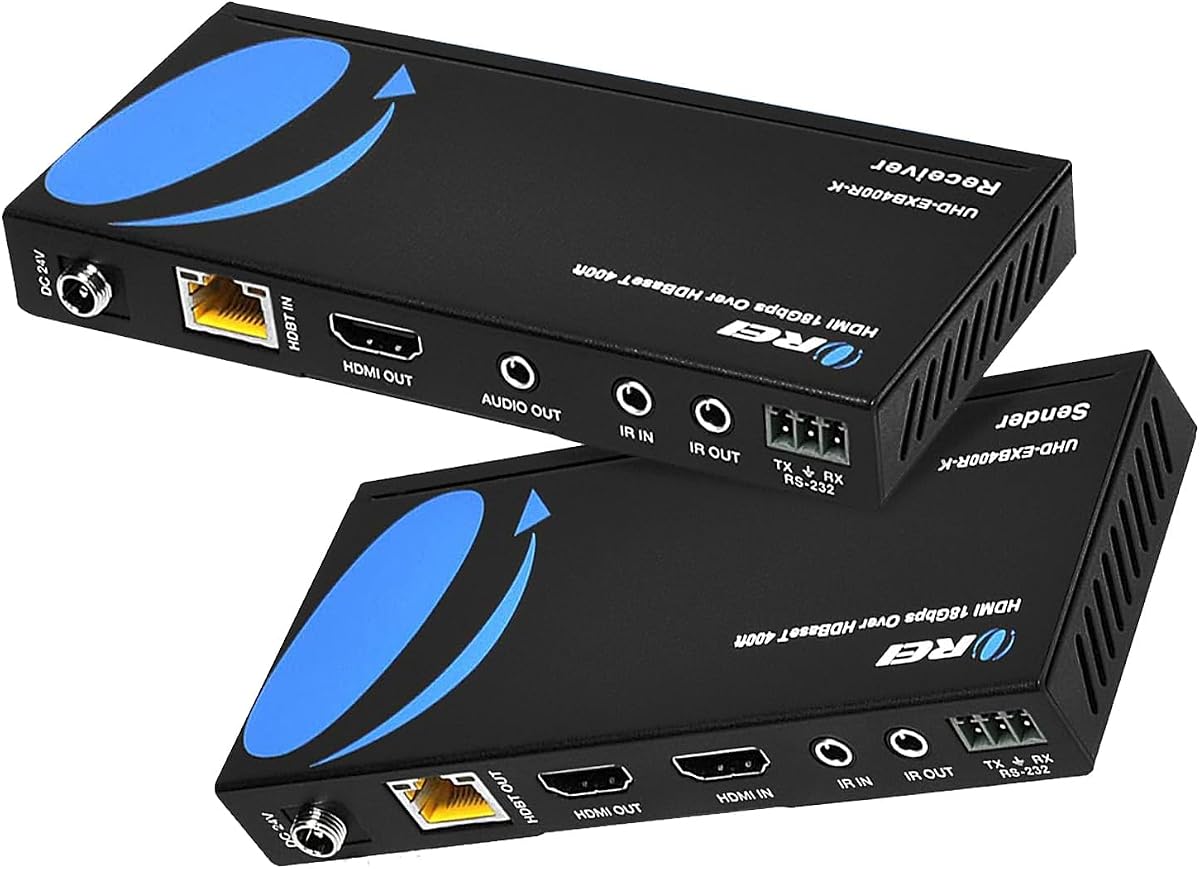
The OREI HDMI Extender HDBaseT 400ft is the most specialized and feature-rich model in this guide. It supports HDMI 2.0a, HDCP 2.2, UHD 4K at 60Hz, 2K at 60Hz YUV 4:4:4, HDR, HDR10+, Dolby Vision, CEC, and 18Gbps bandwidth. Its stated maximum reach of 400 feet gives it a clear advantage for large professional installations.
We may earn a commission when you buy through this link, at no additional cost to you.
The system includes two-way IR, allowing remote commands to travel in both directions, plus an RS-232 command port for compatible control systems. CEC support adds another layer of source-display control, and HDMI loop-out provides a local connection at the transmitter. Power over cable allows either the transmitter or receiver end to use the single included power adapter.
Compatibility is the main constraint. OREI specifically states that its HDBaseT models work only with the matching transmitter and receiver from the same model. They are not interchangeable with other OREI HDBaseT products or compatible with HDBaseT equipment from other brands because of chipset differences. This makes the system less flexible in mixed-brand installations.
Choose the OREI HDBaseT kit for large venues, campus buildings, control rooms, commercial AV, and other installations where long reach, two-way IR, RS-232, and robust control matter. It is less suitable for a basic home setup where a direct Cat6 connection and simpler one-way control would be sufficient.
Two-way IR lets a remote display area control the source while also allowing source-side commands to reach the remote end. That flexibility is valuable in professional rooms with separate operator and display locations.
The PoC system can be powered from either the transmitter or receiver side. Installers can therefore place the single adapter where an outlet is more accessible without running a separate power lead to the other unit.
We may earn a commission when you buy through this link, at no additional cost to you.
The PWAY HT275 ranks last in the supplied ordering but remains a well-rated 4.6 option. It extends 4K at 30Hz up to 130 feet and 1080p up to 230 feet over a single Cat6 cable. That makes it suitable for users who need 4K presentation quality without paying for the higher bandwidth and feature set of a 4K60 professional system.
We may earn a commission when you buy through this link, at no additional cost to you.
IR control and HDMI loop-out provide two of the most practical extender functions. A source can be operated from the remote display side, while a local screen can mirror the content for preview or monitoring. The POC design powers the receiver through the Ethernet cable, and the enclosures include holes for more secure installation.
The specifications list 4K30, 1080p, 720p, 576p, and 480p support but do not claim 4K60, high-bandwidth HDR, bidirectional IR, or KVM. The maximum distance applies to 1080p; the shorter 130-foot figure should be used when running 4K. Cat6 cable quality and correct termination remain important to achieving stable results.
The PWAY HT275 is a compelling choice for home theaters, meeting rooms, live streaming setups, or displays that operate at 30Hz. Its feature combination is easy to understand and install. Buyers who need 60Hz gaming, advanced HDR, or integrated remote computer control should choose a more capable model.
Support for both mirroring and extended display modes gives the user flexibility when connecting a local and remote screen. The choice depends on how the source computer is configured and what the connected displays are expected to do.
The combination of 4K30, Full HD long reach, loop-out, IR, and POC covers many common installation needs without introducing complex control hardware. It is a practical middle ground for users who need more than a basic 1080p link.
We may earn a commission when you buy through this link, at no additional cost to you.
The best HDMI over Ethernet kit is the one that matches the source resolution, cable length, control requirements, and physical layout of the installation. Review the distance ratings by resolution rather than treating the maximum cable length as a blanket guarantee, then account for IR, EDID, loop-out, audio, and power features.
Resolution and refresh rate determine how much signal bandwidth the extender must carry. The guide includes models that stop at 1080p60, models that support 4K at 30Hz, and professional options designed for 4K at 60Hz. A 4K30 kit may be sufficient for a presentation or standard-definition media source, while a gaming system, modern computer, or high-refresh display usually benefits from a genuine 4K60 model.
Choose based on the highest mode the source and display will actually use, not merely the largest number printed on the packaging. Also check chroma sampling, HDR support, HDCP requirements, and audio formats when color accuracy, protected content, or surround sound matters.
An extender's stated maximum distance is not a single universal number. Most products offer their longest reach at 1080p and reduce that reach at 4K. For example, several kits support 1080p up to 230 feet while limiting 4K30 to approximately 130 or 131 feet. The OREI 4K60 model lists 165 feet, and the HDBaseT system reaches 400 feet with its own bandwidth and cable expectations.
Measure the actual route rather than only the straight-line distance. Account for bends, wall penetrations, patch panels, and connectors, and select a product with margin above the required run. A higher-quality category such as Cat6A or Cat7 is generally preferable for demanding 4K60 installations.
The extender and the installed cable work as one system. Most products accept Cat5e, Cat6, Cat6A, or Cat7, but the usable combination depends on resolution, length, and cable construction. High-quality network cable, properly terminated connectors, and a direct point-to-point route improve the likelihood of stable transmission.
Do not route extender signals through ordinary network switches or routers unless the product explicitly supports that architecture. These kits transmit a point-to-point HDMI signal over copper cabling, and the presence of a network device can change the electrical behavior and prevent a reliable link.
IR pass-through lets a remote location operate a source device without exposing its sensor. It is useful for a hidden media player, set-top box, or Blu-ray player, but it normally requires line of sight to the source's IR receiver. One-way IR sends commands from the receiver toward the source, while the HDBaseT model adds bidirectional IR.
Consider CEC, RS-232, and USB KVM alternatives. CEC may permit basic source-to-display control, RS-232 is intended for compatible professional control systems, and KVM extension carries keyboard and mouse input to a remote computer. Match the control method to the equipment rather than assuming every extender provides the same remote-control capability.
EDID tells a source which display capabilities it should use. Copy or pass-through functions can help a source select a compatible resolution and reduce problems caused by a display that is not detected reliably across a long link. This is especially useful for computers, projectors, and presentation systems that may otherwise default to an unsuitable output mode.
Loop-out provides a local copy of the extended image on a second display. That creates a preview, confidence monitor, or dual-display workflow without adding another distribution system. The local screen is generally only a monitoring copy, and the extender does not add independent control over each display.
Power over cable, often abbreviated POC, sends power through the Ethernet cable so the receiver does not need a separate power adapter at the remote display. This is a major installation advantage for wall-mounted televisions, projectors, ceiling displays, and AV cabinets where adding a local outlet is inconvenient.
Verify which end requires the included adapter, because some systems permit powering from either side while others specify the transmitter. Also consider whether the source needs a local loop-out, whether the receiver can be hidden safely, and whether a nearby outlet or conduit is available for the powered end.
Some basic extenders pass HDMI audio to the remote display, while others add analog audio extraction, KVM control, or support for numerous surround formats. A dedicated audio output can be useful for external speakers, but it is not a substitute for a full audio matrix or room-specific sound distribution system.
For multiple displays, compare a point-to-point kit with a dedicated one-to-four distribution system. The latter includes multiple receivers and separate cable runs but distributes one source to four screens. If the goal is simply to move one image to one remote display, a two-box extender is simpler and more economical.
Check the transmitter, receiver, source, display, and control equipment before ordering. Older HDMI extenders may not support modern HDR formats, high refresh rates, protected content, or the audio formats used by a home theater. Specialized HDBaseT systems may also require the manufacturer's exact matching pair and may not interoperate with equipment from other brands.
Finally, inventory the package. A complete kit should include the transmitter, receiver, power supply, required IR cables, and instructions. Products that support KVM should include the necessary USB cabling, while mounting ears or holes matter for permanently securing the enclosures.
Begin by identifying the source, the remote display, and the single direct cable run between them. Connect the HDMI source to the transmitter, connect the transmitter to the receiver using the supported Cat cable, and connect the receiver's HDMI output to the display. Power only the designated unit first, then connect the other end and confirm that the source recognizes the remote display.
If the image is missing, check that the correct transmitter and receiver are paired, that the network cable is firmly seated, and that the selected display mode does not exceed the extender's capabilities. Use EDID copy or pass-through when required, and connect the IR blaster over the source's IR sensor if remote commands are not reaching the equipment. For loop-out installations, test the local display separately to determine whether the issue lies in the source, cable, or remote endpoint.
Treat the cable as part of the signal path rather than ordinary loose wiring. Avoid sharp bends, pinching, excessive pulling, and running the cable beside sources of severe electrical interference. Keep the receiver and transmitter ventilated, and do not overload power strips. Clean connector ports with dry, compressed air rather than conductive liquids, and periodically verify that all connections remain secure.
Most HDMI over Ethernet kits in this guide are point-to-point transmission systems rather than network devices. They are designed to connect a transmitter directly to a receiver through one cable run, and using a router or switch can disrupt the intended signal path. Unless the manufacturer explicitly states that network infrastructure is supported, keep the connection direct and do not pass the extender signal through networking equipment.
The usable distance depends on the extender, source resolution, refresh rate, cable category, and installation. Many products reach approximately 230 feet at 1080p60 but offer only about 130 feet at 4K30. Models designed for 4K60 commonly specify shorter limits, while the OREI HDBaseT unit lists up to 400 feet. Always check the range for the exact resolution you plan to use.
No. Some products support only 1080p60, while others support 4K at 30Hz. The highest-performing options in the guide support 4K at 60Hz, sometimes with full 4:4:4 chroma and HDR. Match the extender to the source and display, because a device may accept 4K60 at a shorter distance while offering reduced maximum range for that mode.
EDID is identification information used by a display to describe its capabilities and preferred resolutions. EDID copy lets the extender read or pass that information back to the source, which can help the source output a compatible mode. It is especially useful with computers, projectors, and presentation displays that may otherwise choose an unsuitable resolution across a long cable run.
Yes, if the extender includes IR pass-through and the source uses an IR-controlled remote. The IR receiver at the display end sends commands back through the cable to a transmitter aimed at the source's IR sensor. One-way IR systems handle this common use case, while bidirectional systems can also send commands in the other direction. IR generally needs a clear path to the source sensor.
Power over cable carries power to the receiver through the same Ethernet cable used for the HDMI transmission. This means only one side usually needs a power adapter, reducing cable clutter around a remote display. A system without PoC requires power at both transmitter and receiver, which can be inconvenient if no outlet is available near the remote screen.
The featured products are presented as direct, uncompressed transmission systems with zero-latency operation, so they are better suited to interactive tasks than a network-based streaming workflow. Actual user experience can also depend on the source, display, and AV equipment. For gaming, presentations, and live monitoring, select a kit that explicitly supports the required resolution and refresh rate.
A compatible Cat5e, Cat6, Cat6A, or Cat7 cable can be used, depending on the extender's specifications. The cable should be a proper network cable with correctly terminated connectors and should be of sufficient quality for the selected resolution and distance. Very long, damaged, poorly terminated, or unshielded cables can introduce instability, especially for 4K60.
The OREI 4K60 Cat6 Extender stands out for buyers who need high-bandwidth 4K60, HDR, full-chroma video, and extended reach. The HT202P is the most straightforward budget-oriented choice for 1080p60 installations, while the OREI HDBaseT system offers the greatest reach and the most advanced control options for professional environments.
Prioritize the resolution and refresh rate you need first, then choose a product whose stated range exceeds the measured cable route. Add IR, EDID, loop-out, POC, audio, or KVM support only when the installation genuinely needs it. This approach prevents a feature-heavy kit from adding unnecessary complexity to a simple point-to-point display.
Before purchasing, confirm the current listing details, package contents, regional power adapter, compatibility requirements, and latest specifications. Retail prices and availability change, so compare the final configuration and warranty terms rather than relying only on a promotional offer or a headline distance figure.