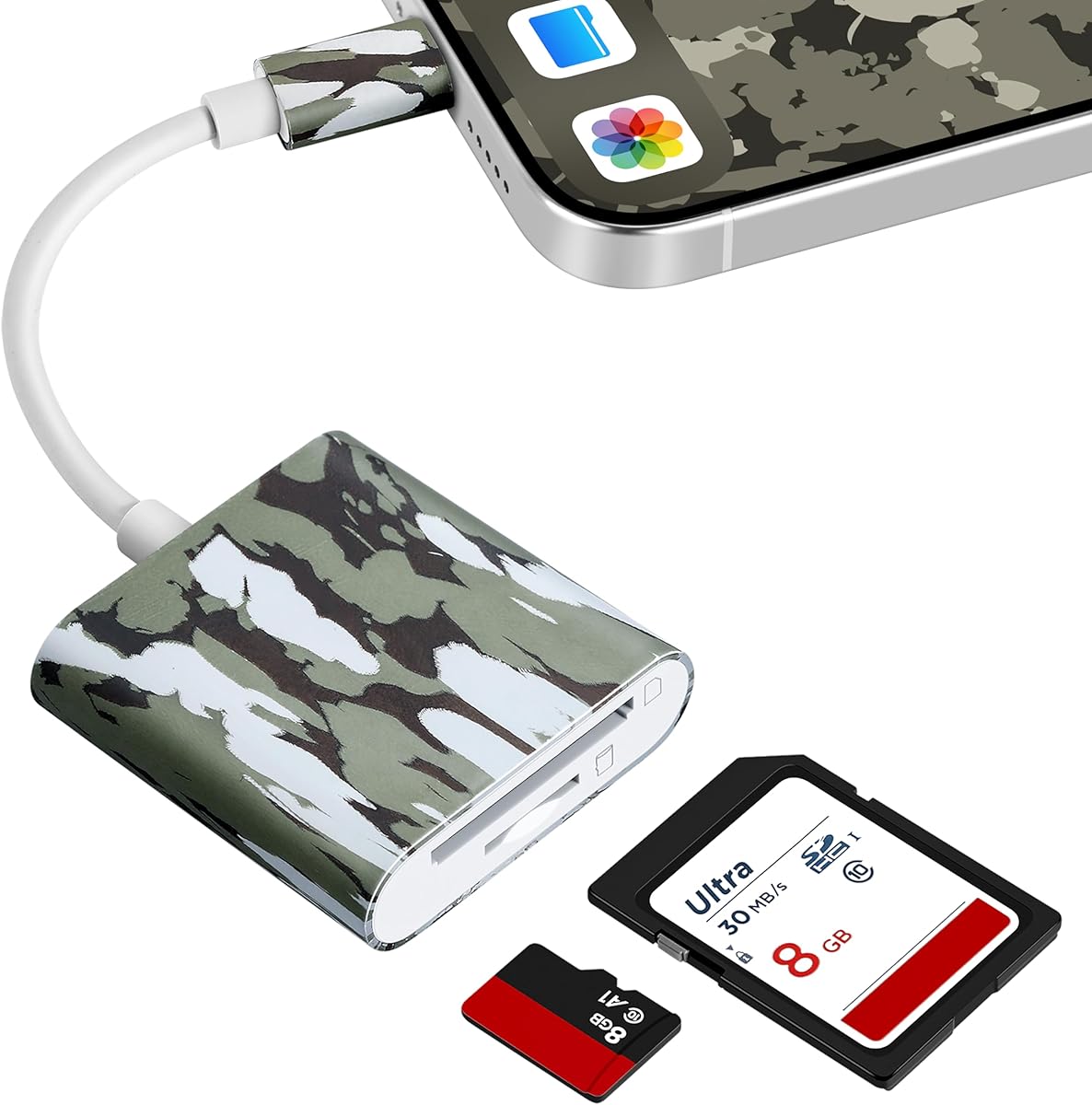
Trail Camera Viewer for iPhone 15 or Later and Android
4.4Editor score
Direct USB-C phone connection
No Wi-Fi or app required
View, save, share, and delete
A trail camera card reader gives hunters and wildlife observers a convenient way to review images and videos without repeatedly returning to a computer. The right choice depends on whether you prefer a compact phone adapter, a dedicated screen, or a tablet-style viewer built for demanding outdoor conditions.
We compared all ten options by examining device compatibility, supported card formats, display size, portability, file-management features, power requirements, and weather-resistant construction. The list includes direct USB-C phone adapters, Lightning and USB-C combinations, and standalone viewers with dedicated screens and media controls.
Each review explains who the product is best suited for, along with its most useful strengths and practical limitations. Product availability, promotional terms, and retailer details can change, so readers should confirm the current listing and camera compatibility before purchasing.
4.4Editor score

4.9Editor score

4.3Editor score
As an Amazon Associate we earn from qualifying purchases.
This side-by-side comparison highlights the main differences among phone adapters and dedicated field viewers, including connection style, display, card capacity, and outdoor construction.


This compact USB-C trail camera card reader is a straightforward option for hunters who want to inspect camera captures on a modern phone. It carries a 4.4 rating and is designed specifically for iPhone 15 or later models, MacBook series computers, and Android devices equipped with USB-C and OTG support. Its primary appeal is the direct, app-free connection.
We may earn a commission when you buy through this link, at no additional cost to you.
The reader lets users view, save, share, and delete trail camera photos and videos directly from a compatible device. That combination of functions covers the basic field workflow: open a card, locate an image, preserve the ones worth keeping, and remove unwanted files. It is designed to work with most trail game cameras, which makes it useful when your hunting setup includes more than one camera brand.
The main limitation is the narrower device range compared with adapters offering several connection types. Android compatibility also depends on OTG support, while iPhone users need a model from the 15 generation or later. There is no built-in screen, so the reader is better for people who already carry and rely on a phone rather than those who want a stand-alone viewing screen.
This is an appealing choice for budget-conscious buyers who want a small, uncomplicated adapter for a compatible USB-C setup. It offers the core benefits of a trail camera viewer without a battery, internal display, or separate app. For anyone with an older iPhone or an Android device without OTG, check the connector requirements carefully before choosing it.
The plug-and-play design removes the usual app-download step, so you can connect the reader and begin moving camera media with less setup. That convenience is particularly useful in a hunting blind, vehicle, or remote setup where connectivity may be limited.
Its compact construction favors portability over standalone media playback. The reader is a strong fit for USB-C users who already know how to import and manage images through their phone or computer.
We may earn a commission when you buy through this link, at no additional cost to you.
The Muddy CRV3 HD is a dedicated field viewer designed for hunters who want to review trail camera media without relying on a phone. Its 4.3-inch color LCD, 1080P video playback, and 4.2 rating make it a practical middle ground between a basic card reader and a large tablet-style viewer. Images and videos appear directly on the built-in screen.
We may earn a commission when you buy through this link, at no additional cost to you.
File management is handled through straightforward View, Transfer, and Delete options. Adjustable brightness helps with changing outdoor conditions, while adjustable volume and a headphone jack improve the experience of watching recorded video with audio. The reader supports SD cards up to 32GB and includes a Micro USB connection for transferring files to another device.
Its durable, water-resistant housing is more appropriate for field use than an ordinary desktop reader, and the included wrist lanyard reduces the chance of dropping the unit or losing the card. The trade-off is that it runs on four AA batteries, which are not included. You must also remain within the stated 32GB card limit.
Choose the Muddy CRV3 HD if you want a dedicated screen but do not need the much larger display of a tablet viewer. It is especially useful for hunters who want hands-on file management, adjustable viewing settings, and audio playback in a weather-resistant package. This is a balanced choice for regular trail camera monitoring.
The 4.3-inch display makes the viewer substantially more useful than a basic adapter while remaining far easier to carry than a full-size tablet. It suits quick reviews of deer, turkey, hog, and other wildlife activity.
Water resistance, adjustable brightness, a wrist lanyard, and a headphone jack combine several field-oriented conveniences. The four-AA battery requirement is worth remembering when planning a long trip away from supplies.
We may earn a commission when you buy through this link, at no additional cost to you.
The Stealth Cam Touch Viewer combines a 4.3-inch color LCD with five-point touch detection, giving users a more interactive way to browse trail camera files. Its 4.4 rating and gesture support distinguish it from simpler button-driven viewers. It can display images and 1080P videos and provides basic View and Delete management functions.
We may earn a commission when you buy through this link, at no additional cost to you.
Multi-point touch and smart gestures make navigation feel closer to using a small display-based device than a basic card reader. The compact format should be easier to carry than a tablet, and the water-resistant housing suits changing outdoor conditions. A wrist lanyard is included to help secure the device during use.
The supplied information is less detailed than for some competing standalone viewers, so buyers should verify battery requirements, maximum card capacity, connection options, and included accessories before ordering. It also does not provide the dual-card workflow or expansive screen offered by the Wildgame Innovations model.
This viewer is a good fit for hunters who prefer touch navigation on a dedicated screen and do not need to manage multiple memory cards simultaneously. It is particularly appealing for checking still images and short videos without taking a phone out of its case. Confirm the remaining technical details on the current listing before purchase.
Five-point touch detection and gesture support offer a more natural way to move through a camera card. The interface is designed to let users view and manage media with fewer separate button presses.
The water-resistant housing, 4.3-inch screen, and included lanyard cover the essentials for portable outdoor viewing. It provides a focused alternative to carrying a full phone or large tablet.
We may earn a commission when you buy through this link, at no additional cost to you.
The Stealth Cam Rugged Viewer is built for hunters who regularly inspect cameras in conditions where an ordinary adapter would be inconvenient. It has a 4.4 rating, a 4.3-inch color LCD, 1080P video playback, and a water-resistant housing with durable rubberized buttons. Users can view, transfer, and delete captured files.
We may earn a commission when you buy through this link, at no additional cost to you.
Physical controls, a headphone jack for audio playback, and a Micro USB connection provide several ways to handle media. The included wrist lanyard helps prevent accidental drops in mud, brush, or other rough terrain. Supporting SD cards up to 32GB makes the viewer relevant for a wide range of typical trail camera workflows.
Its primary compromises are the need for four AAA batteries, which are not included, and the restriction to a single card format and 32GB maximum. It is less convenient than a dual-slot tablet when you need to compare separate cameras or maintain an organized archive card.
Choose this model for its rugged housing, tactile controls, and dedicated display. It is well suited to hunters who want dependable media management without depending on a phone, especially when portability and weather resistance matter more than a large viewing area.
Rubberized buttons provide a secure tactile interface that can be easier to use with cold, wet, or gloved hands than a touch-only screen. The lanyard adds another layer of protection during quick field checks.
Viewing, transferring, and deleting files directly from the reader reduces the need to carry a second device. Support for 32GB cards and 1080P video covers common trail camera storage needs.
We may earn a commission when you buy through this link, at no additional cost to you.
The Wildgame Innovations Trail Pad Tablet VU70 is the most screen-focused option in this guide, offering a seven-inch HD backlit TFT touchscreen for reviewing trail camera photos and videos. Its 4.3 rating reflects a balance of large-screen usability, dual-card handling, and durable outdoor construction. Zoom, swipe, and tablet-style navigation make it approachable for frequent users.
We may earn a commission when you buy through this link, at no additional cost to you.
Two standard-size SD card ports provide a meaningful workflow advantage. The library port holds the main collection of camera media, while the archive port can store selected images or videos for an individual animal, herd, or specific event. Both slots accept cards up to 32GB. A built-in speaker supports audio during video playback, and auxiliary and Micro USB ports enable computer and television viewing.
The heavy-duty, weather-resistant housing is designed for hunting and wildlife observation in variable conditions. The trade-off is size: a seven-inch device takes more room than a 4.3-inch viewer or phone adapter. It is more of a dedicated field console than an ultra-light accessory, so buyers should consider how they will transport it.
This is the strongest choice for users who regularly sort large volumes of camera media, want to compare two cards, or maintain a separate archive. The large display makes detailed review easier, while the dual-card design reduces repeated card swapping. It suits dedicated hunters, property managers, and serious wildlife observers who value screen size and organized storage.
The seven-inch HD backlit display provides a substantial viewing area for checking fine details in stills and monitoring longer videos. Touch navigation offers a familiar experience for users accustomed to tablets.
Keeping a working library card and a separate archive card makes it easier to sort valuable sightings. This is especially useful when a camera card contains hundreds of frames and you want to retain a smaller, meaningful selection.
We may earn a commission when you buy through this link, at no additional cost to you.
The BoneView USB-C Viewer is designed for Android users who want to review trail camera files directly on a USB-C phone or tablet. Its 4.0 rating reflects a practical, no-frills approach: no batteries, no Wi-Fi, no cellular service, and no extra app. It supports both SD and microSD cards commonly used in game cameras.
We may earn a commission when you buy through this link, at no additional cost to you.
Once connected, the adapter allows users to quickly swipe through photos, save valuable images, play most video files, and share content. The lack of a built-in screen means playback happens on the connected device, but that also keeps the reader simple and compact. The product is especially useful in places where internet access is unavailable.
Compatibility is limited to devices with the appropriate USB-C connection. Buyers should not expect the broader connector assortment found in universal readers, and the package does not include any memory cards. Performance also depends on the phone, tablet, card format, and file sizes being handled.
This reader is a good option for Android hunters who want quick access to camera files without a separate viewing device. It is especially effective for basic backups, photo selection, and sharing. If you need a screen, wider device support, or a dedicated archive workflow, a standalone viewer will serve better.
Because the adapter draws power from the connected device and does not depend on Wi-Fi or cell service, it is convenient in remote hunting locations. It also avoids battery preparation before every trip.
The direct workflow supports quick swiping, saving, playback, and sharing. It is most attractive to users who already manage photos on an Android phone and want minimal setup.
We may earn a commission when you buy through this link, at no additional cost to you.
The 4-in-1 Universal Reader is built for people who move between iPhones, iPads, Android devices, Mac computers, and other USB-equipped equipment. It carries a 4.3 rating and combines USB, USB-C, and Micro USB interfaces with dedicated SD and microSD card slots. That variety makes it useful beyond a single hunting setup.
We may earn a commission when you buy through this link, at no additional cost to you.
One particularly practical feature is the charging port for compatible iPhone and iPad connections, allowing the device to charge while file data is being transferred. High-speed two-way transmission supports saving, viewing, sharing, and moving files between devices. The stated maximum memory card capacity is 1TB, and compatibility includes iOS 8.0 or later and OTG-enabled Android equipment.
Its slim enclosure and keychain design make it easy to carry, although the lack of a built-in screen means a phone, tablet, or computer is still required. The high maximum capacity should also be considered alongside the card format and device actually used, since not every device or camera will support every card configuration.
Choose this reader when versatility matters more than having a standalone display. It is well suited to users who want one accessory for trail camera cards, camera photos, and general file transfer across several types of devices. The integrated charging function adds convenience for mobile media workflows.
The varied interface selection reduces the need to carry separate readers for USB-C, USB-A, and Micro USB equipment. It is a practical choice for a mixed household of phones, tablets, and computers.
The integrated charging connection can keep a compatible iPhone or iPad powered during a transfer. That feature is helpful when moving a large collection of photos and videos from a trail camera.
We may earn a commission when you buy through this link, at no additional cost to you.
The second 4-in-1 Portable Reader shares a versatile design with several other universal adapters, combining USB, USB-C, and Micro USB connections with SD and microSD slots. Its 4.3 rating and stated compatibility with iPhone, iPad, Android, Mac, and computer devices make it a flexible option for reviewing trail camera files and handling other media.
We may earn a commission when you buy through this link, at no additional cost to you.
A built-in charging port for compatible iPhone and iPad use allows transfers while the connected device receives power. High-speed two-way transfer supports viewing, saving, sharing, and organizing files. The slim body and keychain attachment make it easy to keep in a pocket or attach to a bag.
Its stated maximum card capacity is 512GB, which is lower than the 1TB figure listed for another closely related reader. Actual support still depends on the connected device, card format, and files involved. There is also no integrated screen, so the adapter cannot provide stand-alone playback.
This is a practical choice for users who want broad compatibility in a small package. It works especially well for travelers and hunters who carry different devices across a season. Choose it over the larger-capacity alternative when portability is the priority and your trail camera cards fall within the supported range.
Several connector types and two card slots provide broad compatibility without the bulk of a standalone viewer. The adapter is easy to carry between a phone, tablet, and computer.
The charging port, two-way transfer, and keychain design support an active media workflow. You can save, share, and organize captures while the device is connected.
We may earn a commission when you buy through this link, at no additional cost to you.
The BoneView Viewer and Zipper Case Combo is a USB-C Android adapter that brings trail camera media directly to a phone or tablet. Its 4.0 rating reflects a focused feature set: SD and microSD compatibility, plug-and-play operation, and support for viewing, saving, sharing, and deleting game camera files without requiring an additional app.
We may earn a commission when you buy through this link, at no additional cost to you.
The included zipper case distinguishes this option from ordinary adapters. It offers a place to keep the reader and related small items together, which can be useful in a hunting pack or vehicle. The reader itself needs neither batteries nor internet, Wi-Fi, or cellular service, making it dependable in remote areas.
The product is designed primarily for newer USB-C Android devices, so it offers less flexibility than the multi-connector universal readers in this guide. It also lacks a screen, and the supplied information does not state a maximum card capacity. Buyers should confirm their phone connection and current card requirements before ordering.
Choose this product if you use a USB-C Android device and value a protected storage solution alongside the reader. It is a straightforward way to back up, inspect, and share trail camera media. For a broader device ecosystem, choose an adapter with more connector options; for stand-alone viewing, a dedicated screen is the better route.
The zipper case gives the reader a dedicated place in a pack and helps keep it together with small accessories. It is a sensible addition for hunters who carry their electronics into brushy or wet environments.
The reader supports quick browsing, saving, sharing, and deletion on a compatible phone or tablet. No application, wireless network, or battery is required for the basic workflow.
We may earn a commission when you buy through this link, at no additional cost to you.
The Dual-Connector Trail Cam Reader stands out with a 4.9 rating, the highest listed rating in this roundup. It combines Lightning and USB-C connectors, allowing it to serve compatible iPhones, iPads, MacBook computers, Android phones, and other devices with the appropriate connection. Its no-app workflow is designed around the native Photos application.
We may earn a commission when you buy through this link, at no additional cost to you.
It supports SD and TF, or microSD, cards with simultaneous access, while also working with USB flash drives through its built-in USB-A port. Two-way transfer allows photos to move from a camera card to an iPhone or iPad, and compatible documents can also be saved onto memory cards. The product supports SDHC, SDXC, TF, 4K video, and RAW-image workflows according to the supplied information.
The bright orange braided-cable design is easy to locate in a bag or against outdoor vegetation, and its compact form is intended for travel and field use. The principal limitation is that it has no screen of its own. Users must rely on a connected device for previewing and organizing media.
This is the strongest all-around recommendation for buyers who want one reader across both major mobile ecosystems. The combination of dual connectors, two card formats, two-way transfers, flash-drive support, and a 4.9 rating gives it exceptional versatility. It is particularly well suited to iPhone users who want an easy import path without downloading extra software.
Lightning and USB-C connectors make the reader useful with recent iPhone models, older supported iPhones, iPads, and compatible USB-C equipment. It reduces the need to carry separate adapters when your devices change.
Simultaneous SD and TF access, USB flash-drive support, two-way transfers, and 4K video handling make the device useful for general photo management. Its orange finish adds visibility in outdoor gear bags.
We may earn a commission when you buy through this link, at no additional cost to you.
The most useful trail camera card reader depends on your camera, devices, and review habits. Consider connection compatibility, card support, screen size, file management, power, and outdoor durability before choosing a model.
Start with the devices you already carry. Newer iPhones use USB-C, while many older supported iPhones use Lightning. Android phones and tablets may use USB-C, but some also require OTG support for external storage. Mac and Windows computers may accept standard USB-A or USB-C connections. A dedicated reader with a screen avoids connector questions entirely, while an adapter must match the exact ports on the devices you intend to use.
Choose a reader with the connectors you need now, not merely a broad compatibility label. Check the product listing for operating-system requirements, supported generations, and any OTG conditions. Universal multi-interface readers are useful for mixed households, while dual-connector products are convenient for people who move between iPhone and Android ecosystems.
Trail cameras may use standard full-size SD cards, microSD cards, or adapters that allow a smaller card to fit a full-size slot. The reader should support the exact format used by your camera, along with the capacity range you expect to use. Native SD slots are convenient because they reduce the need to carry or manipulate adapters in the field.
If your reader supports both formats, you can handle different cameras without changing equipment. Pay attention to the stated maximum capacity, but also check whether the connected phone, tablet, computer, camera, or standalone viewer can recognize cards of that size. Capacity claims describe the reader's limits, not a guarantee that every host device will read the largest card.
A screen changes how you work. A compact 4.3-inch display is easy to carry and sufficient for checking frame composition, animal movement, and timestamps. A seven-inch screen is better for prolonged review, detailed image inspection, and showing media to another person. A phone adapter uses the display and controls you already have, offering the most compact option but requiring a compatible host device.
Consider outdoor readability as well as diagonal size. The Wildgame VU70 has a backlit touchscreen, while the Muddy and Stealth Cam viewers offer adjustable brightness. Touch controls may be convenient, but physical buttons can be easier to operate with cold, wet, or gloved hands. Choose based on your typical viewing environment and personal preference.
A card reader may be used in rain, dust, mud, snow, and uneven terrain. Water-resistant housing, durable buttons, secure lanyards, and protective cases reduce the risk of damage and loss. Standalone viewers need enough protection for the environment in which you plan to use them, while phone adapters should have a compact shape that can remain attached without crowding a pocket.
The most rugged construction does not make a device immune to water. Follow the stated care requirements, close protective covers when provided, and avoid submerging a reader unless the manufacturer explicitly permits it. A wrist lanyard is valuable for standalone units, while a keychain attachment can help keep a small adapter from disappearing into a hunting bag.
Viewing files is only one part of the workflow. Useful features include saving, sharing, deleting, copying to an archive card, and transferring through a computer or television connection. The Muddy and Stealth Cam viewers provide direct View, Transfer, and Delete options. The Wildgame VU70 separates a working library from an archive card, which is useful when managing hundreds of images.
Phone adapters typically work through the phone's native Photos application or file manager, while dedicated viewers use their own menus. Confirm whether you need one-way viewing, two-way transfers, or the ability to copy selected files to another card. More advanced organization can be valuable, but it is unnecessary if your routine only involves quick previews and daily backups.
Direct phone adapters draw power from the connected device and therefore require no separate batteries. This makes them simple for remote use, provided the phone has sufficient charge. Standalone viewers such as the Muddy CRV3 HD and Stealth Cam Rugged Viewer use replaceable AA or AAA batteries, which add convenience as independent devices but require planning and additional batteries.
For long or multi-day hunts, compare battery life and availability rather than only the listed power source. A dedicated viewer that works without a phone may justify the extra batteries, while a phone-based adapter is more convenient for users who already carry a charged device. Always note that the required batteries are not included with the listed products.
Trail cameras record both still images and video, so a useful reader should handle the formats your camera produces. The standalone viewers in this guide support 1080P video playback, while the dual-connector adapter is described as capable of handling 4K video files. Headphone jacks and built-in speakers can make recorded audio easier to hear, although support for a particular codec can also depend on the host device.
RAW-image workflows may also interest photographers who use trail cameras for more than casual viewing. The Trail Game Camera Card Viewer describes support for importing RAW images from Canon and Nikon cameras. Check both the file type produced by your trail camera and the playback capabilities of the reader or connected device before assuming every recording will appear correctly.
Before removing a card from a trail camera, confirm the camera has stopped writing to it. Turn the camera off or follow its recommended safe-removal procedure, then label the card so you know which camera and date it came from. For a dedicated reader, insert the card into the supported slot and power the unit; for a phone adapter, connect the appropriate cable or connector before inserting the card when the manufacturer recommends that order.
Start with a few images to confirm that photos and videos appear correctly and that the date, camera identification, and key activity are visible. Save important captures to the host device or an archive card before deleting anything. Use a second card when possible, and avoid formatting a card until the trail camera is properly powered down and the reader confirms that formatting is available and appropriate for the card.
Keep readers dry, clean, and protected from impact. Remove cards after transferring important media, store them in a labeled case, and use the included lanyard or zipper case for portable units. Do not open electronic adapters, expose them to water beyond their stated rating, or use a device whose connector or housing appears damaged.
A direct card reader connected to a phone or tablet is the simplest offline option. USB-C adapters work with compatible modern devices, while Lightning readers suit supported older iPhones and iPads. A stand-alone viewer with an SD slot is another offline choice and does not require a host device, although it needs batteries and adds more equipment to carry.
Yes, if it includes the correct connection types. The Trail Game Camera Card Viewer combines Lightning and USB-C, while the 4-in-1 readers add USB and Micro USB interfaces. Confirm that your particular phone model, tablet, or computer supports the relevant connector and operating system before purchasing.
Not universally. The Trail Camera Viewer and both BoneView Android readers are described as app-free, while the dual-connector product uses the native Photos app for iPhone imports. Dedicated screen viewers operate through their built-in menus. Always follow the setup instructions included with the specific reader, especially when working with less common file formats.
Many can, but supported resolution and codec matter. The Muddy and Stealth Cam viewers support 1080P playback, and the Trail Game Camera Card Viewer is described as suitable for 4K video files. A connected phone or computer may also impose its own codec and file-size limitations, so test a short recording before relying on the reader for an important trip.
Match the reader to the cards used by your trail cameras and the capabilities of your connected device. Dedicated viewers in this guide support up to 32GB, while some universal adapters list higher limits. A larger capacity rating only matters if the camera, reader, and host device all support that card format and size.
A water-resistant reader is valuable if you often check cameras in rain, snow, or damp brush. Standalone viewers such as the Muddy CRV3 HD and Stealth Cam models include water-resistant housings. Even with that protection, keep the reader away from standing water and follow the manufacturer guidance because water resistance does not necessarily mean it can be submerged.
Choose a phone adapter if you want minimal equipment and already carry a compatible phone or tablet. Choose a standalone viewer if you prefer a larger or dedicated screen, want to leave your phone protected in a pocket, or need physical controls. The Wildgame VU70 is the premium option for extensive review and dual-card organization, while the smaller viewers are easier to carry.
Work from a copy rather than deleting immediately, and use separate labeled cards for different cameras or dates. After reviewing, save important files to two destinations when possible. Keep a working card and an archive card in a dedicated viewer, and confirm that transfers completed before formatting or reusing a card.
The Trail Camera Viewer USB-C is the best budget option for buyers with a compatible modern phone, while the Trail Game Camera Card Viewer is the most versatile choice overall because it combines Lightning and USB-C connections with broad card support. The Wildgame Innovations Trail Pad VU70 takes the premium position through its seven-inch touchscreen, dual-card organization, and weather-resistant construction.
Prioritize the connector and card format your trail camera actually uses, then choose between a lightweight phone adapter and a dedicated field screen. Standalone viewers make sense for regular field checks, larger collections, or users who prefer not to handle media on a phone. Adapters remain the simplest solution when portability and minimal equipment matter most.
Before ordering, confirm device compatibility, maximum card capacity, required accessories, and the current retailer listing. Product specifications, availability, and promotional terms can change, and the newest listing details should take priority over older summaries when setting up a new trail camera kit.
