
C4 Plus Dual LAN Mini PC
4.5Editor score
Ryzen 5 3501U processor
8GB expandable DDR4 memory
Dual Gigabit LAN ports
WiFi 5 connectivity
USB-C video output
Our expert Mini PC for Video Conferencing guide compares ten compact systems for call quality, multitasking, connectivity, display support, & office reliability
A mini PC for video conferencing should deliver smooth application performance, dependable networking, clear display support, and enough memory for several simultaneous tasks. Its compact enclosure can also free valuable desk space in a home office or small meeting room. The right model balances processing power, connectivity, expandability, and practical operating features rather than relying on any single specification.
We compared the supplied mini PCs using processor capability, memory and storage, wireless and wired networking, video outputs, peripheral connectivity, and suitability for common conferencing tasks. The list covers affordable office systems, higher-powered options for demanding workflows, and one dedicated webcam that can improve the image captured during online meetings. Ratings reflect the supplied customer feedback, while practical trade-offs receive equal attention.
Each pick highlights the features that matter most in a conferencing setup, including processor headroom, multi-monitor flexibility, audio accessory support, and room for future upgrades. The webcam is included because a capable camera can make a more visible difference than another modest processor increase. Product availability and prices change, so readers should verify current specifications, operating-system details, and accessory requirements before purchasing.
4.5Editor score

4.8Editor score

4.2Editor score
The comparison below places the featured mini PCs and webcam side by side, focusing on processor class, memory, display flexibility, networking, and conference-room practicality.




The Glorlin Mini PC Ryzen 7 6800H combines an eight-core, 16-thread Ryzen 7 6800H processor with Radeon 680M integrated graphics, 16GB of LPDDR5 memory, and a 512GB NVMe SSD. Those specifications give it the strongest all-around profile in this guide for office applications, browser-heavy meeting schedules, document sharing, and simultaneous conferencing software. Its supplied 4.8 rating also makes it one of the best-regarded selections here.
We may earn a commission when you buy through this link, at no additional cost to you.
Its principal advantage for conferencing is headroom. Sixteen gigabytes of dual-channel LPDDR5 provides room for a meeting application, browser tabs, chat client, screen sharing, and normal office programs without immediately exhausting memory. The processor's eight cores and 16 threads are also well suited to multitasking. For people who share presentations while retaining documents, email, and a call window, that extra capacity is more meaningful than a higher-resolution webcam alone.
Display and network options are especially useful in professional environments. HDMI, DisplayPort, and USB Type-C can support up to three 4K displays, allowing a call, shared document, and participant list to remain visible on separate screens. Dual LAN ports, WiFi 6, and Bluetooth 5.3 give the system useful wired and wireless options. A USB headset, dedicated microphone, external camera, keyboard, and mouse can be connected according to their supported interfaces.
The compromise is memory flexibility. LPDDR5 is normally soldered, so buyers cannot add conventional RAM modules if multitasking demands later grow. It also does not include an external camera, and the multi-display arrangement may require compatible adapters or cables. Even so, it is the most balanced recommendation for a buyer who wants a capable compact workstation rather than a basic meeting-room terminal.
Overall, this is the strongest all-round pick for remote workers, small businesses, and home offices. It offers enough performance for demanding schedules, excellent screen flexibility, and modern connectivity in a compact enclosure. Those features justify prioritizing it over less powerful systems for a setup intended to handle more than one basic video call.
The eight-core Ryzen 7 6800H and 16GB of LPDDR5 create a useful balance for meetings involving multiple browser tabs, shared spreadsheets, screen sharing, and background office applications. Users can keep a call visible while moving between related materials without relying on a much larger desktop.
HDMI, DisplayPort, and Type-C make the mini PC well suited to a three-screen workstation. One display can show the meeting, another shared content, and the third a document, participant list, or messaging application.
We may earn a commission when you buy through this link, at no additional cost to you.
The C4 Plus Dual LAN Mini PC is an economical choice for basic and moderate video-conferencing work. Its Ryzen 5 3501U provides four cores, eight threads, and a maximum clock speed of 3.7GHz, while Radeon Vega 8 graphics handle everyday visual output. The supplied 4.5 rating reflects a generally favorable customer response, and its expandable design makes it more adaptable than a sealed low-cost system.
We may earn a commission when you buy through this link, at no additional cost to you.
For a single user running a meeting application, browser, email, and a lightweight document workflow, the included 8GB of DDR4 memory can be sufficient. The RAM can expand to 32GB, which makes the system a sensible starting point for users who expect their software demands to increase. Its M.2 storage can also be upgraded, and the listed maximum capacity of 4TB is useful for local meeting recordings, media files, or a larger working library.
Networking is the standout feature at this budget. Two Gigabit Ethernet ports permit a wired office connection or more advanced dual-network arrangements, while WiFi 5 and Bluetooth 5.0 cover wireless access and peripherals. The port selection includes three USB 3.2 Gen2 ports, USB 2.0, USB-C, HDMI 2.0, DisplayPort, and a 3.5mm combination audio jack. The USB-C port can handle data and 1080p display output, although the system is not described as a triple-4K solution.
Its limitations reflect the entry-level hardware. Eight gigabytes of memory is modest when many applications remain open, and WiFi 5 may offer less headroom in crowded wireless environments than WiFi 6. The integrated camera and microphone quality of any attached monitor also depends on that display. This makes the C4 Plus most appropriate for a dedicated desk with a good external webcam, headset, and wired network.
For a cost-conscious buyer who needs a dependable, expandable meeting station, this is a convincing recommendation. It covers the essentials, provides unusually flexible dual-LAN networking, and can grow as the user adds memory. It is less compelling for intensive multitasking than higher-tier picks, but it offers an effective foundation without the footprint of a conventional tower.
The included 8GB is adequate for focused meeting use, while expandable DDR4 lets the owner respond to heavier browser and office workloads. Increasing memory can be more useful for conferencing than adding storage when the goal is smoother multitasking.
Two Gigabit Ethernet ports distinguish this model from many compact office systems. They can simplify a wired setup, connect separate office networks, or support a specialized network appliance while regular calls use wireless connectivity.
We may earn a commission when you buy through this link, at no additional cost to you.
The GMKtec M6 Ultra Gaming Mini PC is the most powerful conventional mini PC in the list, pairing a Ryzen 5 7640HS processor with 32GB of dual-channel DDR5 memory and a 1TB PCIe SSD. The six-core, 12-thread chip can boost to 5.0GHz, while Radeon 760M graphics provide hardware encoding and decoding for common formats. Its supplied 4.2 rating is the lowest among the mini PCs here, but its specification profile clearly targets demanding users.
We may earn a commission when you buy through this link, at no additional cost to you.
Video conferencing benefits directly from the 32GB memory allocation. It comfortably accommodates a high-resolution meeting, many browser tabs, collaboration suites, screen sharing, and specialized business software. The processor also provides more headroom for background tasks or virtualized environments. Its 1TB drive removes storage pressure for large video files, shared project assets, and local archives, although a conferencing user may not need all of that capacity immediately.
Connectivity is another major strength. Two 2.5GbE RJ45 ports support fast wired networking, while WiFi 6 and Bluetooth 5.2 cover wireless peripherals. The display arrangement is unusually ambitious: the supplied details describe 8K at 60Hz through USB4 plus 4K at 60Hz through HDMI 2.0 and DisplayPort. This enables a command-center layout, a dedicated call display, and an editing or document workspace with generous resolution.
The trade-offs are cost, power demand, and complexity relative to a basic meeting computer. Not every user needs 32GB of memory, 1TB of storage, or 2.5G networking, and a 2.5G network requires compatible infrastructure to deliver its full potential. Its 4.2 supplied rating is also lower than those of the other mini PCs, so buyers should examine current customer feedback carefully.
It is the best premium choice for content professionals, technical workers, remote team leads, and users who want one compact system for conferencing, creative tasks, and a capable desktop. If the objective is simply to run one or two standard meetings, a less elaborate model would be easier to justify. For users who regularly create or share rich media, however, this system offers a compelling amount of performance in a small footprint.
Thirty-two gigabytes of DDR5 provides comfortable room for calls, screen sharing, browsers, and creative applications operating together. This makes the system particularly useful for remote workers who regularly present media rather than only spreadsheets.
Support for 8K output through USB4 alongside dual 4K outputs allows a meeting, shared presentation, and working application to occupy separate high-resolution displays. Compatible monitors, cables, and adapters remain important parts of the setup.
We may earn a commission when you buy through this link, at no additional cost to you.
The BOSGAME E5 Plus Mini PC combines a Ryzen 5 5400U processor, 8GB of DDR4 memory, a 256GB SATA SSD, and extensive display and network connectivity. Its four cores, eight threads, and boost speed up to 4.0GHz make it suitable for everyday conferencing, browser use, office applications, and active multitasking. The supplied 4.3 rating places it in the middle of the group, with the physical feature set doing much of the persuasive work.
We may earn a commission when you buy through this link, at no additional cost to you.
Its networking hardware is especially relevant to shared offices and small meeting rooms. Two 2.5GbE ports powered by RTL8125 controllers provide fast, stable wired connections, while WiFi 5 and Bluetooth 5.0 handle wireless access and accessories. That combination allows a business to standardize on wired connectivity for reliability or place the computer wherever convenient without giving up a secondary network option.
The E5 Plus can drive three 4K displays at 60Hz through HDMI 2.0, DisplayPort, and USB-C. This is useful when a presenter needs the remote participants, shared slides, and meeting notes visible simultaneously. The full-function Type-C port also supports data transfer, DisplayPort video, and PD 3.0, reducing the number of separate cables in a modern desk arrangement. Front USB 3.2 Gen2 Type-A ports support transfer rates up to 10Gbps.
Its primary limitations are the entry-level memory and SATA storage. Eight gigabytes of RAM can be increased through two SODIMM slots to as much as 64GB, but buyers expecting many concurrent applications should consider upgrading from the outset. The included 256GB SATA SSD offers less performance headroom than a PCIe NVMe drive, although a separate M.2 NVMe slot allows a faster drive to be added.
This model is a strong recommendation for a small business, reception area, analyst's desk, or home office that values networking and multi-monitor flexibility. Preinstalled Windows 11 Pro and compatibility with Linux broaden its deployment options. For uncomplicated personal calls it may be more than necessary, but for professional environments the extra connectivity can be highly valuable.
Dual 2.5GbE connections are well suited to offices that need reliable wired networking, simultaneous wired devices, or dedicated functions for different network segments. They also give a conferencing workstation room to grow.
Three 4K outputs let users keep the video call, presentation, and supporting documents visible at the same time. The compact chassis preserves desk space without limiting the workspace to a single screen.
We may earn a commission when you buy through this link, at no additional cost to you.
The Beelink SER5 Mini PC pairs a Ryzen 5 5500U processor with 16GB of dual-channel DDR4 memory and a 480GB PCIe 4.0 NVMe SSD. The six-core, 12-thread processor can boost to 4.0GHz, giving the system enough capability for video calls, browser use, Microsoft Office, document review, and general content work. Its 4.4 supplied rating also places it favorably among the featured systems.
We may earn a commission when you buy through this link, at no additional cost to you.
For a conferencing workstation, the included 16GB of memory is one of the most useful specifications. It leaves enough capacity for a call and a substantial set of open applications without making an immediate memory upgrade necessary. The dual-channel memory configuration can also expand to 64GB with 2x32GB modules, preserving an upgrade path for a home office that later handles more complex multitasking.
The SER5 includes a versatile port selection: HDMI, DisplayPort, three USB 3.2 ports, one USB 2.0 port, one Type-C data port, 2.5G LAN, and a 3.5mm audio jack. WiFi 6 and Bluetooth 5.2 provide modern wireless connectivity for headsets, keyboards, and other peripherals. Triple 4K display output adds flexibility for users who want the meeting, shared material, and a document or chat window visible simultaneously.
Storage begins with a fast 480GB NVMe drive, and the system can accept a 2.5-inch SATA hard drive for additional capacity. That secondary-drive option is useful for archiving large recordings or keeping media files separate from the operating system. However, the exact internal layout and available upgrade options should be verified before purchase, particularly if a specific future storage configuration is planned.
The SER5 is an excellent general-purpose choice for remote professionals, students, and hybrid workers. It is not the strongest option for specialized AV work, but it balances processor power, memory, storage, networking, and display capability without relying on any one standout specification. It remains a practical recommendation for a dedicated desk used throughout the working day.
The included 16GB is a practical conferencing baseline because it allows a meeting, browser, office suite, and messaging client to remain open together. Expansion to 64GB makes the system adaptable to heavier workflows later.
A PCIe 4.0 NVMe drive supports responsive application and file operations, while 2.5G LAN, WiFi 6, and multiple USB ports cover the main needs of a modern desk. The system avoids forcing users into a single type of connection.
We may earn a commission when you buy through this link, at no additional cost to you.
The Logitech Brio 101 is the only dedicated peripheral in this guide, but it addresses a central video-conferencing need: the quality of the image other participants see. It records in Full HD 1080p, includes a built-in microphone, and works with major services including Microsoft Teams, Zoom, and Google Meet. Its supplied 4.4 rating makes it a credible, well-regarded addition to any of the mini PCs listed.
We may earn a commission when you buy through this link, at no additional cost to you.
The most important feature is the built-in camera rather than the processor. Even a capable mini PC cannot improve a blurry or poorly framed feed at the source. The Brio 101's 1080p resolution provides a meaningful upgrade over many older integrated webcams or low-quality laptop cameras, allowing the computer to handle a clearer image while remaining focused on the call.
Auto-Light Balance is particularly useful in home offices where lighting changes throughout the day. Logitech states that RightLight can boost brightness by as much as 50% compared with previous-generation Logitech webcams while reducing shadows. The physical slide cover provides direct visual privacy, which is reassuring in a shared household or a professional office where the device is permanently pointed toward the user's desk.
Installation is straightforward through the built-in USB-A cable. Users can adjust zoom, framing, and camera settings through the Logi Options+ app, while the integrated microphone offers a convenient fallback for calls. The webcam also comes in multiple colors, allowing it to coordinate with a workspace rather than looking purely utilitarian. Compatible systems may still benefit from a dedicated headset microphone in a noisy or large room.
This is not a substitute for choosing a mini PC, and the built-in microphone is unlikely to meet the needs of a large conference room. It is, however, a smart addition to a compact home-office system whose monitor has a weak or absent camera. Pairing it with one of the stronger mini PCs here creates a more complete meeting station, combining a fast computer with a clearer 1080p camera source.
A dedicated 1080p webcam provides a clearer participant image than many integrated laptop or monitor cameras. That visual improvement can be more noticeable during calls than a small increase in desktop processing power.
The sliding privacy cover physically blocks the lens, while automatic brightness adjustment helps maintain a usable image as room lighting changes. Together, these features suit both private homes and shared offices.
We may earn a commission when you buy through this link, at no additional cost to you.
The Beelink SER3 Mini PC is designed around a simple proposition: a compact Windows 11 Pro computer with enough capability for everyday office work and video conferencing. Its Ryzen 3 3200U processor offers two cores, four threads, and up to 3.5GHz, while 8GB of DDR4 and a 256GB NVMe SSD provide a functional baseline. The supplied 4.5 rating indicates that customers view it favorably for its intended use.
We may earn a commission when you buy through this link, at no additional cost to you.
For one meeting at a time, alongside email, a browser, and a basic document, the SER3 can provide a practical experience. The NVMe drive supports fast boots and application loading, while the preinstalled Windows 11 Pro environment is ready for common office and communication tools. Memory can be expanded to 16GB, making it easy to add more multitasking capacity if the initial configuration is insufficient.
Two HDMI outputs are the key productivity feature. They enable a two-monitor arrangement in which one screen carries the video call and the other shows a document, presentation, participant list, or chat. Both displays can use 4K at 60Hz for sharp video playback and clear interface text. Four USB 3.2 Gen2 ports also provide ample room for a webcam, headset, keyboard, mouse, and external storage without requiring a large hub.
The processor is the main limitation. Two cores and four threads provide less headroom than the quad-core and six-core alternatives in this guide, particularly when a call is combined with heavy browser use, video editing, or numerous background applications. Users who plan to run demanding software should choose a more powerful system. Those who need a basic second office or study computer may find the SER3 entirely sufficient.
The SER3 is a good recommendation for simple calls, online learning, document work, and a focused two-screen setup. It is particularly attractive for users who want a straightforward compact machine and four high-speed USB ports without a large tower. For a more demanding professional workflow, the included memory should be upgraded and a higher-tier processor considered.
Dual HDMI outputs support a practical arrangement with the call on one display and shared work on the other. This can reduce constant window switching and make participant management or presentation delivery easier.
Four USB 3.2 Gen2 ports are enough to connect the core equipment of a complete video-conference station, including a camera, wired headset, keyboard, mouse, and removable drive.
We may earn a commission when you buy through this link, at no additional cost to you.
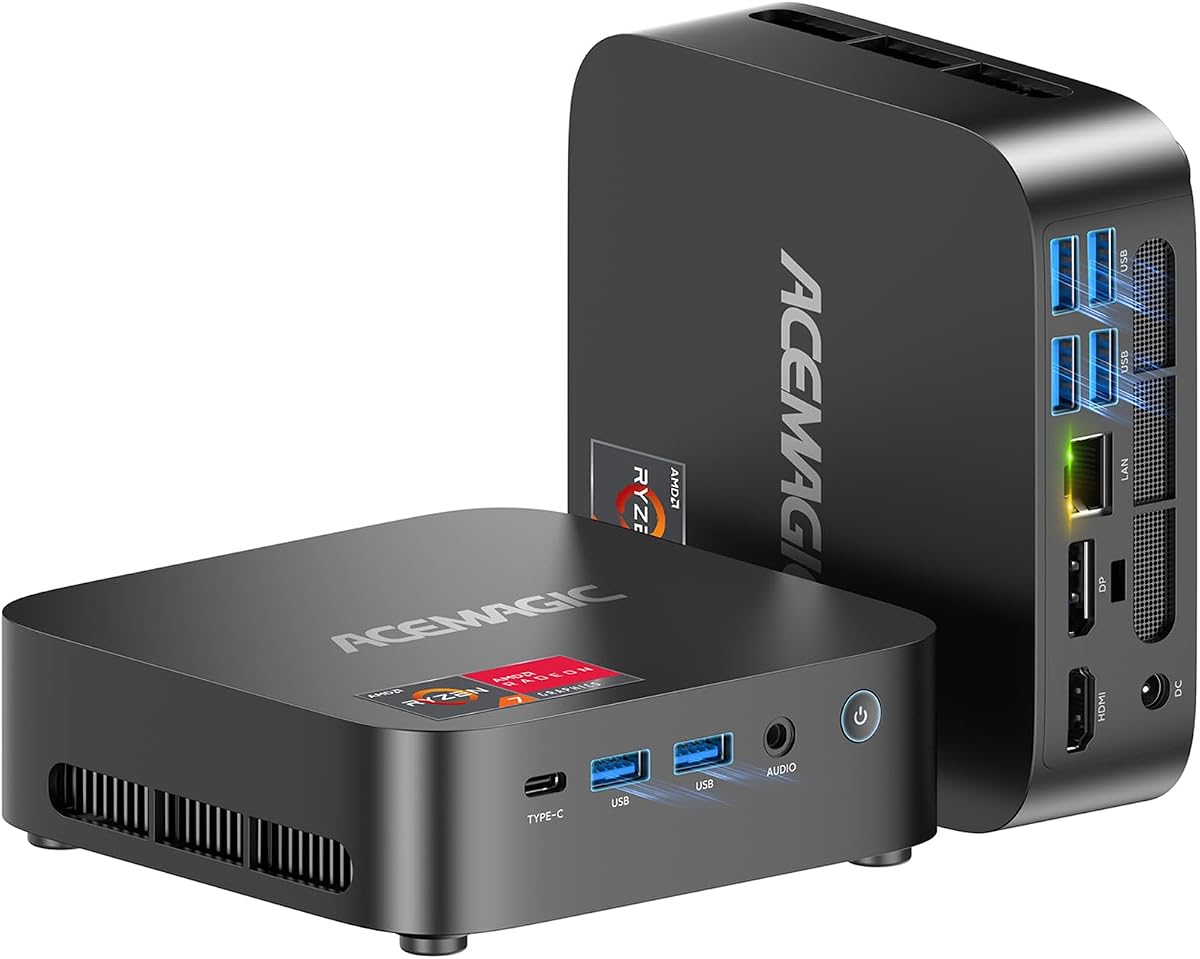
The ACEMAGIC K1 Mini PC is built for offices, home workspaces, and learning spaces where a small computer and quiet operation matter. It combines a Ryzen 5 7430U processor with six cores, 12 threads, and up to 4.5GHz, 16GB of DDR4 memory, and a 512GB SSD. Its supplied 4.5 rating and preinstalled Windows 11 Pro reinforce its suitability for professional daily use.
We may earn a commission when you buy through this link, at no additional cost to you.
The six-core processor provides enough headroom for video calls, web browsing, streaming, office applications, and regular multitasking. Sixteen gigabytes of memory is a practical starting point for keeping several collaboration tools open. It can also be upgraded to 64GB, and the two M.2 2280 storage slots support expansion up to 4TB, giving the compact system a useful long-term path.
Three 4K displays at 60Hz can be connected through HDMI 2.0, DisplayPort 1.4, and USB-C. That gives a remote professional a way to maintain a meeting window, shared content, and daily productivity applications at the same time. The stated under-30dB operating level and intelligent fan control are especially relevant for a call taking place at a desk, since lower acoustic distraction can make the environment feel more comfortable.
Measured at 5 by 5 by 1.6 inches and weighing 2.29 pounds, the K1 is easy to place behind a monitor, move between rooms, or carry for temporary work. Its compact size does not come at the expense of the main connectivity needs: a full USB-C display connection, three displays, and expandable memory all support a flexible setup. The supplied information does not detail the wireless standard, so buyers should confirm WiFi and Bluetooth capabilities if those are priorities.
The K1 is an excellent recommendation for users who want a quiet, professional, highly compact computer. It offers a particularly attractive combination of processor power, memory, storage, and multi-screen flexibility in a very small enclosure. The 512GB drive may eventually need expansion, but the system otherwise looks well prepared for a long-term conferencing and productivity role.
An under-30dB operating level and controlled cooling can make a desktop call less distracting. That matters when a microphone is close enough to pick up the sound of fans, especially in a quiet home office.
The K1 fits behind a display or into a small work area while still providing six CPU cores, 16GB of memory, three 4K outputs, and expandable storage. It is compact without being limited to a basic browser-only role.
We may earn a commission when you buy through this link, at no additional cost to you.
The KAMRUI Pinova P2 Mini PC combines a Ryzen 4300U quad-core processor, 16GB of LPDDR4 memory, and a 512GB M.2 SSD in a compact 5.05-by-5.05-by-1.73-inch enclosure. Its four cores and eight threads can operate up to 3.7GHz, making it suited to browser-based meetings, 4K media, office tasks, and active multitasking. The supplied 4.4 rating supports its position as a capable compact office system.
We may earn a commission when you buy through this link, at no additional cost to you.
The 16GB memory configuration is one of the P2's strongest conferencing features. It provides more breathing room than an 8GB system for simultaneous calls, browser tabs, messaging, and productivity software. Because the memory is LPDDR4, however, it cannot be expanded through conventional SODIMM modules. Buyers who expect to add more memory later should treat the included capacity as a fixed ceiling.
The P2 supports three 4K displays at 60Hz through HDMI 2.0, DisplayPort 1.4, and a 10Gbps USB-C port. Two USB 3.2 Gen2 Type-A ports support data transfer rates up to 10Gbps, while Gigabit LAN, WiFi, and Bluetooth cover network and peripheral needs. A VESA mount allows the system to attach beneath a display or to the back of a compatible monitor, which is useful when desk space is tight.
Storage can be expanded across two M.2 2280 slots, one supporting SATA or PCIe 3.0 NVMe and the other SATA, for a listed total of up to 4TB. The supplied data does not specify whether drives are included, so prospective buyers should confirm the package contents and current configuration. Its Ryzen 4300U processor is also from an older generation, making it less attractive for intensive creative work than newer alternatives.
Overall, the Pinova P2 is a good pick for a compact home office, conference room, or business workstation that needs three screens and 16GB of memory. Its quiet cooling and VESA-friendly size support a neat installation, while the 10Gbps USB-C connection simplifies peripheral and display setup. It remains most convincing for users who value display flexibility and memory capacity more than future CPU upgrades.
HDMI, DisplayPort, and USB-C allow a meeting, presentation, and reference document to occupy separate displays. This is a practical advantage for administrators, teachers, analysts, and remote team leads.
Two M.2 slots support additional drives for local archives or larger working files, while VESA mounting and the compact square chassis make the computer easy to position out of the way.
We may earn a commission when you buy through this link, at no additional cost to you.
The BOSGAME E5 Mini PC uses a Ryzen 3 5300U processor with four cores, eight threads, and speeds up to 3.8GHz. It comes with 8GB of DDR4 memory and a 256GB M.2 SATA SSD, making it an efficient option for daily office productivity, online classes, business software, and video calls. Its supplied 4.6 rating is the second-highest among the mini PCs in the guide.
We may earn a commission when you buy through this link, at no additional cost to you.
The processor provides enough capability for a standard conferencing workflow, including a meeting application, browser tabs, email, and office documents. Although the supplied description expressly places the system outside demanding professional 3D rendering and intensive 3A gaming, that limitation is rarely relevant to a dedicated meeting terminal. Upgrading the memory is advisable for heavier multitasking or several applications remaining open throughout the day.
Two SODIMM slots allow memory expansion up to 64GB. The storage arrangement includes the 256GB SATA system drive and an additional empty M.2 2280 NVMe PCIe 3.0 slot, enabling a second, faster drive without replacing the original. Dual 2.5GbE ports, WiFi 5, and full-function USB-C provide a flexible networking foundation, while HDMI 2.0, DisplayPort, and Type-C support three 4K displays at 60Hz.
The full-function Type-C port handles data, 4K video output, and PD 3.0, helping reduce cable clutter. The optimized cooling fan and copper heat pipes are intended to keep the unit quiet, which is useful during voice calls. As with other mini PCs in this guide, the display's built-in camera and speakers may not satisfy a large room, so a separate webcam, microphone, and headset can complete a professional installation.
The E5 is a good recommendation for budget-conscious users who still want dual fast Ethernet and triple-display flexibility. It is especially suitable for a small office, reception desk, remote-work station, or network-adjacent computer that handles occasional conferencing. Adding memory and a quality webcam would produce a particularly capable setup without moving to a larger desktop.
Dual 2.5GbE ports provide fast wired connectivity for offices, network appliances, and installations where stable Ethernet is preferred. Separate ports also offer room for specialized network arrangements.
The Ryzen 3 5300U is well matched to standard calls, online learning, and office productivity. Adding RAM remains worthwhile for users who keep many browser tabs, messaging applications, and collaboration tools open simultaneously.
We may earn a commission when you buy through this link, at no additional cost to you.
The right conferencing mini PC should handle the applications used during a call, maintain a stable connection, support the chosen displays and peripherals, and fit the user's budget without limiting future growth.
The processor should have enough capacity for the meeting application, browser, screen sharing, chat, and any work that remains open during a call. Quad-core processors such as the Ryzen 3 5300U and Ryzen 5 5400U are suitable for standard work, while six-core or eight-core chips provide more headroom for heavy browser use, media review, and multitasking. Clock speed alone does not tell the whole story, so core count, architecture, memory, and cooling should be considered together.
Choose a quad-core processor for ordinary office calls and a six-core or larger model for demanding schedules. Verify the included memory as well, because it can prevent the processor from reaching its practical potential.
Conferencing software may seem light, but a typical call quickly becomes a collection of browser tabs, a meeting window, screen sharing, email, messaging, and document or presentation tools. Sixteen gigabytes provides a comfortable starting point for sustained multitasking, while 8GB is better suited to lighter use or a system that will receive an immediate memory upgrade. A minimum of 16GB is a practical target for a new professional workstation.
Prefer standard DDR4 SODIMM configurations when future expansion matters. LPDDR memory can be efficient and compact, but it is often fixed, so it should be chosen only when the included capacity is sufficient for the long term.
An SSD is essential for responsive boots, application launches, and call software. NVMe storage generally offers stronger performance than SATA, although both are suitable for ordinary conferencing. The included capacity should be large enough for the operating system, collaboration tools, and local meeting assets. Extra M.2 slots are useful for adding a faster system drive, separating media files, or creating a local archive without replacing the original drive.
For routine online meetings, 256GB can be sufficient if files are kept in cloud storage. Users who download recordings, edit video, or maintain large project libraries should consider 512GB or more and verify whether expansion hardware is included.
Display support determines whether a mini PC can create a useful call-focused workspace. A single 1080p or 4K monitor is enough for basic use, while two displays let a user keep the meeting and shared content visible separately. Three-display systems are ideal for administrators, teachers, analysts, and presenters who also need notes, chat, or a second application. Buyers should confirm each output's maximum resolution and refresh rate, along with cable and adapter requirements.
Choose two outputs for a practical dual-screen office and three outputs for a command-center arrangement. Do not count USB-C as a display input unless the specification confirms that it supports video, data, and power delivery.
Stable networking matters because a strong computer cannot compensate for a dropped or unstable connection. A Gigabit Ethernet port is suitable for ordinary office use, while 2.5GbE is useful for large transfers and higher-bandwidth network environments. Dual LAN ports add flexibility for small offices, network appliances, and segmented networks. WiFi 6 can offer improved wireless performance, but the router, signal strength, and local network conditions determine the real-world result.
Use Ethernet for important scheduled calls when possible, especially in offices with crowded wireless networks. Dual LAN is a specialized advantage rather than a universal requirement, so it should influence the decision only when the network setup genuinely benefits from it.
Many compact mini PCs are used with separate monitors, and those monitors may lack a good camera or microphone. A 1080p webcam with automatic light adjustment can noticeably improve the participant's image, while a headset with a boom microphone usually provides clearer voice capture in noisy environments. The computer must also have a suitable USB port and compatible conferencing software. A separate webcam is especially valuable when a built-in laptop camera is the only alternative.
Do not assume the mini PC includes a camera. For a home office, choose a quality webcam and headset; for a conference room, use dedicated room audio rather than relying on a computer's integrated microphone.
A conferencing setup commonly needs several USB connections for a keyboard, mouse, headset, webcam, and removable storage. USB 3.2 Gen2 offers transfer rates up to 10Gbps, while USB-A and USB-C improve device compatibility. Display connectors, a 3.5mm audio jack, and a wired Ethernet port round out a flexible desk. Full-function USB-C is useful for one-cable displays, but ordinary data-only USB-C should not be mistaken for a video connection.
Count the peripherals that will remain connected and select a model with enough ports. A small hub can fill gaps, but keeping essential devices attached directly reduces cable clutter and potential compatibility problems.
Mini PCs are valuable because they reclaim desk and storage space, but size should be balanced with cooling and service access. VESA mounting can help position the system behind a monitor, while quieter cooling is useful when a microphone is nearby. Warranty terms and technical support can also matter for business deployments, especially when a machine will remain in service for years. Review the stated coverage and support period before making the final choice.
Prioritize a size that suits the workspace, not merely the smallest enclosure. Confirm that ventilation remains unobstructed and that the manufacturer provides an appropriate warranty and support channel.
Begin by placing the mini PC in an open area with ventilation and connect the chosen monitor, keyboard, mouse, webcam, and headset. Install the required conferencing application, sign in, and grant camera and microphone permissions only to trusted software. Test the call before an important meeting, check the selected microphone and speaker in the operating system's audio settings, and confirm that the webcam image is correctly framed.
For the most stable results, use Ethernet for fixed office desks and position the camera at eye level. Use a single headset microphone rather than leaving a room microphone and headset microphone active at the same time. Adjust lighting so the face is illuminated evenly, avoid bright windows directly behind the user, and use the webcam's privacy cover whenever the computer is not in use. A brief setup check can prevent common audio and video interruptions.
Keep the software and operating system updated, allow enough free storage for temporary files and updates, and use a brief restart routine when the machine has been running for an extended period. Clean the exterior vents gently and keep the enclosure away from enclosed shelving. If memory or storage can be upgraded, record the supported module and drive specifications first, power down completely, and follow the manufacturer's installation guidance.
Sixteen gigabytes is the most practical target for a dedicated conferencing computer. It provides enough room for a meeting application, multiple browser tabs, messaging, and office programs. An 8GB model can work for lighter calls, but an upgrade is advisable if many applications stay open. Users should also consider whether the memory is standard DDR4 or fixed LPDDR, since only the former is normally user-expandable.
It depends on the monitor and meeting environment. Many mini PCs do not include a camera, and some displays have outdated or low-quality integrated cameras. A dedicated 1080p webcam can provide a clearer image and better automatic lighting. In a large room, a quality camera alone is not enough; a separate room microphone and speakers may also be required.
WiFi 6 is beneficial but not essential in every setting. It can improve efficiency and performance on compatible routers and crowded wireless networks. A stable wired Ethernet connection is still the safest choice for important calls because it reduces dependence on signal quality. If WiFi is used, placing the computer and router in open positions and testing the network before each critical meeting is wise.
Yes, and most of the featured systems support at least two independent displays. Several provide three outputs through combinations of HDMI, DisplayPort, and USB-C. Buyers should verify maximum resolution and refresh rate for each port, use compatible cables, and check whether the USB-C port supports DisplayPort video output as well as data transfer.
A modern quad-core processor is generally sufficient for standard meetings, office applications, and moderate browser use. Additional cores and faster performance become more useful when screen sharing, video editing, large spreadsheets, or many background applications share the computer with the call. The memory and network setup also influence the overall experience, so processor performance should not be considered in isolation.
DDR4 is generally preferable when upgradeability matters because compatible SODIMM modules can often be added or replaced. LPDDR can make a mini PC more compact and may improve energy efficiency, but it is frequently soldered to the board. If LPDDR capacity is adequate for the intended workload, it can still be a sound choice; otherwise, a system with expandable DDR4 offers more flexibility.
A mini PC can offer more persistent desk performance, a cleaner setup, and the flexibility to connect multiple large displays. A laptop is more portable and includes a built-in keyboard, screen, camera, and battery. Many users benefit from a laptop for travel combined with a mini PC at a fixed workstation, though the dedicated desktop often provides more ports and easier multi-monitor placement.
A 1080p webcam, wired headset, external keyboard, and mouse are the most useful additions. A laptop-style monitor can also provide a clean all-in-one arrangement, while a second or third display is valuable for shared documents and participant management. Adhesive light strips or a simple desk lamp can improve facial illumination, and a compact headset hanger or cable management tray can keep the workspace orderly.
The Glorlin Mini PC Ryzen 7 6800H is the strongest all-round recommendation because it combines eight cores, 16GB of LPDDR5 memory, a fast NVMe drive, three 4K outputs, and modern wireless connectivity. The C4 Plus stands out as the budget-oriented choice with expandable DDR4 and dual Gigabit Ethernet, while the GMKtec M6 Ultra leads the premium group with 32GB of DDR5, a Ryzen 5 7640HS processor, 1TB of storage, and advanced display support.
Prioritize the parts of the setup that directly affect calls: stable networking, sufficient memory, a clear camera, a good microphone, and displays that make shared content easy to manage. Other models in the list offer distinct combinations of compact size, quiet cooling, dual 2.5GbE networking, dual-screen operation, and three-screen productivity. The Logitech Brio 101 is a useful accessory for improving the image when a connected monitor has no suitable camera.
Before ordering, confirm the current configuration, operating-system inclusion, port layout, memory upgrade path, and display compatibility. Availability and prices change, so compare the latest listing with the priorities established in this guide. The strongest final purchase is the one that fits the room, supports the chosen peripherals, and leaves enough performance headroom for the applications that will remain open throughout a working day.