
Joso Switch 2 Adapter
3.8Editor score
Driver-free plug-and-play setup
Four remapping profiles
Wired and 2.4G support
Discover the best Nintendo Switch 2 keyboard options, comparing compatibility, key mapping, wired connectivity, saved profiles, portability, and setup ease.
A Nintendo Switch 2 keyboard setup can make competitive shooters, strategy games, and other PC-style genres more comfortable and precise. However, the most useful choice depends heavily on console compatibility, input methods, remapping options, controller requirements, and whether you prefer a complete gaming set or an existing keyboard and mouse.
This guide compares ten keyboards, keyboard-and-mouse combinations, and input adapters for features that matter on Nintendo Switch 2. It examines explicit Switch 2 support, multi-platform coverage, wired and wireless connections, programmable controls, sensitivity adjustment, profile storage, portability, and the availability of setup guidance.
Each pick reveals a different approach, from a feature-rich adapter with macros and firmware updates to compact one-handed keyboards and full-size membrane models. Ratings reflect the supplied customer feedback rather than personal testing, and availability, compatibility details, and prices can change as manufacturers update their products.
3.8Editor score

4.0Editor score

3.6Editor score
The comparison covers dedicated Switch 2 adapters, multi-console converters, compact and full-size keyboards, and complete keyboard-and-mouse sets. The most important distinction is whether a product explicitly supports Nintendo Switch 2 or merely older Switch models.


The Joso Multi-Platform Adapter holds a 4.1 rating and is built around customizable keyboard-and-mouse control rather than a physical gaming keyboard. Its standout feature is the ability to save eight distinct profiles, allowing separate configurations for shooters, strategy titles, and other genres without rebuilding the layout each time.
We may earn a commission when you buy through this link, at no additional cost to you.
The adapter supports wired USB and 2.4G peripherals, while Bluetooth is not supported. Remapping is available through an official controller, which the product guidance recommends for reliable configuration. It works with the original Switch, Switch OLED in dock mode, Xbox One, and several PlayStation models, making it useful for building a multi-console control setup.
The decisive drawback is explicit incompatibility with Nintendo Switch 2, PS5, and Xbox Series consoles. That limitation means this adapter should not be purchased by a Switch 2 owner expecting native support, despite its otherwise generous profile and mapping feature set. A controller is also required for setup and some console configurations.
It remains a good choice for owners of older supported systems who want extensive profile storage and granular remapping. For Nintendo Switch 2, however, buyers should favor a product that explicitly names the newer console. The product's 4.1 rating suggests generally favorable customer sentiment, but compatibility should take priority over aggregate feedback.
Saving up to eight configurations is particularly useful when one controller serves several games. It can reduce repeated setup work and let players keep separate control layouts ready for movement, aiming, and other game-specific actions.
A device that works with the original Switch or OLED model is not automatically compatible with Switch 2. This adapter expressly excludes the new console, so its attractive mapping features cannot be used on the platform targeted by this guide.
We may earn a commission when you buy through this link, at no additional cost to you.
The BLADER Multi-Platform Adapter carries a 3.5 rating and focuses on a simple, portable bridge between standard keyboards, mice, and supported consoles. It is designed for players who want quick access to familiar controls without installing a dedicated application or navigating a complicated setup process.
We may earn a commission when you buy through this link, at no additional cost to you.
Shortcut-based customization and mouse-sensitivity adjustment provide useful control over the input experience. The adapter translates keyboard-and-mouse activity into controller signals and is listed for Nintendo Switch, Xbox One, Xbox Series X|S, and PS4. Its small housing is also designed to fit easily into a backpack or gaming setup.
There are several limitations. An original controller corresponding to the connected console is required, while authorized controllers are not supported. The adapter's 3.5 mm headphone jack on the connected controller will also stop working, and mice that need driver installation are excluded. Most importantly, the supplied information does not explicitly identify Switch 2 compatibility.
This is a practical option for owners of the listed older consoles, especially those who value portability and straightforward remapping. A prospective Switch 2 buyer should verify current compatibility with the manufacturer before purchasing. The lower rating reflects a product that appears functional but introduces restrictions that may not suit every setup.
The lightweight enclosure makes BLADER easy to carry between a home console and another gaming location. Its emphasis on plug-and-play operation also reduces the amount of setup required for players who already know how they want their controls arranged.
Connecting a controller through the adapter causes its 3.5 mm headphone jack to become unusable. Players who depend on wired controller audio should account for this limitation or choose a different input solution.
We may earn a commission when you buy through this link, at no additional cost to you.
The arVin Multi-Platform Adapter has a 4.0 rating and is designed for players who want keyboard-and-mouse input across a wide collection of older consoles. It supports the original Switch, Switch OLED, several PS4 and PS3 models, and multiple Xbox One and Xbox 360 variants.
We may earn a commission when you buy through this link, at no additional cost to you.
Its strongest feature is the ability to store up to eight separate keyboard and mouse mapping sets. A keyboard shortcut switches between saved configurations, while separate controls allow mouse sensitivity to be adjusted according to the game or the player's habits. Wired and 2.4G wireless peripherals are supported, and installation requires no downloadable software.
The product's limitations are important. It is not compatible with PS5, Xbox Series consoles, Switch Lite, PCs, Bluetooth-only keyboards and mice, or third-party controllers. It also does not support Switch 2, meaning its broad legacy coverage should not be mistaken for current-generation console compatibility.
For owners of the original Switch or OLED model, arVin offers solid customization and dependable multi-platform coverage. Its 4.0 rating reflects a balanced feature set for the systems it targets. Buyers focused specifically on Nintendo Switch 2 should instead select an adapter with explicit support for that console.
Eight mapping sets allow a player to retain tailored controls for different genres. This is helpful when a keyboard and mouse setup serves games with distinct movement, aiming, and shortcut requirements.
The adapter accepts both wired USB and 2.4G wireless peripherals, but Bluetooth products are excluded. Checking a keyboard or mouse's connection method before buying can prevent avoidable setup problems.
We may earn a commission when you buy through this link, at no additional cost to you.
The 39-Key Gaming Combo has a 3.7 rating and combines a compact keyboard, an RGB mouse, and a console adapter in one package. Its appeal lies in offering a complete, space-conscious input solution for players who do not want to depend on a full-size desktop keyboard.
We may earn a commission when you buy through this link, at no additional cost to you.
The keyboard uses a 39-key layout with a mechanical feeling, rainbow backlighting, an integrated palm rest, and anti-ghosting across the included keys. The mouse has RGB lighting, while the included converter supports driverless key binding and sensitivity adjustment. The bundle is also listed for Windows and several PlayStation, Xbox, and Nintendo Switch models.
This is not a conventional full-size keyboard, so buyers who need a number row, dedicated function row, or complete workstation layout may find it limiting. Switch 2 is not explicitly named in the supplied compatibility information, and the adapter is not designed for one specific game. That broader approach may be convenient, but game-specific support should not be assumed.
The combination is best for console players seeking portability and a coordinated keyboard-and-mouse set rather than separately owned peripherals. Its 3.7 rating indicates moderate customer approval, which fits a product offering several useful features but requiring careful attention to layout expectations and current Switch 2 compatibility.
The 39-key format is useful when desk space is limited or when the keyboard will travel between locations. Its compact design focuses on gaming inputs rather than productivity features, making it more suitable for dedicated play than extended office work.
The keyboard, mouse, and converter provide the core hardware needed for a console control arrangement. This is convenient for new players, although existing owners of suitable peripherals may get better value from a standalone adapter.
We may earn a commission when you buy through this link, at no additional cost to you.
The Brook Sniper 2 has a 4.0 rating and is the most comprehensively equipped adapter in this roundup. It explicitly supports Nintendo Switch 2 as well as the original Switch, PS5, PS4, Xbox Series X|S, Xbox One, PCs, and mobile devices, giving it unusually broad reach for one controller-conversion device.
We may earn a commission when you buy through this link, at no additional cost to you.
Keyboard and mouse controls can be refined through sensitivity settings, key mapping, and controller parameters. Smart macro tools can create tap, hold, or loop actions, while built-in memory stores multiple profiles and permits switching without reconnecting to the app. The companion application handles configuration, and over-the-air firmware updates offer a way to maintain or expand device support.
Some platforms impose extra requirements. Xbox authentication requires an official controller, and mobile use works only in controller-mode games while requiring a secondary phone for setup control. The extensive feature set also makes the adapter more complex than a basic plug-and-play converter, so users who need only basic mouse movement may not use every function.
For Nintendo Switch 2 owners, this is the strongest all-around choice in the list because its support is explicit and its customization tools extend beyond basic remapping. The 4.0 rating is solid, and the product suits players who want one adaptable peripheral across consoles, PCs, and selected mobile experiences.
Tap, hold, and loop macro functions can streamline recurring inputs in supported games. They are especially valuable for players who want repeatable sequences without repeatedly pressing several controls, although users should follow game rules and configure commands carefully.
Support for Switch 2, current PlayStation and Xbox families, PC, and limited mobile use reduces the need to buy separate converters. Built-in profile memory and over-the-air updates further strengthen the device's value as a long-term multi-platform control hub.
We may earn a commission when you buy through this link, at no additional cost to you.
The IOGEAR KeyMander 2 has a 3.6 rating and is aimed at players who want more control over how keyboard-and-mouse input is presented to a console. It can be configured through the downloadable K2 App, giving users a dedicated interface for personalization rather than relying only on hardware shortcuts.
We may earn a commission when you buy through this link, at no additional cost to you.
The adapter supports Xbox Series X|S, Xbox One, PS4, and standard and OLED Nintendo Switch models. Its crossover function allows controllers to be moved between PS4, Xbox One, and Switch systems, adding flexibility for players who rotate among consoles. Built-in Bluetooth connectivity is another notable feature.
Switch Lite is not supported, and PS5 is not fully supported, with remote play or additional software presented as the route to broader PS5 use. The supplied compatibility information also does not explicitly list Nintendo Switch 2, so buyers should confirm that point before assuming this model fits the newer console.
This product makes the most sense for owners of the specifically supported systems who value app-based configuration and controller crossover. Its feature set is sophisticated for an adapter, but the 3.6 rating and important exclusions mean prospective buyers should carefully match the hardware to their console collection. For Switch 2, Brook's explicit support offers a clearer path.
The K2 App provides a structured way to adjust the adapter's behavior and tune a play style. This can be more approachable than learning numerous device shortcuts, particularly for users creating detailed mappings across several games.
The ability to swap controllers between PS4, Xbox One, and Switch adds flexibility beyond simple keyboard conversion. It is particularly useful for players with multiple supported systems who want a more unified hardware arrangement.
We may earn a commission when you buy through this link, at no additional cost to you.
The Joso Switch 2 Adapter has a 3.8 rating and directly addresses the console at the center of this guide. It supports Nintendo Switch and Switch 2, Xbox Series X|S, Xbox One, PS4, and PS3, making it one of the most clearly relevant options for players building a multi-console input setup.
We may earn a commission when you buy through this link, at no additional cost to you.
Installation is driver-free and described as plug-and-play. Most wired USB and 2.4G wireless keyboard-and-mouse combinations are accepted, while Bluetooth and driver-dependent devices are excluded. Users can customize key bindings, adjust sensitivity, and save up to four profiles for different games. The package includes an adapter, USB-C to USB-A cable, OTG converter, and manual.
PS5 is explicitly unsupported, and an official controller is recommended during setup to avoid connection issues. The four-profile capacity is less generous than the eight-profile options found elsewhere, and the absence of an application keeps the process simple but limits deeper visual or macro-oriented customization.
This is the best budget choice for a buyer whose priority is dependable, clearly stated Switch 2 support without a complex application. Its 3.8 rating indicates moderately positive feedback, and the included guidance helps make custom mapping less intimidating. It is less appropriate for PS5 owners or users who want extensive programmable actions.
The driver-free design lets players begin with standard keyboard-and-mouse input and then assign functions through the adapter itself. This keeps setup approachable while still allowing sensitivity and game-specific profile changes.
The supplied USB-C to USB-A cable and OTG converter cover common connection arrangements. Buyers should still check the physical ports available on their console, dock, or controller setup before installation.
We may earn a commission when you buy through this link, at no additional cost to you.
The UGREEN USB Sharing Switch has the highest rating in the roundup at 4.4, but its function differs from a conventional keyboard-and-mouse console adapter. It is a two-computer, four-device USB sharing box designed to let two PCs share peripherals such as a keyboard, mouse, printer, scanner, or card reader.
We may earn a commission when you buy through this link, at no additional cost to you.
A single front button changes the active computer, and an LED indicator shows which system is selected. The box uses USB 2.0 and includes two USB-A to USB-A cables. It works without drivers across widely used Windows, macOS, Linux, and Chrome OS systems, and an optional micro-USB power input can help when several high-draw peripherals are connected.
This is not a KVM switch and does not transmit display output. More importantly for this guide, it does not convert keyboard and mouse signals into Nintendo Switch 2 controller input, and no Switch 2 compatibility is listed. Its usefulness on the target console is therefore indirect and limited to a compatible physical connection arrangement.
The product is worth considering for PC users who want to share peripherals between two computers, especially with its simple button and clear status light. It is not a substitute for a dedicated Nintendo Switch 2 adapter. Buyers searching specifically for console control should examine the Joso or Brook options instead.
The primary benefit is avoiding repeated manual cable movement between two computers. One button changes which system can access the shared keyboard, mouse, printer, scanner, or other peripheral.
The separate micro-USB power port can improve stability when multiple powered peripherals operate at once. This makes the box more practical for substantial desk setups, although the charging cable and adapter are not included.
We may earn a commission when you buy through this link, at no additional cost to you.
The Cyber Gadget USB Keyboard carries a 3.6 rating and offers a specialized alternative to gaming-focused adapters. It is a compact, wired 55-key Japanese keyboard designed to connect to the USB port on a Nintendo Switch dock's Joy-Con area, making it especially relevant for players who prefer typing or using a small auxiliary keyboard.
We may earn a commission when you buy through this link, at no additional cost to you.
Its lightweight construction and small footprint make it easy to carry, and the design can be used alongside the Cyber Gadget CYBER Double Style controller for Switch. The keyboard is intended for online games, where text entry and system navigation can be more comfortable than using on-screen controls.
The 55-key Japanese layout is a significant consideration for users accustomed to a standard North American full-size arrangement. Compatibility is listed for the original Switch and Switch OLED rather than Nintendo Switch 2, and the product does not provide power to docked Joy-Con controllers. It is therefore a niche peripheral rather than a universal Switch 2 solution.
This keyboard is best for owners of older supported Switch models who value portability and dock-based text entry more than mouse aiming or extensive remapping. Its 3.6 rating reflects a focused design with clear limitations. Nintendo Switch 2 buyers should confirm the revised dock layout and current manufacturer guidance before considering it.
The keyboard's shape and connection method are designed around a Switch dock rather than a standard desktop setup. That specialization may appeal to portable users, but it offers less flexibility than a conventional USB keyboard and adapter.
The compact body is easy to transport, while the 55-key Japanese layout creates an adjustment period for many players. Buyers who rely on a full number row, function keys, or a familiar language layout should confirm the arrangement before purchasing.
We may earn a commission when you buy through this link, at no additional cost to you.
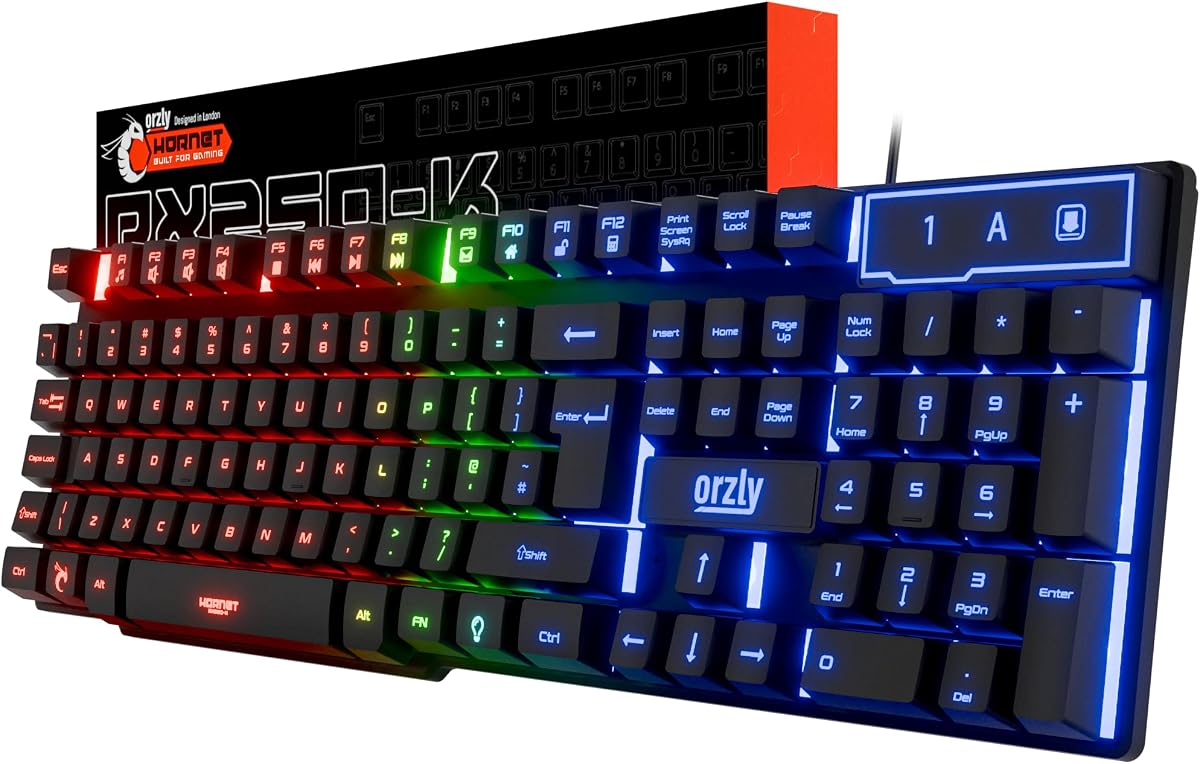
The Orzly RX-250 Hornet has a 4.1 rating and is the most conventional full-size keyboard in the collection. Its 104-key wired membrane layout, 19-key rollover, anti-ghosting, and comfortable design make it useful for both gaming and everyday productivity rather than only short console sessions.
We may earn a commission when you buy through this link, at no additional cost to you.
The keyboard supports a wide device list, including PS5, PS4, Xbox Series X|S, Xbox One, Steam Deck, ROG Ally, laptops, Windows and Mac computers, and Nintendo Switch. It requires no additional software or drivers. RGB-style rainbow backlighting includes three lighting modes, four brightness levels, and a dynamic breathing effect.
The supplied information does not explicitly identify Nintendo Switch 2 compatibility, and a standard console keyboard may require a suitable USB connection arrangement or adapter. Its full-size footprint is also less portable than the Cyber Gadget model, while the membrane switches are designed for quiet, responsive everyday use rather than the tactile feedback of mechanical keyboards.
This is a strong general-purpose option for a buyer who wants one keyboard for gaming and work across many devices. Its 4.1 rating and broad compatibility make it appealing, but Switch 2 owners should verify support and adapter requirements. Those seeking a guaranteed console-focused solution should favor the Brook Sniper 2.
The complete 104-key arrangement makes the RX-250 practical for work, browsing, and writing as well as play. Foldable anti-slip feet allow the user to adjust its position, while membrane switches offer a quieter feel for shared spaces.
Support for many modern gaming platforms makes this keyboard versatile, but platform naming does not always guarantee support for the latest hardware revision. Nintendo Switch 2 buyers should check the product information or manufacturer before committing.
We may earn a commission when you buy through this link, at no additional cost to you.
The right Nintendo Switch 2 keyboard depends on whether you want a direct console solution, a portable typing accessory, a complete gaming set, or a full-size keyboard for use across several devices. Compatibility should be checked before aesthetics or extra features.
A keyboard that supports the original Nintendo Switch does not necessarily support Switch 2. Look for explicit wording in the manufacturer or listing, especially when the accessory depends on a console's USB host behavior, dock arrangement, or authentication process. Among the products here, the Brook Sniper 2 and Joso Switch 2 Adapter clearly name Switch 2 support, while several others expressly exclude it or leave compatibility unstated.
In short, confirm the exact console model before buying, rather than assuming that a Switch or Switch OLED label covers Switch 2.
Many console games are designed around aiming, and a mouse can offer familiar precision when a title supports the right input mode. A keyboard-only product is best for text entry, menus, and games with conventional keyboard controls. A complete keyboard-and-mouse set may be more convenient for a new setup, while an adapter lets you reuse peripherals you already own and gives you more control over keyboard choice.
Choose a complete set for convenience, or choose an adapter when you already have a keyboard and mouse that feel comfortable.
Wired USB is the most broadly predictable option, and 2.4G wireless support offers cable-free use with a dedicated receiver. Bluetooth is excluded by several adapters in this roundup, including the Joso and arVin models. The products described as plug-and-play generally avoid driver installation, while mouse sensitivity may still need to be maximized within the game's own settings for consistent aiming.
Match the adapter to the connection method of your peripherals, and favor wired operation when reliability is the priority.
A console adapter often needs to translate keyboard and mouse events into controller inputs that a game recognizes. Remapping lets you assign those events to familiar controller actions. Profile storage is especially helpful for games with different control demands: the Joso Switch 2 Adapter stores four profiles, arVin stores eight, and the Brook Sniper 2 uses built-in memory for multiple profiles. More profiles add flexibility, but they do not automatically mean that every game will benefit.
Prioritize a sensible remapping system and enough profiles for the games you actually play, rather than choosing solely by the largest number.
Some adapters require an official console controller during setup or throughout use. This can affect how the adapter appears to the console and may influence whether keyboard-and-mouse input is recognized. The Joso Switch 2 Adapter recommends an official controller for setup, the Brook Sniper 2 requires one for Xbox authentication, and the BLADER model requires an original controller while excluding authorized controllers. These distinctions can be confusing because controller requirements differ by platform and product.
Check whether the required controller is already available to you and whether the setup procedure allows the controller to be removed afterward.
A docked Switch setup benefits from a compact device, but keyboard size affects the available key set. The Cyber Gadget USB Keyboard has 55 keys in a Japanese layout, while the 39-Key Gaming Combo uses a highly reduced portable format. The Orzly RX-250 uses a full 104-key layout, and the adapters themselves are generally small enough to store near a console or carry in a bag. Consider where you will play and whether you need a number row, function keys, and familiar key spacing.
Travel players should prioritize compactness, while desktop users and typists will usually benefit more from a complete layout.
RGB lighting can improve visibility and match a gaming setup, while macros can automate tap, hold, or loop sequences. Brook Sniper 2 combines both features with a companion app and over-the-air updates. Simpler adapters use hardware shortcuts and avoid software, which can be easier for occasional users. The trade-off is less detailed control: basic adapters may offer only mapping and sensitivity, while app-based products add setup complexity and potential firmware maintenance.
Choose advanced software features when they solve a specific problem, and favor a simple interface when quick, repeatable setup matters more.
Begin by confirming that the adapter or keyboard explicitly supports Nintendo Switch 2 and the connection mode of your peripherals. Connect the adapter to the appropriate console port, plug the keyboard and mouse into their assigned USB sockets, and connect the required official controller. For products with an OTG converter, use it only when the console or dock connection calls for it. Read the included manual and current setup guide before attempting a complicated mapping.
Test basic input before creating profiles. Confirm that every required key produces movement or an action, verify the mouse direction, and adjust pointer or view sensitivity within the game. Then use the adapter's mapping interface or shortcut commands to assign keyboard and mouse events to controller functions. Save a separate profile for each distinct game configuration, and retain the original controller layout as a fallback if an update or mapping change creates problems.
For care, keep the adapter and keyboard away from moisture, excessive heat, and impact. Use gentle compressed air or careful brushing to remove dust from key gaps, and avoid pulling cables directly from the connector. Update app-based devices when instructed, but do not interrupt a firmware installation. If input becomes inconsistent, reconnect the peripherals, try a wired connection, verify the active profile, and consult the manufacturer's troubleshooting material before changing many settings at once.
No. Original Switch and Switch OLED compatibility does not automatically guarantee Switch 2 support. Some products explicitly name Switch 2, some support only older models, and others leave the new console unmentioned. Check the current manufacturer information and verify the exact console model before purchasing.
It depends on the adapter and console. Some products require an original or official controller for setup, authentication, or continuous recognition by the system. The Joso Switch 2 Adapter recommends an official controller during setup, while the Brook Sniper 2 specifically requires one for Xbox authentication. Review the product requirements before installation.
Bluetooth support is limited or absent on several products in this roundup. The Joso Switch 2 Adapter and arVin adapter support wired USB and 2.4G wireless peripherals but exclude Bluetooth. The IOGEAR KeyMander 2 lists built-in Bluetooth connectivity, so connection requirements should always be checked for the exact model being considered.
No. A mouse can provide familiar precision, but the game must support the relevant controller or mouse input behavior, and the adapter must map that input correctly. Sensitivity also needs to be adjusted within the game. A console can still require controller input for menus, authentication, or unsupported modes, so keeping a controller available is sensible.
They are useful when one setup serves several games with different control needs. Stored profiles let you preserve separate movement, aiming, and action arrangements without remapping everything each time. The value depends on how often you switch games and how many distinct configurations you need, since products offer different profile capacities.
A full-size mechanical or membrane gaming keyboard is not required solely for console use. A compatible adapter, standard USB keyboard, and suitable mouse may be enough for supported titles. Dedicated gaming features matter when portability, anti-ghosting, backlighting, compact layout, or integrated mouse control are priorities for the player.
Reconnect the adapter and peripherals, confirm the correct profile is active, and verify that the required controller is connected. Check whether the peripheral uses wired, 2.4G, or Bluetooth mode, because unsupported modes can prevent recognition. Consult the manual and current troubleshooting guide before changing mappings or settings.
Usually, yes, provided the keyboard has a compatible connection and the console adapter supports the peripheral. A wired USB keyboard is usually the simplest choice, while 2.4G models require a compatible receiver. Products such as the Orzly RX-250 and Brook Sniper 2 are designed for broader multi-device use, though Switch 2 support should still be confirmed for the Orzly model.
The Brook Sniper 2 stands out as the most complete choice because it explicitly supports Switch 2, spans major modern consoles and PCs, includes macros and profile memory, and provides app-based configuration and firmware updates. The Joso Switch 2 Adapter is the best budget option for buyers wanting explicit compatibility, four profiles, and a simpler driver-free process.
Prioritize exact console compatibility before considering lighting, macros, or key count. Controller requirements, Bluetooth limitations, mouse-driver support, physical connector layout, and game-specific behavior can matter more than headline features. Players needing a complete peripheral set can consider the 39-Key Gaming Combo, while full-size keyboard users can examine the Orzly RX-250 after confirming Switch 2 support.
Finally, check the current listing and manufacturer documentation before ordering, since hardware revisions and compatibility claims can change. Ratings provide a useful snapshot of customer feedback, but they do not replace checking port requirements, controller rules, and the support status of the exact console and game involved.