
Nuetsa Flat Plug Power Strip
4.8Editor score
Eight AC outlets
Four USB charging ports
2,700-joule protection
Six-foot extension cord
Explore the best surge protector for laptop setups, comparing outlet counts, USB charging, joule ratings, cord lengths, safety features, and ideal workspaces.
A laptop power strip should do more than provide extra outlets. It should organize a crowded desk, accommodate large charging bricks, deliver convenient USB charging, and help protect sensitive electronics from overloads, spikes, and other electrical hazards. The right model depends heavily on your workspace, equipment, and outlet layout.
We compared all 10 products by examining AC outlet count, USB port availability, surge-protection capacity, cord length and thickness, plug design, mounting options, safety certifications, and practical space-saving features. The guide covers everything from compact five-foot strips to large charging stations designed for a multi-device home office.
Each pick highlights the qualities that make it best suited to a particular setup, while the comparison table provides a quicker way to evaluate specifications. Product details, ratings, protection levels, and availability can change, so readers should verify the current listing and compare their needs before making a final purchase.
4.8Editor score

4.8Editor score

4.8Editor score
The following comparison makes the main differences clear, including capacity, protection, connectivity, and physical design. Use it to identify the model that best matches your laptop, charger, desk, and broader household electronics.




This Belkin power strip combines a generous twelve-outlet layout with a high 4.7 rating, making it a practical option for laptop desks that also contain monitors, peripherals, cameras, and other electronics. Its eight-foot flat cord offers enough reach for most furniture arrangements, while the angled three-prong plug is designed to fit more easily into outlets that are crowded or positioned close to a wall.
We may earn a commission when you buy through this link, at no additional cost to you.
The strip provides 3,780 joules of overcurrent and overload protection, placing its capacity above several similarly sized competitors. Widely spaced outlets are especially important for laptop users because modern charging bricks and monitor power adapters are often bulky. A safety indicator light adds visibility, allowing the user to check whether the strip is operating and protected without examining every cable or outlet.
There are some trade-offs. It does not include USB charging ports, so phones, tablets, and accessories still need their own wall adapters. Its eight-foot cord may also be excessive for a compact desk unless it is routed behind furniture. The product description mentions a housing made with a minimum of 72% post-consumer recycled material, along with a two-year limited warranty and connected-equipment coverage, but buyers should consult the current listing for the precise terms.
This is a strong choice for a home office or shared workstation where AC capacity is the priority. It is especially practical for users who prefer dedicated chargers and want a straightforward, wall-mountable strip with no complicated charging specifications. Choose it when outlet count, spacing, and substantial surge capacity matter more than integrated USB convenience.
The widely spaced twelve-outlet arrangement reduces the chance that a large laptop adapter will block neighboring sockets. That makes the strip easier to share among several devices without resorting to extension cords or awkwardly angled plugs.
Its 3,780-joule protection rating and illuminated status indicator provide useful reassurance. The flat eight-foot cord also offers flexibility when the wall outlet is not directly behind the desk.
We may earn a commission when you buy through this link, at no additional cost to you.
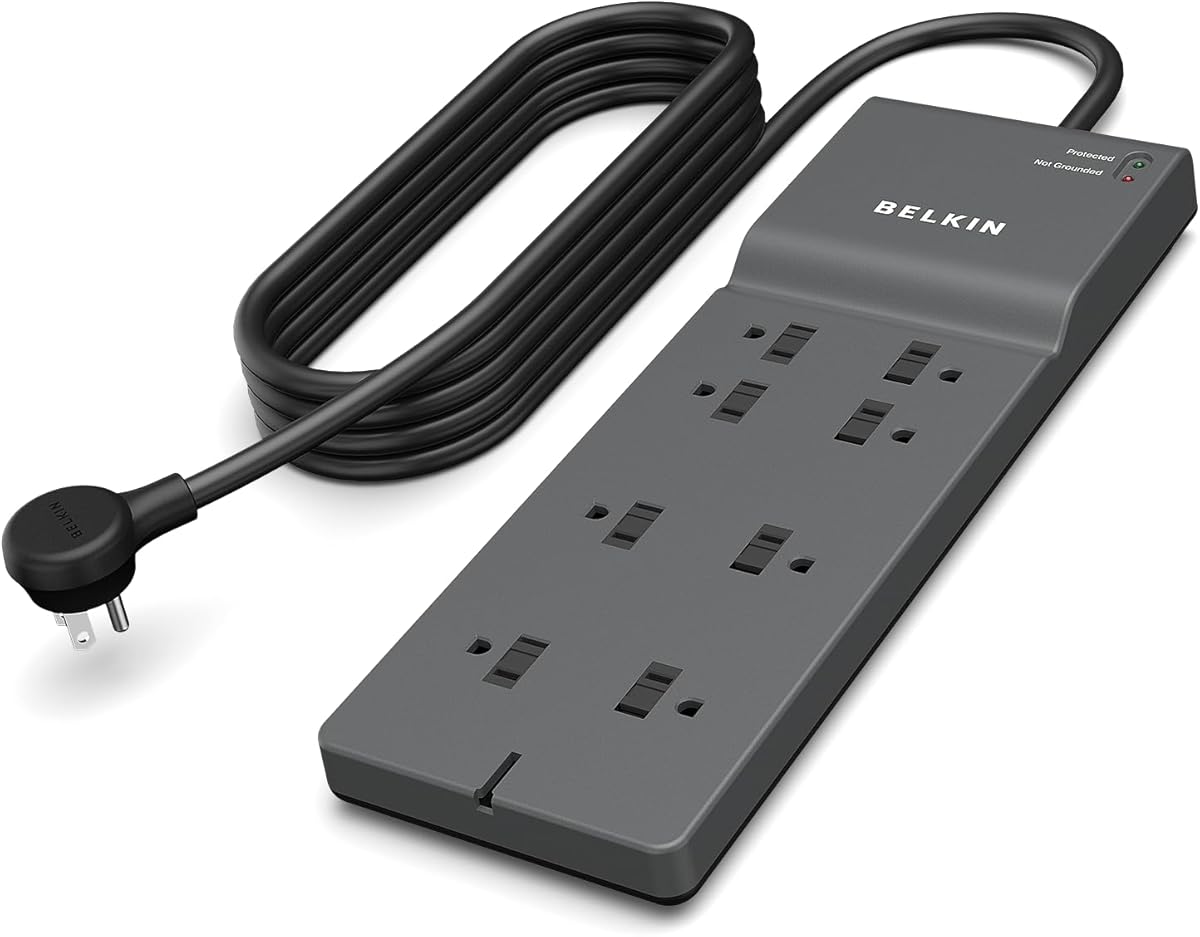
This Belkin eight-outlet model is a straightforward choice for a laptop user who wants dependable surge protection without an oversized charging station. Its 4.7 rating reflects a generally well-received product, while the eight AC outlets are enough to support a notebook, monitor, docking equipment, phone charger, and several smaller peripherals.
We may earn a commission when you buy through this link, at no additional cost to you.
The most notable convenience is the safety slide lock on each outlet, which helps close unused receptacles. The widely spaced outlets reduce conflict between large power adapters, and the slender housing suits home offices, workstations, and game rooms. An eight-foot flat cord gives users ample reach, while the three-prong angled plug can preserve access to the lower receptacle on a crowded wall outlet.
Its 2,500-joule protection capacity is lower than the higher-output Belkin models in this list, and the absence of USB ports limits its value as an all-in-one charging hub. Users with many USB accessories will need separate wall chargers, which can bring back the cable clutter the strip is intended to reduce. Nevertheless, the focused design, individual outlet locks, and UL certification make it a sensible option for a modest desk.
This strip is best for someone who values a manageable number of AC outlets, tidy outlet access, and a long flat cord. It works particularly well in offices, dorm rooms, and home offices where a laptop and a few essential accessories are the main loads. Users seeking broader protection or integrated charging should consider one of the higher-capacity alternatives.
Individual safety slides make it possible to cover unused sockets, which is useful in shared offices and homes with children. The feature adds security without changing the strip's simple rectangular layout.
Eight outlets are sufficient for many laptop desks while keeping the overall footprint less imposing than larger power bars. The long flat cord remains easy to route behind or beneath furniture.
We may earn a commission when you buy through this link, at no additional cost to you.
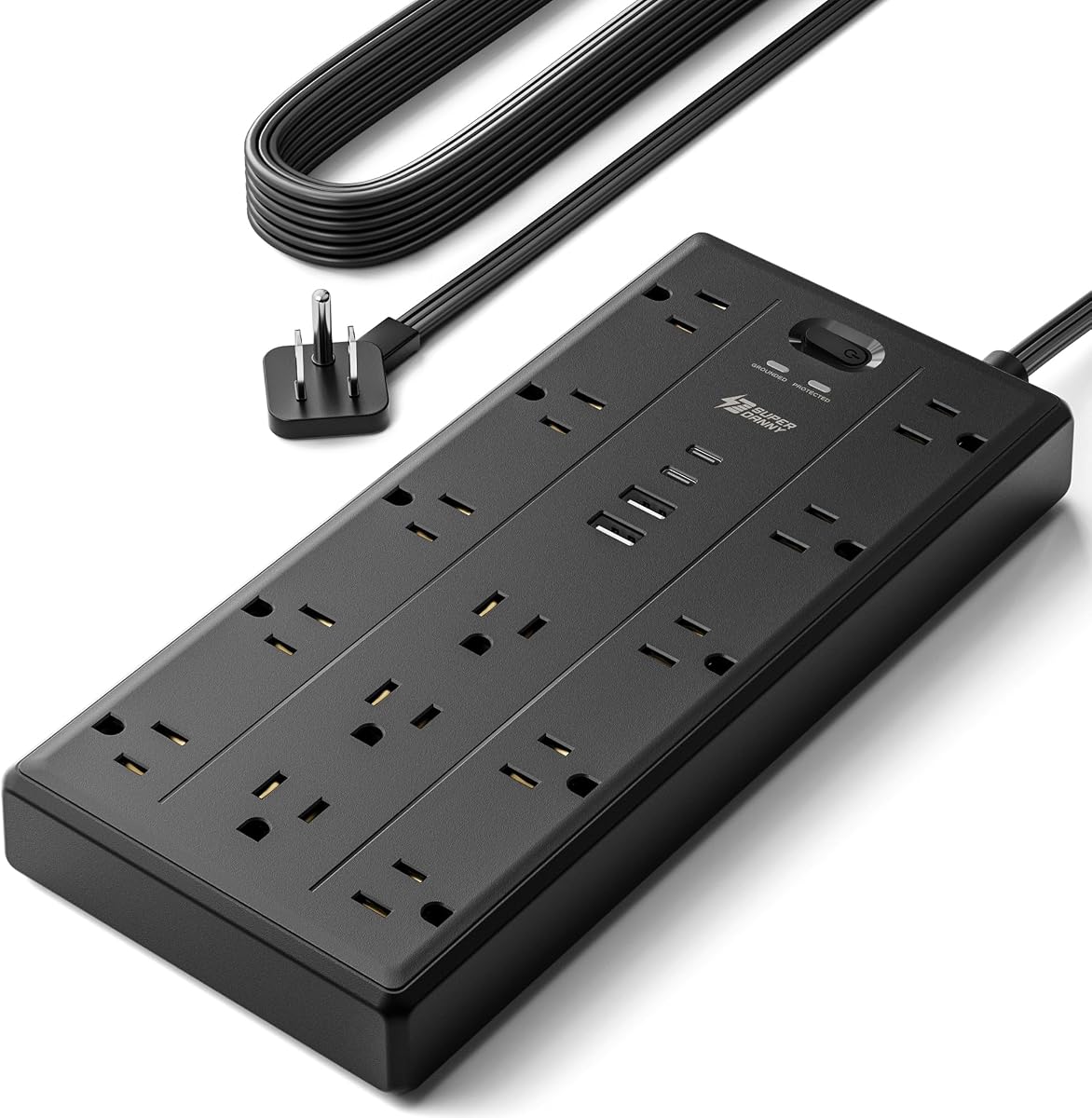
The SUPERDANNY model is built for users who want a laptop to be only one part of a large powered setup. It offers thirteen widely spaced AC outlets plus two USB-A and two USB-C ports, creating seventeen total charging positions. Its 4.7 rating and extensive protection features make it a credible all-in-one option for a workstation, entertainment center, gaming desk, or dorm room.
We may earn a commission when you buy through this link, at no additional cost to you.
Two-inch spacing gives large laptop chargers and other bulky adapters room to sit side by side. The three rows of outlets also provide several approaches for arranging plugs, reducing the visual clutter that can develop on a conventional power bar. USB devices can be charged without separate wall bricks, and the stated outputs include USB-C charging up to 5V/3A and USB-A charging up to 5V/2.4A.
The 10-foot flat cord is only 0.12 inches thick, while the ultra-thin plug is 0.31 inches wide. Its 45-degree angle helps preserve access to the lower wall receptacle, and two rear keyhole slots make wall or furniture mounting possible. On the other hand, 2,100 joules is lower than several alternatives, and thirteen AC outlets may be more than a small desk can use cleanly.
This strip suits a laptop owner who also charges many phones, tablets, accessories, monitors, and entertainment equipment. Choose it for outlet spacing, USB convenience, and cord reach. For a smaller setup with a need for higher surge capacity, a model with fewer outlets may offer a more balanced choice.
Combining thirteen AC outlets with four USB ports means a user can consolidate a wide assortment of equipment. This is especially useful when the number of charger bricks otherwise consumes much of the available desk space.
The thin ten-foot cord can run along a wall or beneath a desk without creating the same bulk as a conventional round extension cable. The angled plug and rear mounting slots improve placement flexibility.
We may earn a commission when you buy through this link, at no additional cost to you.
The Nuetsa Flat Plug Power Strip stands out as a balanced, value-focused option with a 4.8 rating. It combines eight AC outlets, four USB charging ports, a six-foot heavy-duty cord, and 2,700 joules of surge protection. Those features cover most laptop desks without turning the product into a large charging station.
We may earn a commission when you buy through this link, at no additional cost to you.
Its USB section includes one USB-C port and three USB-A ports. The listed maximum output is 3A for USB-C and 2.4A for each USB-A connection, with smart charging intended to detect connected devices. Laptop owners can use the AC outlets for the main computer and reserve the USB connections for a phone, tablet, earbuds, watch, or other compatible accessory.
The 2,700-joule rating is competitive with many larger strips, while ETL certification adds a clear safety credential. A protected-status indicator light makes operating condition visible. The six-foot cord is shorter than many competing models, though it may be sufficient for a desk close to a wall outlet. The USB-C port does not support devices requiring 9V through 22V, which is an important limitation for some modern laptops.
This is our Best Budget pick because it balances charging convenience, protection, certification, and compact outlet count without becoming oversized. It is a good fit for students, remote workers, and anyone building a modest laptop station. Verify the charger requirements of any USB-C laptop before relying on the integrated port.
Four USB ports add charging flexibility without requiring a separate desktop charging hub. This keeps phones and small accessories connected while leaving all eight AC outlets available.
A 2,700-joule protection rating exceeds that of several larger products in the list. The indicator light provides a quick visual check that the strip remains in its protected state.
We may earn a commission when you buy through this link, at no additional cost to you.
This Belkin 12-Outlet Power Strip is our Editor's Choice because it offers a well-rounded combination of capacity, protection, reach, and specialty line coverage. It carries a 4.8 rating and provides 4,156 joules of overcurrent and overload protection, giving it more protection capacity than many products with similar outlet counts.
We may earn a commission when you buy through this link, at no additional cost to you.
The twelve AC outlets are generously spaced, making room for laptop charging bricks, monitor adapters, and other bulky plugs. Its ten-foot heavy-duty cord provides considerable freedom in arranging furniture, while the flat angled plug helps fit into a crowded wall receptacle. The housing is slim enough for home offices, workstations, and game rooms, although twelve outlets naturally create a larger footprint.
It also includes one-in-two-out RJ11 telephone or fax protection and coaxial cable protection. Those features are not necessary for every laptop setup, but they can be valuable when the strip also supports a desk phone, modem, cable box, or satellite connection. Unlike many modern charging strips, it has no built-in USB ports, so users with several USB accessories will need separate chargers.
The product is backed by a lifetime warranty and connected-equipment protection according to the supplied listing. It is well suited to a permanent office, editing desk, gaming station, or shared charging area where high protection and numerous AC connections matter. Choose this model for dependable Belkin construction and extensive outlet capacity, but add a separate USB charger if the desk needs modern device ports.
The 4,156-joule capacity provides one of the stronger protection figures among the options reviewed. That makes the strip appropriate for a desk containing a laptop, external drive, monitor, and other equipment worth protecting.
RJ11 and coaxial protection create added value for setups that still rely on a telephone, fax, cable box, or satellite line. Laptop-only users can ignore these features and focus on outlet spacing and cord reach.
We may earn a commission when you buy through this link, at no additional cost to you.
The Belkin Rotating-Outlet Power Strip is our Best Premium pick, offering a distinctive solution to the adapter-crowding problem that affects many laptop desks. It has eight rotating outlets and four standard outlets, giving it twelve AC connections in total, and it carries a 4.8 rating.
We may earn a commission when you buy through this link, at no additional cost to you.
Its 4,320-joule protection capacity is the highest listed among these ten products. The eight-point safety system addresses excessive temperature, overcurrent, overload, short circuits, and clamping, while three-line AC protection covers surges between hot, neutral, and ground. LED indicators communicate surge and ground status, adding useful visibility to the safety features.
The rotating outlets are the defining feature. They can be turned to create more usable space around large laptop adapters and reduce interference with neighboring plugs. An eight-foot cord and flat pivot plug make the strip adaptable to tight wall positions, while fire-resistant material supports its suitability for home and office use. The product is also backed by a two-year warranty and connected-equipment coverage as described.
This model is a strong match for power users who have several charging bricks or work in a shared office where plug access matters. It costs more in physical complexity than a basic row of sockets because of the rotating design, and it still lacks integrated USB. Even so, for a laptop owner who values flexible outlet positioning and top-tier listed surge capacity, it offers a compelling premium feature set.
The adjustable outlets can be oriented around bulky plugs instead of forcing every adapter into a fixed row. This reduces blocked sockets and makes a crowded workstation easier to manage.
The 4,320-joule rating, three-line AC protection, status indicators, and eight-point safety system provide a comprehensive safety-focused design for sensitive electronics.
We may earn a commission when you buy through this link, at no additional cost to you.
This 15-in-1 Power Strip Tower uses a vertical form factor to make a large number of connections feel less intrusive on a desk. It has a 4.8 rating, 12 AC outlets, three smart USB ports, and a ten-foot extension cord. Two of the USB connections are USB-C, giving the tower a more contemporary charging setup than basic power strips without USB ports.
We may earn a commission when you buy through this link, at no additional cost to you.
The tower's white housing and narrow upright design can sit beside a monitor, under a desk, or near a dorm-room bed. The angled flat plug is intended to preserve access to the lower receptacle and fit closely against a wall, while the ten-foot cord offers more placement freedom than the shorter Nuetsa model.
Its listed 1,800-joule protection is lower than the figures offered by most competitors here, making it more suitable for a straightforward desktop charging hub than a high-surge installation. The USB section has a combined maximum output of 3.4A, with a stated 20W USB-C mode. It is also important to distinguish the number of physical ports from the promotional total: the product has 12 AC sockets and three USB ports.
Choose this tower if vertical footprint, USB-C convenience, and a long cord are your priorities. It is a good match for students, office workers, and creative professionals who want a compact charging station with many AC connections. Users with a substantial collection of high-power equipment should prioritize a model with a higher surge-protection rating.
The tower arrangement packs fifteen charging positions into a footprint that is less wide than a conventional horizontal strip. That makes it easier to place beside a display or along the edge of a desk.
Two USB-C ports and one USB-A connection support a mixed collection of modern accessories. The stated 20W USB-C output offers more useful charging flexibility than legacy-only USB strips.
We may earn a commission when you buy through this link, at no additional cost to you.
The HANYCONY Surge Protector Power Strip is a compact option for a small desk, dorm room, or nightstand. Its 4.8 rating and 12-in-1 configuration combine eight AC outlets with two USB-C and two USB-A ports. A three-sided layout helps users approach outlets from multiple directions, while 2.2-inch spacing is intended to fit larger adapters without blocking adjacent sockets.
We may earn a commission when you buy through this link, at no additional cost to you.
USB-C output is listed up to 5V/3A, and USB-A output up to 5V/2.4A, with all USB ports sharing a maximum output of 5V/3.1A. Smart charging technology is designed to detect compatible devices automatically. The included braided cord is five feet long and described as thick for its size, while the low-profile right-angle plug is intended to fit behind furniture and avoid obstructing the lower wall outlet.
The major limitation is its 1,080-joule protection rating, the lowest in this group. It also has the shortest cord among the more highly rated options. The integrated circuit breaker and illuminated on/off switch help manage overload, and the surge-protected indicator provides a visual status. The product also has RoHS and ETL certifications and a flame-retardant PC shell.
This strip is best for a compact personal charging area where the laptop, phone, tablet, and a few small accessories share one outlet. Its wall-mounting holes add flexibility for a bedside or desk setup. If the location has a valuable desktop computer, external drives, and other sensitive equipment, a higher-joule model would offer a more conservative safety margin.
The three-sided arrangement lets plugs enter from different directions, which is useful behind a monitor or along a narrow wall. Wide spacing helps preserve access to neighboring outlets.
The five-foot braided extension cord adds durability and reduces bulk compared with a thin flat cable. Its right-angle plug helps it sit discreetly behind furniture.
We may earn a commission when you buy through this link, at no additional cost to you.
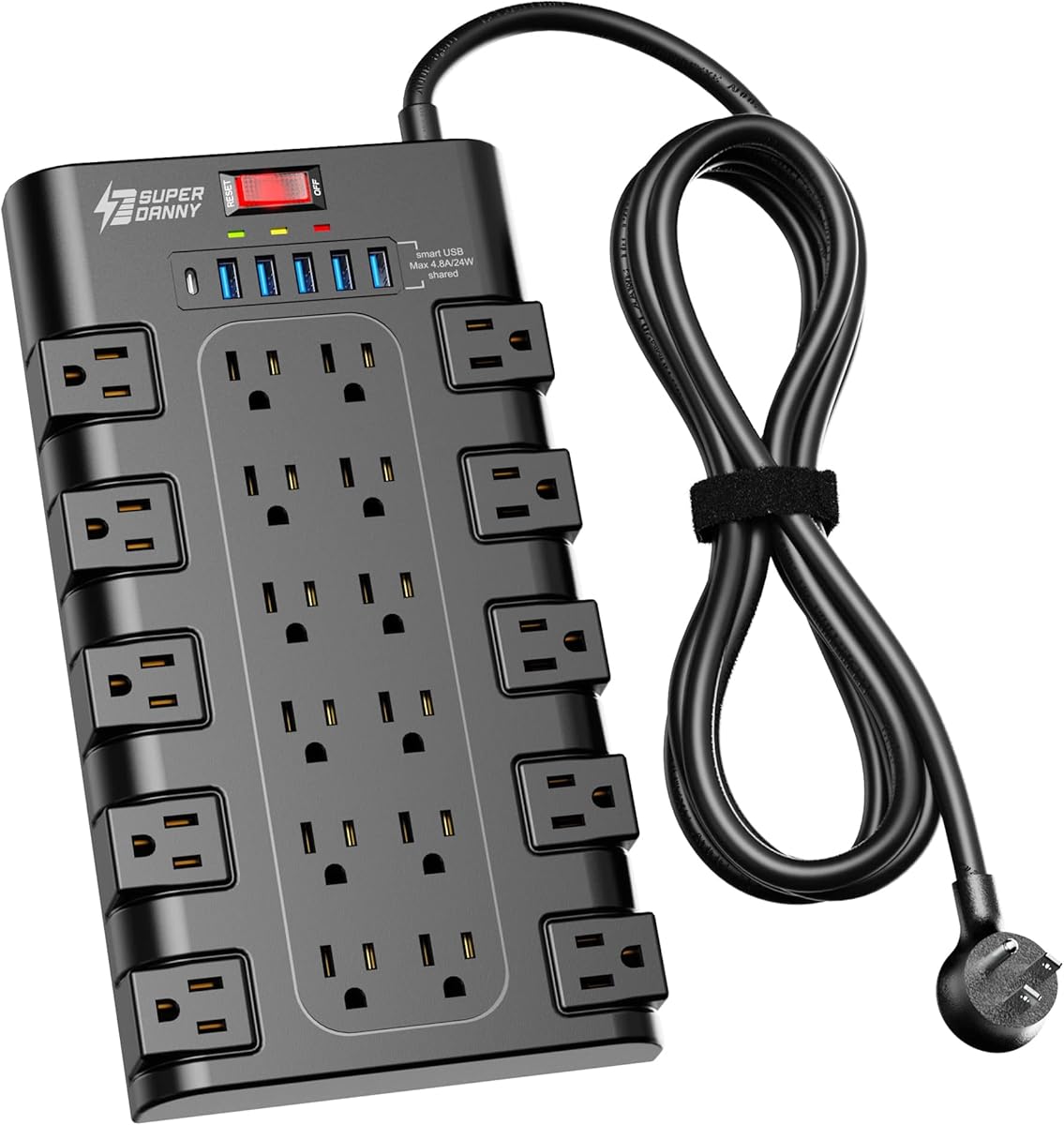
The SUPERDANNY 28-in-1 Power Strip is designed for a shared charging environment rather than a minimalist single-laptop desk. It has a 4.8 rating and an unusually large selection of 22 grounded three-prong outlets plus six USB ports, including one USB-C connection. That makes it a central power source for a gaming setup, media center, dorm, or busy office.
We may earn a commission when you buy through this link, at no additional cost to you.
The outlets are arranged in four rows with spacing designed to reduce conflicts between bulky plugs. The strip can handle many devices simultaneously, including a laptop, gaming computer, monitor, television, surround-sound equipment, tablet, phone, and lamps. The USB section includes five USB-A ports and one USB-C port, with the USB-C output listed up to 5V/3A.
A flat 45-degree plug helps preserve access to the wall receptacle, while four rear keyhole slots and included screws allow wall or furniture mounting. The six-and-a-half-foot cord provides practical reach. Eight-fold protection covers fire-retardant casing, surge, overload, grounding, short circuit, overcurrent, overvoltage, and overheating, backed by 2,100 joules of surge capacity and a 1,875W/15A rating.
The obvious trade-off is size. Twenty-two outlets and six USB ports create a larger unit that is unnecessary for a simple laptop workspace. The side outlets also cannot rotate, so some large plugs may still require careful placement. Even so, for a room where many people or devices need centralized power, this is one of the most capable options in the guide.
Twenty-two AC outlets and six USB ports make the strip a genuine shared charging station. It can replace several small adapters while keeping equipment connected to one wall receptacle.
Four mounting points help secure the large strip under a desk or on a wall. Its flat angled plug and medium-length cord make it easier to position around entertainment furniture.
We may earn a commission when you buy through this link, at no additional cost to you.
The 18-in-1 USB-C Power Strip combines twelve AC outlets with three USB-A and three USB-C charging ports, producing a versatile desktop charging solution. Its 4.7 rating reflects a generally favorable reception, and the 2,400-joule protection capacity gives it a middle ground between basic strips and higher-rated models.
We may earn a commission when you buy through this link, at no additional cost to you.
Its three-sided layout places six outlets on the front and six on the sides, allowing plugs to approach from different directions. The 1.7-inch spacing is designed to fit bulky laptop chargers, power bricks, and standard adapters without blocking nearby sockets. A 0.5-inch flat plug with a 45-degree angle sits close to the wall and can preserve access to the lower receptacle.
The USB section offers three USB-C and three USB-A connections, but the listed total output is 5V/3.1A for each group. That distinction matters when several devices charge simultaneously, because the output is shared rather than guaranteed at the maximum for every connected device. A resettable circuit breaker, master switch, protected light, and grounded light make operation easy to monitor.
This strip is a good match for a modern home office, dorm room, nightstand, or entertainment center. It offers more USB-C convenience than most alternatives while retaining twelve AC outlets and useful wide spacing. The six-foot cord may be limiting if the outlet is far from the desk, so measure the distance before ordering. For heavier-duty protection, one of the 4,000-joule models may be preferable.
Three USB-C ports support newer accessories without requiring a separate wall charger. The additional USB-A connections preserve compatibility with older cables and smaller devices.
Front and side outlets reduce the awkwardness of placing many plugs in one row. Generous spacing and a slim angled plug improve use in confined areas.
We may earn a commission when you buy through this link, at no additional cost to you.
The right laptop surge protector depends on device count, charger size, cord reach, protection needs, and the physical demands of your workspace. Reviewing these factors before shopping helps prevent an expensive mismatch, especially when comparing products with very different outlet layouts and USB capabilities.
Begin by counting every device that needs a direct AC connection. A basic laptop setup may require only three or four outlets, while a desk with several monitors, docking stations, speakers, lamps, printers, and charging bricks can benefit from eight, twelve, or more. The physical layout matters almost as much as the number. Three-sided or rotating outlets are easier to use when every socket is occupied, while widely spaced conventional outlets reduce conflicts with oversized adapters.
Joule ratings indicate the amount of transient energy a surge protector is designed to absorb. A higher figure generally indicates greater capacity before protective components are exhausted. For a laptop and associated electronics, products in this guide range from 1,080 to 4,320 joules. Larger or more sensitive setups benefit from higher figures, particularly when the strip also powers monitors, entertainment equipment, or other costly devices. The joule figure is only one part of safety and should be considered alongside circuit protection, temperature controls, and certification.
Integrated USB ports can reduce the number of separate wall chargers required for phones, tablets, watches, and other accessories. USB-C is particularly useful for modern devices, but output specifications need careful attention. Some models provide up to 5V/3A on an individual USB-C port, while others share total output across multiple ports. A laptop requiring USB-C Power Delivery above the stated output should be powered through its compatible AC adapter rather than an underpowered USB connection. Check both port type and available output before choosing.
A long cord gives the laptop desk more freedom from the wall outlet, but a very long cable can create clutter if it is not routed carefully. Five- and six-foot cords suit compact desks, while eight- and ten-foot options accommodate furniture placed farther away. Flat cords slide behind desks and under rugs more easily, whereas braided cords may be easier to handle in visible areas. Measure the intended route, including desk depth, wall distance, and the space required to bend the plug.
A flat, angled plug can make a crowded wall receptacle much easier to use. The 45-degree orientation may leave the lower outlet available for another device, while the low-profile body can sit behind a desk, sofa, bed, or cabinet. The plug should also be compatible with the wall outlet used in the intended location. Compact plugs are particularly useful in dorm rooms and hotel workspaces, although the wall itself must be properly grounded.
UL or ETL certification provides evidence that a product or its major components have been independently evaluated against recognized safety standards. Certification should be considered alongside overload protection, resettable breakers, flame-retardant housing, and thermal safeguards. Indicator lights are helpful because they allow a user to check whether the strip is powered, grounded, or still in a protected state without troubleshooting every connection. A master switch can also reduce the inconvenience of unplugging each device separately.
A power strip that can be mounted under a desk or against furniture often remains more usable than one left in a traffic area. Keyhole slots or screw mounting points prevent accidental movement, while an angled wall plug and rotating outlets improve access. A tower form can save desk width, although a very large multi-outlet strip may require dedicated mounting. Consider where chargers and cords will remain during work sessions rather than focusing only on the total outlet count.
The best design for a minimal laptop desk may be an eight-outlet strip with a few USB ports, while a media center or shared office benefits from twenty or more AC connections. Evaluate the largest charger, the number of external displays, whether older telephone or coax lines are present, and how much room is available. Avoid paying for an oversized unit if it creates a new obstacle, and avoid an undersized one that forces you to retain multiple extension cords.
Begin by confirming that the wall outlet is in good condition, properly grounded, and located where the extension cord can be routed without becoming a trip hazard. Connect the strip, then check its protected and grounded indicators before attaching equipment. If an indicator shows a fault, unplug the strip and investigate the outlet or connected load rather than continuing to use it.
Arrange laptop chargers, monitor adapters, and USB devices so that large plugs do not block the outlets needed most often. Use the master switch for brief shutdowns when appropriate, and avoid repeatedly plugging in or unplugging USB devices unless necessary because a brief interruption may occur during power negotiation. Keep the strip uncovered, away from liquids, and out of confined spaces where heat cannot dissipate.
Inspect the cord and plugs periodically for damage, discoloration, loose connections, or unusual heat. Do not use a strip whose rating has been exceeded, and do not daisy-chain power strips unless the manufacturer expressly permits it. Replace the unit if a breaker repeatedly trips, protective components appear damaged, or the housing becomes cracked. For long-lived installations, review the warranty and connected-equipment coverage terms as well.
A surge protector is useful because a laptop charger, monitor, and external storage can all be exposed to electrical spikes or fluctuations entering through wall outlets. It does not protect against every electrical problem, and it cannot replace proper grounding or sound household wiring. Even if the laptop has internal protection, a certified power strip can add a layer of protection and make cable management easier.
There is no single requirement for every setup, but a higher rating is generally preferable when the strip powers multiple sensitive or expensive devices. Products in this guide range from 1,080 to 4,320 joules. Consider the joule figure together with overload protection, grounding, thermal safeguards, short-circuit protection, and recognized safety certification rather than relying on a single number.
Only if the laptop's charging requirements are supported by the strip's USB-C output. Many charging strips provide up to 5V/3A, while some modern laptops require higher USB-C Power Delivery voltages or wattages. Check the laptop's manual and the port specifications carefully. If compatibility is uncertain, use the laptop's original AC adapter and reserve the strip's USB ports for smaller accessories.
A flat angled plug is especially helpful when the outlet is behind furniture or another plug occupies the lower receptacle. Its low-profile design can sit close to the wall and avoid forcing the cord sharply backward. In a less confined location, a conventional plug may be perfectly adequate, so the deciding factors are available clearance, wall orientation, and the design of the plugs already in use.
Choose the shortest length that comfortably reaches the intended wall outlet without stretching or creating a trip hazard. Five or six feet is often enough for a desk near the wall, while eight or ten feet provides more furniture placement flexibility. Very long cords may need careful routing, particularly where they cross walkways or pass through doorways.
Many models include keyhole slots, screw holes, or dedicated mounting accessories that make under-desk installation practical. Confirm that the product is designed for mounting, use the supplied hardware, and avoid trapping the cord where it can be pinched. A mounted strip should still have ventilation and should not be covered by fabric, paper, or other heat-insulating material.
Some multi-port charging strips share available power among connected devices and perform power negotiation when a device is attached or removed. That negotiation can briefly interrupt another port. The HANYCONY product description explicitly notes this behavior. If uninterrupted charging is essential, choose a strip with independently specified outputs or use separate wall chargers.
No. Surge protection addresses transient electrical energy, while a power strip may also provide overload and thermal safeguards. A surge protector does not replace ventilation, safe battery practices, or proper charger use. If a laptop, charger, or strip becomes unusually hot, disconnect the equipment and have it evaluated rather than continuing operation.
The Nuetsa Flat Plug Power Strip is the Best Budget choice because it combines eight AC outlets, four USB ports, 2,700 joules of protection, ETL certification, and a strong 4.8 rating in a manageable format. The Belkin 12-Outlet Power Strip earns the Editor's Choice designation for its 4,156-joule protection, generous outlet count, ten-foot cord, and additional telephone and coax coverage. For premium flexibility, the Belkin Rotating-Outlet Power Strip offers the highest listed joule rating and adjustable sockets for large adapters.
For most laptop desks, prioritize the number and spacing of outlets, usable USB-C output, cord reach, and independent safety features. High joule ratings are most valuable when the strip protects several sensitive devices, while compact strips make more sense for a small workstation. Under-desk mounting, angled plugs, and a master switch can make a correctly sized model much easier to live with every day.
Ratings, specifications, warranty terms, and availability can change, so readers should confirm the current product listing before buying. Comparing the intended device load, charger requirements, and available space against the final specifications will help ensure that the selected surge protector remains convenient, safe, and appropriately equipped for the intended laptop setup.