
Epson EcoTank ET-15000
4.2Editor score
Refillable wide-format ink system
Printing copying scanning faxing
USB LAN and Wi-Fi connectivity
Compare ten A3 Printer models for print quality, speed, paper handling, connectivity, and office features in this expert buying guide to help you choose better.
An A3 printer is a versatile wide-format machine capable of handling documents, photographs, presentations, and artwork on paper up to 11 by 17 inches. A strong model combines accurate color, dependable paper feeding, useful connectivity, and enough speed for regular home-office or small-business work. The right choice depends heavily on how much you print and which functions you actually need.
This guide compares ten A3 printers across print resolution, maximum sheet size, ink or tank system, automatic duplexing, document handling, scanning, copying, faxing, displays, and network connectivity. It includes cartridge-based office models, refillable EcoTank and supertank options, and a Canon PIXMA model suited to AirPrint and cloud workflows. The goal is to clarify the practical differences rather than simply rank specifications.
Each review identifies the feature that gives the model its main appeal, along with compromises worth considering. The selections show that the most capable A3 printer is not automatically the most appropriate one: a large paper capacity may matter more than a touchscreen, while a cartridge model may suit buyers who value simple replenishment over bulk ink. Product details and availability can change, so confirm the current specifications before purchasing.
4.2Editor score

4.0Editor score

4.2Editor score
The table below places all ten A3 printers side by side, emphasizing maximum paper size, document-handling features, ink approach, and connectivity. It makes it easier to distinguish print-focused models from multifunction office machines before evaluating deeper details in the individual reviews.




The Epson EcoTank Photo ET-8550 is the most photo-oriented model in this group, combining 13-by-19-inch output with Epson's six-color Claria ET Premium ink system. Its 4.0 rating reflects a machine aimed particularly at buyers who want polished photographs, graphics, and creative projects without relying on disposable ink cartridges. The high-accuracy printhead and six inks also make it more versatile for color-critical work than a basic four-color office printer.
We may earn a commission when you buy through this link, at no additional cost to you.
Its main attraction is the cartridge-free EcoTank design. Epson states that the included ink can support up to two years of printing under its cited usage assumptions, while replacement sets are designed to reduce cartridge waste. The printer can produce 4-by-6-inch photos for approximately four cents each according to the supplied product information, although real results depend on the images, settings, and paper selected. It also offers wireless connectivity and combines printing, scanning, and copying in one body.
The trade-off is that the ET-8550 is a creative inkjet rather than a document-processing specialist. There is no automatic document feeder or fax function listed, and it is not positioned as a high-volume office machine. You also need to maintain refillable ink tanks and choose ink and paper carefully if consistent photographic output is your priority. Those limitations are reasonable for designers, educators, photographers, and home users who value color quality more than automated paper feeding.
Buy the ET-8550 if your main goal is large, colorful, lab-style output or creative projects on 13-by-19-inch media. It is particularly compelling for mixed workloads that include sharp documents, family photographs, charts, and posters. If you routinely process multi-page document stacks or need sending and receiving by fax, one of the office-focused all-in-one models would be a more practical purchase.
The six-color Claria ET Premium configuration separates tones that a conventional four-color system may combine, supporting smoother gradients and more nuanced skin tones. That extra color flexibility makes the ET-8550 well suited to photography and detailed creative work.
Refillable tanks can reduce the frequency of consumable changes and keep ink on hand for occasional creative projects. Epson also cites reduced cartridge waste as a benefit of the EcoTank approach, although proper storage and regular use remain important.
We may earn a commission when you buy through this link, at no additional cost to you.
The Epson WorkForce Pro WF-7820 is a 3.7-rated wide-format all-in-one built for offices that regularly print, copy, scan, and fax. Its maximum sheet size is 13 by 19 inches, and it combines automatic duplexing with a 50-sheet automatic document feeder. Those details make it more suitable for recurring document workflows than the ET-8550, particularly when users need to handle multipage reports without feeding every sheet manually.
We may earn a commission when you buy through this link, at no additional cost to you.
Performance comes from Epson's PrecisionCore Heat-Free Technology, which is rated at up to 25 black pages and 12 color pages per minute in ISO terms. DURABrite Ultra instant-dry pigment inks are designed for sharp text and professional-looking color, while a 250-sheet paper capacity reduces interruptions during medium and large jobs. The 4.3-inch color touchscreen provides direct access to settings and is complemented by the Epson Smart Panel app for mobile control.
Connectivity is particularly flexible for a business-oriented printer. It supports built-in wireless, Wi-Fi Direct, Bluetooth Low Energy-assisted setup, and Ethernet networking. The machine also includes security features such as secure wireless and Secure Data Erase. A significant caveat is Epson's statement that its printing system is designed exclusively with Epson Genuine Cartridges; using non-genuine ink may cause damage that is not covered by the limited warranty.
The WF-7820 is best for buyers who need a true office multifunction and occasionally produce wide-format documents. Its 250-sheet tray is less generous than the 500-sheet arrangements of some competitors, and the 3.7 rating suggests that real-world experiences may vary. It remains a practical choice when duplexing, faxing, Ethernet, and a larger touchscreen are more important than the highest rating in the group.
Automatic two-sided printing, copying, and scanning can reduce paper consumption and shorten everyday office tasks. The 50-sheet ADF is particularly useful for recurring reports, contracts, and multi-page records.
Built-in wireless, Wi-Fi Direct, and Ethernet make it easier to place the printer in different work areas. A 4.3-inch color touchscreen gives staff a straightforward way to select common functions without navigating a computer.
We may earn a commission when you buy through this link, at no additional cost to you.
The Epson WorkForce Pro WF-7310 combines 13-by-19-inch output with a generous 500-sheet paper capacity, making it one of the strongest choices for sustained wide-format office printing. Its 3.8 rating places it in the middle of the group, but the hardware configuration is attractive for users who print large batches. Two 250-sheet trays and a rear feed give it more flexibility than many competitors with a single main cassette.
We may earn a commission when you buy through this link, at no additional cost to you.
The WF-7310 uses PrecisionCore Heat-Free Technology, with listed speeds up to 25 black and 12 color pages per minute. Heat-free operation also means no routine warmup time and lower stated energy consumption. DURABrite Ultra instant-dry pigment inks are intended to produce sharp text and vivid color, making the machine suitable for reports, proposals, drawings, and presentation materials rather than photographs alone.
Its navigation is simpler than that of premium office models. A 2.4-inch color display handles basic setup and control, while the Epson Smart Panel app provides wireless setup and management from a compatible smart device. Wi-Fi 5 and Wi-Fi Direct support flexible connections, but Ethernet is not listed among the connections. Epson also notes that the printer is designed for Genuine Cartridges, and third-party ink could cause damage not covered by the limited warranty.
Choose the WF-7310 when uninterrupted, high-volume wide-format printing is the priority and you do not need a large touchscreen or advanced document feeder. The 500-sheet capacity is a major practical advantage for offices that repeatedly print large presentations or technical documents. It is less suitable for users who spend most of their time scanning lengthy paper records or faxing from a shared workspace.
The dual 250-sheet trays and additional rear feed reduce the need to refill media during long projects. This makes the WF-7310 especially useful for offices producing batches of 13-by-19-inch pages.
PrecisionCore Heat-Free Technology supports quick first-page output and removes the routine warmup cycle associated with some inkjets. That can be valuable in busy offices where short jobs arrive throughout the day.
We may earn a commission when you buy through this link, at no additional cost to you.
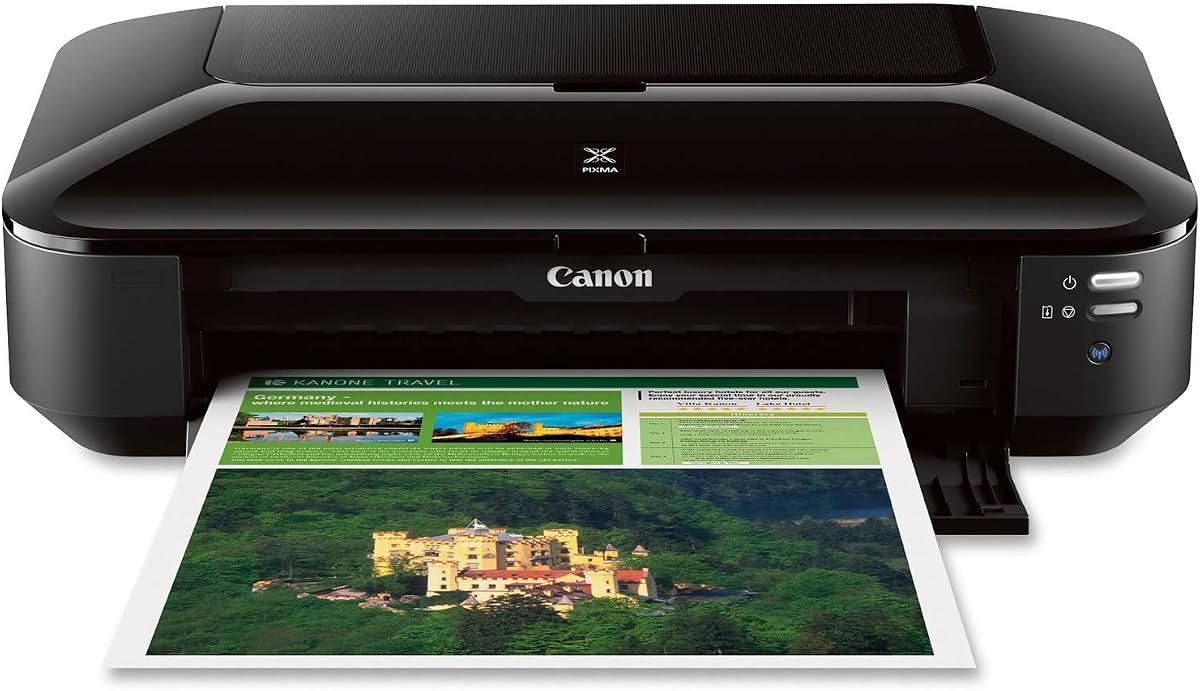
The Canon PIXMA iX6820 is a wireless business printer rated 4.1, giving it one of the stronger user ratings among the Epson office models in this comparison. It supports sheets up to 13 by 19 inches and uses five individual ink tanks, giving buyers more control over individual color replenishment. Its maximum resolution of 9600 by 2400 dots per inch is also among the most detailed figures listed in the group.
We may earn a commission when you buy through this link, at no additional cost to you.
Mobile and cloud workflows are central to the iX6820's appeal. It supports AirPrint, Google Cloud Print, and Pixma Printing Solutions, allowing compatible devices and cloud services to send documents more conveniently. The 150-sheet automatic feeder is useful for moderate workloads, while the printhead uses full photolithography inkjet nozzle engineering and lists 4,096 color nozzles plus 1,024 black nozzles.
The main limitations concern office automation and compatibility. Automatic duplexing is not identified in the supplied specifications, so buyers needing unattended two-sided output should confirm the current configuration. The listed operating-system support includes older Windows versions and Mac OS X releases, meaning buyers should check whether their current device is fully supported. It is also a printer-focused model rather than a complete scanning, copying, and faxing workstation.
The PIXMA iX6820 makes sense for users who want a straightforward wide-format inkjet with flexible mobile printing, individual ink tanks, and strong resolution. It is a good match for creative offices, small businesses, and home users who prioritize wireless access over automated duplexing. For a shared office that copies and faxes frequently, an all-in-one model with an automatic document feeder would be more capable.
AirPrint and Google Cloud Print support reduce the need to install a full desktop driver for many common devices. Canon Printing Solutions adds another route for managing compatible output from the office network.
The listed 9600-by-2400 maximum resolution and separate color tanks make the iX6820 appropriate for images and documents that benefit from detailed rendering. Media selection will still influence the final appearance of photographs.
We may earn a commission when you buy through this link, at no additional cost to you.
The Epson EcoTank ET-15000 combines wide-format printing with copying, scanning, and faxing in a refillable supertank design. Its 4.2 rating is tied for the highest in this comparison, and the machine's ability to handle all four core office functions gives it broad practical value. It is especially attractive to buyers who want to reduce cartridge consumption without giving up a full multifunction office workflow.
We may earn a commission when you buy through this link, at no additional cost to you.
The supplied specifications list a maximum resolution of 4800 by 2400 dpi, color output up to nine pages per minute, and black output up to 17 pages per minute. Its stated monthly duty cycle is 33,000 pages, indicating that it is designed to handle more serious office work than a basic home printer. USB 2.0, Ethernet LAN, and Wi-Fi provide both direct and network connections, which is useful for shared workplaces.
One notable omission is the absence of an automatic document feeder in the supplied information. That means routine copying and scanning may require more manual page placement than on the WF-7820, WF-7840, or several HP and Brother models. The ET-15000 also lacks the larger sheet maximum advertised by some 13-by-19-inch competitors, and its listed speed is lower than the fastest Epson and HP office printers here.
The ET-15000 is a compelling premium choice for a high-volume office that values refillable ink, Ethernet, and a complete set of multifunction features. It is less suitable for a busy mailroom that depends on automated feeding or duplex document scanning. For those needs, the Brother INKvestment 6960 or one of the duplex-focused Epson WorkForce Pro models may offer a more suitable balance.
The supertank format is intended for users who print frequently enough to value keeping reservoirs filled rather than replacing compact cartridges. Its stated 33,000-page monthly duty cycle also signals suitability for sustained office use.
Printing, copying, scanning, and faxing are all included, reducing the need for separate office devices. USB, LAN, and Wi-Fi broaden compatibility with both direct and shared-network setups.
We may earn a commission when you buy through this link, at no additional cost to you.
The Epson WorkForce Pro WF-7840 is a 3.9-rated wide-format all-in-one designed to handle print, copy, scan, and fax jobs up to 13 by 19 inches. Its major distinguishing feature is a 500-sheet paper capacity, a useful advantage for offices producing large presentation packets, technical drawings, or batches of reports. PrecisionCore Heat-Free technology supports fast output without a conventional warmup cycle.
We may earn a commission when you buy through this link, at no additional cost to you.
DURABrite Ultra ink dries quickly to support smudge-resistant results, and Epson positions this model for professional-quality prints. It provides 802.11a/b/g/n/ac wireless connectivity, along with support for Epson Connect, Epson Email Print, Epson Remote Print, the Smart Panel app, iPrint, and Creative Print. Apple AirPrint, Android printing, and Mopria Print Service expand the options for direct mobile and network output.
The supplied information does not identify an automatic document feeder, duplex function, touchscreen, or Ethernet connection, which separates it from more fully equipped office competitors. Those omissions matter if you routinely scan contracts, copy bound materials, or manage several pages at once. Its stated strengths are faster printing, wide media support, and generous paper capacity rather than advanced automated document handling.
The WF-7840 is a good fit for a graphics-heavy or presentation-focused office that prints a lot but does not require extensive copying. It offers the flexibility of Epson's apps and compatibility with major mobile printing systems. Buyers with intensive document workflows should compare it directly with the WF-7820, Brother INKvestment 6960, and HP OfficeJet Pro models that explicitly include a duplex ADF.
A 500-sheet capacity is a meaningful advantage for high-volume users who want to keep a large stock of wide-format media loaded. The arrangement reduces interruptions during multipage or multiple-copy projects.
AirPrint, Android printing, Mopria, and Epson's own apps provide several routes for remote jobs. This makes the printer adaptable to mixed device fleets and employees who work away from a fixed desk.
We may earn a commission when you buy through this link, at no additional cost to you.
The HP OfficeJet Pro 9135 is a 4.0-rated all-in-one for offices that need fast color documents and capable automated document handling. Listed print speeds reach 25 pages per minute in black and 20 pages per minute in color, placing it among the quickest models in this comparison. It supports presentations, brochures, flyers, and other professional-looking office materials through print, copy, fax, automatic duplexing, and an automatic document feeder.
We may earn a commission when you buy through this link, at no additional cost to you.
The ADF is designed for single-pass two-sided scanning, helping reduce the handling required to digitize two-sided documents. Two 250-sheet input trays provide 500 sheets of combined paper capacity. A large 4.3-inch color touchscreen offers phone-like navigation, while dual-band Wi-Fi is intended to identify and resolve network issues more reliably. The HP app supports printing, scanning, copying, and faxing from a smartphone.
HP AI is included to format web pages and emails, remove unwanted content, and avoid awkward layouts or wasted pages. HP Wolf Pro Security adds network protection, and the enclosure contains more than 40% recycled plastic. Two cautions are important: the printer is intended to operate with cartridges containing original HP chips or circuitry, and the included Instant Ink trial converts to a monthly service after three months unless canceled. Neither issue is unusual, but both deserve review before adoption.
The OfficeJet Pro 9135 is our Editor's Choice because it combines speed, a useful touchscreen, a duplex ADF, and a substantial 500-sheet paper arrangement in one package. It is a strong all-around option for a busy office that produces a mixture of color documents and spreadsheets. The Instant Ink arrangement may suit existing subscribers, while users who avoid subscriptions should verify the cartridge workflow and ongoing consumable approach.
The ADF is built to scan both sides of a document in one pass, saving time and reducing the number of times pages must be moved through the feeder. This is especially useful for contracts, records, and lengthy reports.
HP AI is designed to remove unnecessary web and email elements so output uses pages more efficiently. The feature can be particularly handy when sending web content to the wide-format printer without extensive manual cleanup.
We may earn a commission when you buy through this link, at no additional cost to you.
The Brother INKvestment 6960 is a 4.2-rated all-in-one that delivers the essential features of a small-business A3 printer without moving beyond 11 by 17 inches. It prints, copies, scans, and faxes, and its standout configuration includes a 50-page single-pass duplex ADF, automatic duplex printing up to 11 by 17 inches, and a 3.5-inch color touchscreen. This balance makes it a particularly useful value-oriented office choice.
We may earn a commission when you buy through this link, at no additional cost to you.
Its listed speed reaches 31 pages per minute in black and 30 pages per minute in color, giving it strong throughput for A3 work. The main capacity totals 500 sheets across two trays, with an additional 100-sheet multipurpose tray for unusual media. MAXIDRIVE technology supports fast output, while the PerfectPrint Auto Detection System is intended to promote consistent print quality across different jobs.
Connectivity is broad for the category. It supports wireless networking, Ethernet, USB, and Wi-Fi Direct, allowing direct printing even without an external network. The Brother Mobile Connect app handles printing, copying, scanning, and device management from a phone. Cloud destinations include Google Drive, Dropbox, Box, OneDrive, and other supported services, all accessible through the touchscreen. Brother recommends its Genuine LC506 ink, and the package includes a high-yield black cartridge and color cartridges.
Choose the Brother INKvestment 6960 if 11-by-17-inch output, fast printing, and automated document handling matter more than maximum sheet dimensions. It is an excellent fit for small offices handling proposals, spreadsheets, calendars, and multi-page records. The 13-by-19-inch Epson models offer a larger canvas, but this Brother reduces complexity while preserving the paper handling and connectivity that busy teams often need.
The 50-page single-pass duplex ADF, automatic duplex printing, and 500-sheet combined capacity cover the essential document workflow of a small business. A 3.5-inch color touchscreen makes those functions accessible without a computer.
Listed speeds of 31 black pages and 30 color pages per minute make the MFC-J6960DW responsive for A3 jobs. The multipurpose tray adds flexibility for media that is not normally kept in the main cassettes.
We may earn a commission when you buy through this link, at no additional cost to you.
The Epson WorkForce WF-7710 carries the highest customer rating in this comparison at 4.3, making it a noteworthy choice for buyers who value broad multifunction capability and flexible connectivity. It prints, scans, copies, and faxes, while supporting borderless output as large as 13 by 19 inches. That combination gives it considerable flexibility for photographs, posters, reports, and routine office documents.
We may earn a commission when you buy through this link, at no additional cost to you.
Automatic two-sided printing is rated at 8.7 pages per minute in black and six pages per minute in color. The 250-sheet main tray can also hold up to 20 sheets of photo paper or 10 envelopes, so it is not limited to plain office media. Wi-Fi Direct and Ethernet are both included, allowing direct wireless use and a stable wired connection on a shared office network.
As with the WF-7820, Epson states that the printing system is designed for Genuine Cartridges and that non-genuine ink could cause damage not covered by the limited warranty. The 250-sheet capacity is also lower than the 500-sheet configurations offered by the WF-7310, WF-7840, HP OfficeJet Pro 9135, and Brother INKvestment 6960. No automatic document feeder is identified in the supplied data, which limits unattended scanning and copying.
The WF-7710 is worth considering when a 4.3 rating, large print dimensions, borderless capability, and flexible network connections are the priority. It suits a home office or creative business that needs reliable large-format output and occasional document services without selecting the most complex feeder-equipped model. For high-volume document processing, a model with a duplex ADF would be more efficient.
Support for borderless 13-by-19-inch prints broadens the model's use beyond standard reports. It can produce presentation boards, oversized images, and wide-format graphics with the surrounding margin removed.
Wi-Fi Direct is useful for a private connection without an external network, while Ethernet offers a stable shared-workgroup option. Supporting both makes the printer adaptable to different office layouts.
We may earn a commission when you buy through this link, at no additional cost to you.
The HP OfficeJet Pro 9730 is a 3.9-rated wide-format office all-in-one with a distinctive emphasis on color. It prints, scans, copies, and faxes on 11-by-17-inch media, and HP describes its P3 support as providing a wider color gamut than sRGB. That makes it a compelling option for floorplans, mood boards, spreadsheets, and other visual documents where screen-to-print color consistency matters.
We may earn a commission when you buy through this link, at no additional cost to you.
Document handling is well developed. The automatic document feeder supports single-pass two-sided scanning, and the machine offers automatic duplex printing. Two 250-sheet input trays provide 500 sheets of total capacity. A 4.3-inch color touchscreen provides phone-like navigation, while listed print speeds reach 22 pages per minute in black and 18 pages per minute in color.
Wireless access includes dual-band Wi-Fi and the HP app for mobile printing, scanning, copying, and faxing. HP AI can format websites and emails to reduce unwanted content and wasted pages, and HP Wolf Pro Security supports network protection. The enclosure contains more than 30% recycled plastic. Buyers should note the included three-month Instant Ink trial and its monthly service after that period unless canceled, along with HP's cartridge-chip and circuitry restrictions.
The OfficeJet Pro 9730 is a strong choice for a small creative or service office that values color range, automated duplexing, and a large touchscreen within an 11-by-17-inch format. It is less suitable if you routinely need 13-by-19-inch sheets; the Epson EcoTank Photo ET-8550 and several WorkForce Pro models provide that larger maximum. For users already comfortable with HP's ink service, however, its document features and P3 color make it particularly compelling.
The P3 color support is designed to produce a wider range than standard sRGB output. It can benefit visual projects such as mood boards, presentations, and floorplans where richer color reproduction is important.
Single-pass two-sided ADF scanning and automatic duplex printing streamline recurring document jobs. Two large input trays help support the machine's office positioning and reduce media changes.
We may earn a commission when you buy through this link, at no additional cost to you.
Choosing an A3 printer means balancing paper size, ink system, output quality, speed, document handling, and connectivity. Begin with the work you actually perform, then consider which specifications will save the most time and reduce interruptions in your particular home or office.
A3 is commonly represented in printer specifications as 11 by 17 inches, but many models can also print on 13 by 19-inch sheets. The Epson EcoTank Photo ET-8550, WF-7820, WF-7310, WF-7840, and WF-7710 support the larger 13-by-19-inch maximum, while the Brother INKvestment 6960, HP OfficeJet Pro 9135, and HP OfficeJet Pro 9730 top out at 11 by 17 inches. The Canon PIXMA iX6820 also offers 13-by-19-inch output. Confirm both the maximum sheet size and borderless capability if posters, photographs, or artwork are central to your plans.
Cartridge-based models such as the Epson WorkForce Pro series, Brother INKvestment 6960, and HP OfficeJet Pro printers are straightforward to replenish and may suit intermittent users. Refillable systems such as the Epson EcoTank Photo ET-8550 and EcoTank ET-15000 are more relevant to heavy print volumes because reservoirs can hold larger quantities of ink. Canon PIXMA iX6820 uses five individual ink tanks, giving buyers a middle approach between conventional cartridges and a large supertank system.
Printing alone may not meet the needs of a busy office. The Epson WF-7820 has a 50-sheet ADF, the Brother INKvestment 6960 has a 50-page single-pass duplex ADF, and both HP OfficeJet Pro models support single-pass two-sided scanning. Automatic duplex printing appears in the specifications for these office models. By contrast, no automatic document feeder is identified for the ET-8550, ET-15000, WF-7840, WF-7710, or PIXMA iX6820. These details determine how efficiently contracts, invoices, and multi-page reports can be copied or digitized.
Listed speed can indicate how well a printer will fit into a busy workflow. The Brother INKvestment 6960 is listed at up to 31 black and 30 color pages per minute, while the HP OfficeJet Pro 9135 reaches 25 black and 20 color pages per minute. The Epson WF-7310 and WF-7820 list up to 25 black and 12 color pages per minute. The ET-15000 lists 17 black and nine color pages per minute and has a stated monthly duty cycle of 33,000 pages. Consider both speed and recommended duty cycle, since fast first-page output and steady performance differ.
Paper handling determines how often a printer needs attention. The Epson WF-7310, WF-7840, HP OfficeJet Pro 9135, and Brother INKvestment 6960 offer a combined 500-sheet capacity, while the Brother also includes a 100-sheet multipurpose tray. The Canon PIXMA iX6820 has a 150-sheet automatic feeder, and the Epson WF-7820 and WF-7710 use a 250-sheet tray. Media versatility also matters: the WF-7710 can hold photo paper and envelopes, and the Brother's multipurpose tray supports specialized sheet sizes.
All ten models support wireless printing, but their networking options differ. Wi-Fi Direct appears across many of the Epson, Brother, and HP models, allowing direct use without an external network. The Epson ET-15000, WF-7710, and Brother INKvestment 6960 include Ethernet for wired office placement. The HP OfficeJet Pro 9135 and 9730 use dual-band Wi-Fi, while the Canon PIXMA iX6820 supports AirPrint and Google Cloud Print. App support ranges from Epson Smart Panel and Brother Mobile Connect to the HP app, with several models also supporting Apple AirPrint, Android printing, or Mopria.
The ET-8550 uses six Claria ET Premium inks, making it the most photo-focused choice and a strong option for gradients, skin tones, and detailed color. The HP OfficeJet Pro 9730 supports P3 color for a wider gamut than sRGB. Office-focused Epson models use DURABrite Ultra instant-dry pigment inks for sharp text and vivid color. The PIXMA iX6820 lists a maximum resolution of 9600 by 2400 dpi. Resolution alone does not determine the final result; ink, paper, driver settings, and the source file all influence printed quality.
Epson states that several WorkForce Pro models are designed exclusively for Epson Genuine Cartridges, and warns that non-genuine ink may cause damage not covered by its limited warranty. Brother recommends Genuine LC506 ink. Both HP OfficeJet Pro products include a three-month Instant Ink trial, after which a monthly service applies unless canceled. The HP models also use cartridge-chip and circuitry restrictions. Review these operating conditions before purchase, especially if you currently use another ink brand or prefer a subscription-free workflow.
Begin by unboxing the printer on a stable surface with enough clearance for its paper trays, rear feed, and output area. Remove all packing material, install the supplied ink or cartridges according to the manufacturer's instructions, and load the appropriate paper. Large media sizes require a flat, level location, so avoid placing the unit where cabinet edges could interfere with a wide tray or sheet as it feeds.
Complete the network setup before beginning regular work. Use the touchscreen, Epson Smart Panel, Brother Mobile Connect, Canon Printing Solutions, or HP app as appropriate to connect the printer to the intended Wi-Fi network. Ethernet is another option on selected models. Print a short test page and a small image in the intended media size to confirm alignment, color, and duplex behavior before committing to a long project.
For routine care, use the manufacturer-approved ink and clean the printhead, rollers, and scanner glass according to the manual. Keep paper in a dry environment, avoid touching sensitive photo or film surfaces, and feed one sheet at a time when the printer instructs you to do so. For a blockage, consult the printer's cleaning cycle before using a manual tool, and contact support if the problem persists.
Not always. A3 paper is 297 by 420 millimeters, while 11 by 17 inches is a closely related format used by many North American printers. Some models use A3 as their standard wide format, while the Epson models in this guide can reach 13 by 19 inches. Check the maximum sheet size before ordering large paper.
It depends on the dimensions and volume of your work. A3 output is useful for wide spreadsheets, floorplans, posters, photographs, and multi-column layouts. If most of your files are standard letter pages and you rarely print large media, a smaller multifunction printer may offer a more compact footprint and simpler operation.
It depends on usage. Refillable systems can be more practical for frequent printing because they hold larger quantities and reduce the need for frequent cartridge changes. Cartridges may be easier for occasional users, and individual tanks can still offer control over which colors are replenished. The best choice reflects your volume, storage space, and preferred maintenance routine.
Automatic duplex printing produces two-sided pages without manually turning the sheet. A duplex ADF is different: it automatically feeds a stack of pages into the scanner and processes both sides in one pass. A printer can support one without the other, so check both features separately if your office scans or copies multi-page documents.
Many can, but maximum sheet size and ink configuration determine the best result. The Epson EcoTank Photo ET-8550 uses six inks and supports 13-by-19-inch output, making it especially suitable for creative work. The Epson WF-7710 also supports borderless wide-format printing, while the HP OfficeJet Pro 9730 emphasizes P3 wide-gamut color.
Wi-Fi is useful for flexible placement and mobile printing, while Ethernet can provide a stable wired connection to a busy office network. Wi-Fi Direct allows direct wireless printing without an external network. The Epson ET-15000 and Brother INKvestment 6960 support both wired and wireless approaches, making them adaptable to different work environments.
Some models can, but not all. The ET-15000, WF-7820, WF-7840, WF-7710, Brother INKvestment 6960, and both HP OfficeJet Pro models include scanning and faxing. However, an automatic document feeder and automatic duplex scanning are not universal, so buyers who handle many paper records should verify those functions before relying on the printer as a complete document hub.
Allow space for the main output area, rear feed, paper trays, and room to open a manual or multipurpose tray. Models supporting 13-by-19-inch sheets need more clearance than those limited to 11 by 17 inches. A level, sturdy surface is also important because a large paper tray can place extra force on the frame while feeding.
The Epson EcoTank ET-15000 stands out as the premium pick for buyers who want refillable wide-format ink alongside printing, copying, scanning, and faxing. The HP OfficeJet Pro 9135 is the most complete office choice, combining fast output, a duplex ADF, a large touchscreen, and 500 sheets of capacity. For a value-focused small business, the Brother INKvestment 6960 delivers a balanced package with fast speed, cloud support, and serious document handling.
Prioritize the requirements that appear most often in your workflow. Creative users may need six inks, borderless output, or 13-by-19-inch media, while busy offices should focus on duplex ADFs, paper capacity, and network stability. Cartridge-based machines simplify occasional maintenance, while tank-based systems suit heavier output. Check operating-system compatibility, genuine-ink policies, subscription terms, and physical dimensions before finalizing a purchase.
Finally, confirm the current specifications, deal terms, and availability at the time of purchase. Printer configurations, bundled accessories, and service offers can change, and the supplied information may not capture every detail. Comparing the live listing with the requirements developed in this guide will help ensure that your chosen A3 printer remains suitable for your documents, media, and working environment.