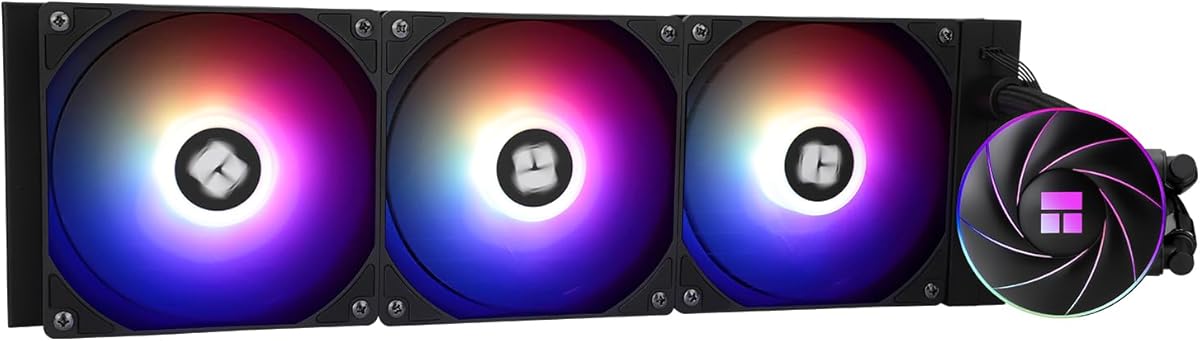
Thermalright Aqua Elite 360 ARGB
4.6Editor score
Three 120mm PWM fans
AM4 and AM5 support
Synchronized ARGB lighting
Compare the best Aio for Am4am5 liquid coolers, focusing on AM5 and AM4 support, radiator size, pump performance, lighting, displays, installation, and noise.
An all-in-one liquid cooler can help an AM4 or AM5 processor remain cool, quiet, and visually coordinated with the rest of a desktop. The right model depends on case clearance, socket hardware, preferred lighting, display functions, and the level of thermal headroom needed for sustained gaming or content creation.
This guide compares ten liquid coolers listed for AM4 and/or AM5 platforms, including compact 120mm and 240mm designs, full-size 360mm models, and options with ARGB lighting or an LCD screen. The comparison focuses on documented specifications, platform support, radiator size, pump behavior, fan features, and installation considerations.
The selections show why there is no single ideal AIO for every AM4 or AM5 build. Some models prioritize straightforward cooling, others add a customizable display, and several focus on polished RGB styling or quieter operation. Ratings and specifications can change, so confirm the current product listing and case dimensions before purchasing.
4.6Editor score

4.5Editor score

4.6Editor score
This side-by-side overview compares the included AIO coolers by radiator size, display or lighting features, fan configuration, and processor-socket support, helping AM4 and AM5 builders identify the most appropriate option for their case and priorities.


The ARCTIC Liquid Freezer III Pro 360 A-RGB is a 360mm liquid cooling solution with a 4.5 rating, making it a strong all-around choice for an AM4 or AM5 gaming system. Its most immediately interesting feature is native offset mounting, which shifts the cold plate toward the CPU hotspot to improve the transfer of heat into the coolant. That practical design is combined with ARGB fan lighting and a design aimed at reducing visible motherboard connections.
We may earn a commission when you buy through this link, at no additional cost to you.
The cooler uses ARCTIC's P12 PRO fan, which the manufacturer describes as more powerful and quieter than the earlier P12, particularly at low speeds. It also includes a PWM-controlled VRM fan intended to cool the processor's voltage converters, an addition that can be useful in a compact or densely packed build. Cable management is another strength: the radiator-fan PWM cables are routed inside the hose sheathing, leaving only a single visible cable connected to the motherboard.
Those benefits come with practical limitations. A 360mm radiator demands a case designed to accommodate it and sufficient clearance for the fan and radiator assembly. The product also does not include an LCD, so builders seeking a live status display will need to look elsewhere. As with any liquid cooler, correct mounting and a secure radiator installation remain essential, and the listed rating reflects the experiences of customers rather than an independent laboratory result.
This is an excellent recommendation for builders who want a full-size radiator, understated cable routing, and useful platform-focused cooling features without paying for a screen. It is particularly appealing for AM5 systems used for extended gaming or productivity sessions, provided the chosen case supports a 360mm radiator. Among the choices reviewed, it stands out as the most balanced option without relying on a display to provide its appeal.
Moving the cold plate toward the CPU hotspot gives the coolant a more direct path through the processor's hottest region. On AM4 and AM5 platforms, that can make the mounting design more effective than centering the contact area on an offset heat spreader, although the result still depends on the processor and case.
Routing the fan PWM wiring through the hose sheathing reduces the number of loose cables around the motherboard. The result is a tidier installation with fewer visible connections, particularly helpful in glass-sided cases where the internal layout is a major part of the build's appearance.
We may earn a commission when you buy through this link, at no additional cost to you.
The non-RGB ARCTIC Liquid Freezer III Pro 360 shares the core cooling architecture of the illuminated version while taking a more restrained approach to appearance. Its 4.3 rating makes it a credible choice for builders who want a full-size AIO and useful installation features without emphasizing decorative lighting. Native offset mounting, an integrated VRM fan, and clean cable routing form the core of its appeal.
We may earn a commission when you buy through this link, at no additional cost to you.
The radiator is paired with three 120mm P12 PRO fans, described as delivering greater power and quieter operation than the standard P12, especially at lower speeds. The integrated PWM-controlled VRM fan helps cool the voltage regulators around the CPU socket. Because the fan wiring is carried within the reinforced hose sheathing, the system requires fewer visible motherboard cables and presents a cleaner interior.
The main tradeoff is aesthetic rather than functional. This version does not add A-RGB illumination to the fans, so it will not coordinate with a brightly illuminated system unless other components provide the color. It also lacks a screen for temperature monitoring or custom graphics. The 360mm size still demands a compatible chassis, and buyers should plan the radiator orientation carefully so it does not interfere with rear exhaust airflow.
The ARCTIC Liquid Freezer III Pro 360 is best for a performance-focused AM4 or AM5 build where clean installation matters more than synchronized lighting. It is a particularly logical choice for restrained workstations, understated gaming systems, or builders who prefer to let the case, graphics card, and memory define the visual theme.
Removing the lighting does not change the documented 360mm format, offset mounting arrangement, or P12 PRO fan design. Builders who do not use RGB can therefore concentrate on the cooler's physical design and cable organization rather than paying for an illuminated version they might not use.
The dedicated PWM-controlled VRM fan targets the voltage converters surrounding the processor. While the processor remains the primary heat source, cooling this surrounding area can contribute to a more thoughtful thermal design in compact builds.
We may earn a commission when you buy through this link, at no additional cost to you.
The Thermalright Peerless Vision 360 ARGB is the feature-focused option in this guide, combining a 360mm radiator with a 3.95-inch magnetic IPS display. It carries a 4.6 rating and supports AM4 and AM5 as well as numerous Intel platforms. The screen is the defining feature, supporting video, animation, screen projection, system information, personalized images, and custom text through the supplied TRCC software.
We may earn a commission when you buy through this link, at no additional cost to you.
Its display uses a narrow bezel to create a more expansive appearance, while the magnetic pump head can be removed quickly. The screen operates at 480 by 480 resolution with a 60Hz refresh rate, and the IPS panel is described as offering stable viewing angles and accurate color reproduction. Cooling is handled by three TL-M12Q PWM fans with infinity-mirror side lighting, S-FDB bearings, and a listed maximum speed of 2000 rpm.
PWM temperature control allows the fans to respond automatically to processor temperature. Lighting uses the motherboard's 5V three-pin ARGB connection, and the fans connect through four-pin PWM. Compatibility is broad, covering AM4, AM5, and Intel LGA1150, 1151, 1155, 1156, 1200, 2011, 2066, 1700, and 1851. One important detail is that AMD installations require the original motherboard backplate, which is not included.
This cooler is ideal for a showcase build where the LCD is part of the appeal. It offers more visual functionality than a conventional ARGB pump head, and the magnetic screen design adds convenience. The trade-offs are additional setup requirements for custom content and the need to source or retain the correct AMD backplane. For a builder willing to manage those details, it delivers one of the most distinctive feature sets in this comparison.
The 3.95-inch IPS panel can present system parameters, custom text, static images, animations, and supported video. That makes it useful as a small focal point in a glass-sided case, especially when the system is configured to show a favorite image, gameplay, or animated theme.
Because the pump head is magnetically attached, it can be removed quickly when the user wants to change the display content or clean around the mounting area. This convenience does not remove the need to handle the component carefully, but it makes routine customization less involved.
We may earn a commission when you buy through this link, at no additional cost to you.
The MSI MAG Coreliquid A13 360 has the highest listed rating in this group at 4.7, combining a 360mm radiator, three 120mm ARGB PWM fans, and a pump that can operate at up to 3800 rpm. It supports both AM5 and AM4, making it a natural fit for modern AMD builds that want a substantial liquid cooler with coordinated lighting.
We may earn a commission when you buy through this link, at no additional cost to you.
The radiator uses a split-flow water-cooling arrangement with an integrated three-phase pump. MSI describes this configuration as improving durability and reducing motor resonance, while ceramic bearings help balance cooling performance and noise. The 390mm tubes use triple-layered neted plastic beneath reinforced mesh sheathing, an arrangement intended to keep water within the closed loop and resist evaporation.
The package is designed for straightforward fitting on AMD AM5 and AM4 and Intel LGA1700, with LGA1851 readiness as well. Thermal paste is included, which removes one potentially annoying preparation step. The main consideration is physical: a 360mm radiator restricts case choice, and the ARGB fans add another lighting element that must connect to a compatible five-volt three-pin header. There is no integrated display.
The A13 360 is an excellent recommendation for a high-power AM5 gaming or productivity build that values a fast pump, robust tubing, and established socket support. It is less suitable for compact cases or for users who want the screen-based customization found in the Peerless Vision. Within the simpler 360mm options, however, its high rating and pump specification make it stand out.
The pump's listed maximum speed of 3800 rpm gives it a strong performance specification for circulating coolant through a 360mm radiator. That capability is most relevant when the processor is expected to remain under sustained load or when the system contains other hot components.
The triple-layered internal tube structure and reinforced outer mesh are intended to protect the cooling loop from evaporation and mechanical wear. Properly installed and cared for, this design supports the long-term reliability expected from a sealed liquid-cooling system.
We may earn a commission when you buy through this link, at no additional cost to you.
The Thermalright Aqua Elite 240 V3 offers a useful middle ground between compact 120mm AIOs and large 360mm models. It has a 4.7 rating, uses a 240mm radiator, and includes two 120mm TL-C12B-S V2 PWM ARGB fans. The cooler supports AM4 and AM5, making it a flexible choice for AMD processors in cases that cannot fit a 360mm assembly.
We may earn a commission when you buy through this link, at no additional cost to you.
Its fourth-generation pump head is described as reaching up to 2800 rpm with a rated life of up to 40,000 hours. The pump includes an ARGB halo beneath the logo, while the fans can synchronize with motherboard lighting through a five-volt three-pin ARGB connection. The fan specification lists up to 1500 rpm, 66.17 CFM maximum airflow, noise of no more than 25.6 dBA, and PWM temperature control.
A 240mm radiator provides more surface area than a 120mm unit while remaining easier to position in a mid-tower or larger compact chassis. The trade-off is less thermal headroom than a 360mm model. There is also no LCD for live system information or custom graphics. Installation is supported by mounting accessories for a broad range of AMD and Intel sockets, and the provided guidance helps simplify platform-specific fitting.
The Aqua Elite 240 V3 is a strong recommendation for builders who want more cooling capacity than a 120mm cooler but do not need a 360mm radiator. It is particularly attractive for AM5 systems in smaller cases and for users who want ARGB lighting without adding a display. Its combination of compact dimensions, strong specifications, and a 4.7 rating makes it one of the most balanced selections here.
The 240mm format is often easier to accommodate than a 360mm radiator while still offering a meaningful increase in heat-dissipation area over a 120mm cooler. It gives builders a practical option when case dimensions, aesthetics, and processor demands need to be balanced.
The pump and dual fans use standard four-pin PWM and five-volt three-pin ARGB connections. Once linked to a compatible motherboard and its software, the lighting can be synchronized with other compatible components while fan speed responds automatically to CPU temperature.
We may earn a commission when you buy through this link, at no additional cost to you.
The NZXT Kraken Plus 360 combines a 360mm radiator with a compact square LCD, giving it the polished appearance associated with premium display-equipped coolers. Its 4.2 rating is the lowest in this list, but the available specifications show a deliberate focus on quiet cooling, convenient installation, and customizable monitoring for supported AMD and Intel platforms.
We may earn a commission when you buy through this link, at no additional cost to you.
NZXT's turbine pump is engineered for high flow and head pressure, which supports efficient heat transfer through the radiator. The bright 1.54-inch square display can show real-time system temperatures, animated GIFs, custom images, and integrations such as Spotify and YouTube through NZXT CAM. This gives it the same broad visual-purpose appeal as the larger Peerless Vision display, although with a smaller screen.
Quiet operation is supported by high-static-pressure fans and Zero RPM Mode, which stops the fans completely at low loads. Pre-applied thermal paste and a single breakout cable simplify installation and reduce motherboard clutter. Tool-free mounting brackets support recent AMD and Intel sockets, including AM5 and LGA1851, although buyers using AM4 should verify the included hardware and current listing details.
The Kraken Plus 360 is best suited to a polished gaming build where an LCD, recognizable software ecosystem, and quiet idle behavior are priorities. Its 360mm size still requires a compatible case, and users who do not need the display may find more value in a simpler model. For AM5 builders who want a refined screen experience and low-load silence, it remains a compelling premium option.
The LCD can move beyond a simple temperature readout by displaying custom images, animations, and supported web integrations. NZXT CAM provides a centralized way to configure the display, making this cooler especially appealing to users who enjoy personalizing the visible interior of their system.
Zero RPM Mode can stop the radiator fans when the system is not under enough load to require active airflow. This can reduce everyday acoustic output and make the cooler feel quieter during browsing, desktop work, or lightly threaded applications.
We may earn a commission when you buy through this link, at no additional cost to you.
The Thermalright Aqua Elite 120 V3 is the most compact radiator option in this guide, but it brings more features than a basic entry-level AIO might suggest. Its 4.6 rating is supported by a fourth-generation pump head, an aluminum cold plate, protected mesh tubing, and a pair of TL-C12B-S V2 ARGB PWM fans. It supports both AM4 and AM5, as well as a broad selection of Intel sockets.
We may earn a commission when you buy through this link, at no additional cost to you.
Despite the 120mm radiator size, the listed configuration includes two 120mm fans. The pump is rated at up to 2800 rpm with a life of up to 40,000 hours, and its ARGB halo adds lighting beneath the logo. The fans run at up to 1500 rpm, provide 66.17 CFM of maximum airflow, and use a four-pin PWM connection alongside five-volt three-pin ARGB lighting.
The important limitation is radiator surface area. A 120mm cooler leaves less room for heat dissipation than a 240mm or 360mm model, so it is best matched to the processor's thermal output and the case's available airflow. It does, however, fit a broader range of chassis than larger assemblies and can be particularly appealing in compact builds. The unusual two-fan arrangement should also be considered when planning radiator placement.
The Aqua Elite 120 V3 is a good recommendation for a small AM4 or AM5 system where case clearance is the deciding factor and the processor is not being pushed beyond its normal power envelope. It combines a strong rating, ARGB synchronization, PWM control, and broad platform support in a compact package. Builders with sustained heavy workloads should give more serious consideration to a 240mm or 360mm radiator.
A 120mm radiator is easier to place than a 240mm or 360mm unit, making this option relevant to compact cases and builders who want to preserve space for graphics cards, storage, or airflow. Case fitment should still be checked against the exact fan-and-radiator thickness.
The compact cooler still includes automatic PWM temperature control, an illuminated pump halo, and synchronized ARGB fans. These practical and visual features make it more flexible than a barebones liquid cooler, even though its thermal capacity remains below that of larger models.
We may earn a commission when you buy through this link, at no additional cost to you.
The NZXT Kraken Core 360 RGB offers full-size liquid cooling without a display, focusing instead on a streamlined installation, a high-speed pump, and RGB illumination. Its 4.6 rating makes it one of the stronger-rated options in the guide, particularly for builders who want a 360mm radiator and a clean visual design without the complexity of an LCD.
We may earn a commission when you buy through this link, at no additional cost to you.
The pump operates at up to 3100 rpm to circulate coolant during heavy gaming and multitasking. The included RGB Core fans use optimized blades designed to push air through the radiator with strong static pressure, while PWM control allows the user to tune their speed. Their single-frame design combines multiple fans into one solid structure, reducing the number of screws and cables required during installation.
Connectivity is straightforward because the fans connect directly to the motherboard without an additional controller. This simplifies both physical installation and software configuration for users who want their existing motherboard utilities to control fan behavior. The tradeoff is that the model lacks a live display, so temperature monitoring and visual customization remain limited to RGB effects and whatever monitoring utilities the motherboard provides.
The Kraken Core 360 RGB is a strong choice for an AM5 gaming system with a case that supports 360mm radiators, especially when simple wiring and a tidy installation are priorities. Users should verify the current socket bracket contents for their exact motherboard, since the supplied product data does not list specific AMD socket support. Compared with display-equipped alternatives, it offers a more focused and potentially less complicated feature set.
Combining the radiator fans into one solid frame reduces fastening points and the number of separate cables. That can shorten installation and leave a cleaner internal layout, two qualities that are especially visible in cases with a transparent side panel.
The cooler connects directly to compatible motherboard headers, avoiding the need for an additional fan controller. This simplifies the build and allows the motherboard's own software to manage PWM-controlled fan behavior alongside other case fans.
We may earn a commission when you buy through this link, at no additional cost to you.
The CORSAIR Nautilus 360 RS is designed around low-noise operation, efficient airflow, and straightforward wiring. It has a 4.6 rating and explicitly supports AM5 and AM4 along with Intel LGA1851 and LGA1700. Its three RS120 fans use AirGuide technology and magnetic dome bearings, while the pump keeps coolant moving at a high flow rate with a listed acoustic level of 20 dBA.
We may earn a commission when you buy through this link, at no additional cost to you.
A slightly convex cold plate is designed to maximize contact with the CPU's integrated heat spreader. Thermal paste is already applied in an optimized pattern, reducing installation time and helping ensure that the surface is covered when the mounting bracket is tightened. The package includes the three RS120 radiator fans and uses a daisy-chain arrangement to reduce wiring clutter.
The daisy-chained fans connect to a single four-pin PWM motherboard header, which makes cable management more orderly than running three separate leads. This approach is convenient, though it requires a compatible header with enough available ports or an appropriate hub. The cooler has no LCD, keeping the design focused on cooling rather than on-screen customization, and the 360mm radiator still requires careful case planning.
The Nautilus 360 RS is a compelling recommendation for an AM4 or AM5 build that prioritizes low noise, clean wiring, and a straightforward installation. It is particularly suitable for gaming systems intended to operate quietly during lighter workloads. The lack of a display makes it more focused than the NZXT and Thermalright screen-equipped options, while its 360mm size provides more cooling area than the 240mm and 120mm alternatives.
The listed 20 dBA pump specification supports the product's low-noise positioning. While the complete system's sound depends on the CPU, case fans, and workload, a quieter pump can make a meaningful contribution to a pleasant desktop and gaming experience.
The RS120 fans are linked so they can use one four-pin PWM connection. This reduces loose cables and makes the radiator easier to route, though users should verify that the motherboard header arrangement can support the daisy-chained group.
We may earn a commission when you buy through this link, at no additional cost to you.
The Thermalright Aqua Elite 360 ARGB combines a full-size radiator with three illuminated PWM fans and a copper cold plate. Its 4.6 rating makes it one of the most well-reviewed products in the selection, while its support for AM4 and AM5 gives it broad usefulness across AMD platforms. It is a compelling fit for a gaming system that wants substantial cooling and synchronized lighting.
We may earn a commission when you buy through this link, at no additional cost to you.
The cold plate uses a full copper mirror base with a stated 0.1mm pitch, while the pump is described as reaching up to 2600 rpm and having a rated life of up to 40,000 hours. Three TL-C12C-S ARGB fans are included. They operate at up to 1550 rpm, provide up to 66.17 CFM airflow and 1.53mmH2O static pressure, and use S-FDB bearings. PWM and automatic temperature response are both supported.
The fans and pump head synchronize with five-volt three-pin ARGB connections on the motherboard, allowing their lighting to match compatible case components. AMD AM4 and AM5 are supported, along with Intel LGA1851, 1700, 1150, 1151, 1155, 1156, and 1200. As with any 360mm cooler, the case should provide sufficient radiator clearance. The listing also recommends a case width greater than 250mm, making fitment an important pre-purchase check.
The Aqua Elite 360 ARGB is a strong recommendation for an AM5 or AM4 builder who wants a 360mm radiator, copper cold plate, and full ARGB synchronization without moving into display-equipped models. It offers a balanced feature set, though builders who want a live screen should examine the Peerless Vision or NZXT Kraken Plus instead. For conventional RGB-focused performance, this is a well-rounded final recommendation.
The cooler's copper contact surface is designed to transfer heat efficiently from the processor into the circulating coolant. Combined with a pump rated up to 2600 rpm and a 360mm radiator, it provides the broad hardware foundation needed for a capable AM4 or AM5 system.
The included fans combine PWM control, automatic response to CPU temperature, ARGB lighting, and S-FDB bearings. This makes it easier to create a coordinated appearance while allowing the cooling system to adapt to changing processor demand.
We may earn a commission when you buy through this link, at no additional cost to you.
Choosing an AIO for an AM4 or AM5 processor requires balancing radiator capacity, case clearance, socket support, noise, lighting, displays, and the expected workload. The most important starting point is a compatible chassis and processor rather than a particular brand.
Every cooler in this guide has documented support for AM4, AM5, or both, but the exact mounting package still deserves attention. The MSI MAG Coreliquid A13 360 explicitly includes a bracket for AM5 and AM4, while the Thermalright Peerless Vision requires the original motherboard backplate for AMD mounting and does not include it. Check the included hardware, motherboard layout, and instructions before ordering so that installation does not stall after the cooler arrives.
Choose only a model explicitly listed for your processor socket, and verify whether a separate backplate is required.
Radiator size determines how much cooling hardware the system can accommodate. The 360mm models in this guide provide the largest radiator area and are best for cases designed around them, while the 240mm Aqua Elite 240 V3 offers a middle ground. The 120mm Aqua Elite 120 V3 is suited to smaller cases but has less thermal headroom. Measure the case's top and front mounting positions, account for the thickness of the fans, and leave adequate clearance from the motherboard and memory.
Select the largest radiator the case supports without compromising airflow, memory clearance, or ease of installation.
An AM5 processor used mainly for gaming may not require the same cooling capacity as one used for sustained rendering, compiling, or other high-threaded workloads. The 360mm options offer more radiator surface area, while the 120mm model is more appropriate when physical constraints dominate. No AIO can compensate for poor case airflow, blocked filters, or an improperly installed mounting system, so the complete thermal design still matters.
For sustained heavy workloads, favor a 360mm radiator; for constrained builds, select the largest well-supported option that fits.
ARGB models coordinate the pump and fans with a compatible motherboard through a five-volt three-pin connection. Display-equipped coolers add another level of personalization: the Thermalright Peerless Vision has a removable 3.95-inch IPS screen, while the NZXT Kraken Plus has a 1.54-inch square LCD. Screens require software, suitable data connections, and a visible position inside the case. Builders who never customize the display may gain more from spending their budget on a simpler cooling package.
Choose ARGB for coordinated lighting, an LCD for live information or custom visuals, or a plain design for the simplest visual approach.
Cooling performance and acoustic output are related but not identical. Fans can ramp down when temperature demand is low, and the NZXT Kraken Plus explicitly offers a Zero RPM mode that stops its fans at low loads. The CORSAIR Nautilus 360 RS lists a 20 dBA pump, while the Thermalright Aqua Elite models list fan noise of no more than 25.6 dBA. Actual system noise varies with the CPU, fan curve, radiator position, and workload, so published figures are best treated as comparative guidance.
Set a reasonable PWM curve after installation and do not repeatedly override it with maximum fan speed.
The selected coolers list different maximum pump speeds, from 2600 rpm in the Thermalright Aqua Elite 360 ARGB to 3800 rpm in the MSI MAG Coreliquid A13 360. ARCTIC's models use native offset mounting, while the CORSAIR includes a convex cold plate. These are useful differentiators, but they do not provide a simple universal ranking of real-world performance. Case design, CPU workload, mounting quality, and software control all influence the final result.
Use pump and cold-plate specifications to identify the design approach, then prioritize fit, platform support, and workload needs.
ARCTIC's Liquid Freezer III Pro models integrate the radiator-fan PWM cables into the hose sheathing, leaving fewer visible wires. The CORSAIR Nautilus 360 RS daisy-chains its fans, and the NZXT Kraken Core 360 RGB connects directly to the motherboard without a separate controller. Display models add software considerations, including NZXT CAM and TRCC. Confirm that the motherboard has the required PWM, ARGB, and display connections before installation.
Check every required header, choose tidy routing options, and make sure the lighting and display software supports the chosen motherboard.
A liquid cooler does not operate in isolation. Its fans must move air through the radiator, and that air should ideally travel toward an exhaust vent without obstruction. RAM height, the graphics card, front-mounted radiators, dust filters, and intake fans can all affect the outcome. Rather than focusing on a single pump figure, evaluate the complete package: radiator size, fan arrangement, fitting requirements, noise controls, and the aesthetic features that genuinely add value to your build.
Optimize airflow and mounting as carefully as choosing the cooler, because no AIO can perform its intended job in a restrictive case.
Begin by confirming the radiator position, radiator dimensions, pump orientation, socket hardware, and required motherboard headers. Follow the included instructions, apply even pressure when securing the mounting bracket, and verify that the pump block is firmly attached. A transparent cooler is also an opportunity to check the visible system for an AM4 or AM5 match. If the build uses an original AMD motherboard, confirm the required backplate is installed before placing the pump block.
After the first boot, enter the motherboard software and set up the PWM fan curve and ARGB lighting. A sensible starting point is to let the fans respond gradually to processor temperature and reserve higher speeds for sustained load. Display-equipped coolers should be configured through NZXT CAM or TRCC, including brightness, images, animations, and any system-monitoring options. Confirm that the screen remains visible through the case and that its software does not interfere with other utilities.
For ongoing care, keep the radiator and fans free of dust and ensure that intake filters remain clear. Do not operate the pump while the cooler is disconnected, and avoid routing the tubing where it may be pinched or rubbed by sharp case edges. Periodically check the fittings and connections for moisture, particularly in systems that are frequently moved. If unusual noise, vibration, or instability appears, stop investigating through software alone and power down to check the mounting and radiator seating.
The listed models include support for AM4 and AM5, although the wording varies by product and the included mounting hardware may differ. The Thermalright Peerless Vision specifically requires the original motherboard backplate for AMD installation, and that backplate is not included. Always confirm the exact socket kit, especially when using an older motherboard or moving the cooler between systems.
A 360mm radiator has more heat-dissipation area, but it is not automatically the right choice for every system. Smaller radiators can be more practical in compact cases, while a 360mm model requires adequate case clearance and airflow. Match the radiator to the processor's expected workload and the case's supported mounting positions rather than choosing only by size.
AM5 processors need a cooler with a compatible mounting kit, but they do not require a particular AIO brand or feature set. The key is proper support for AM5, adequate thermal capacity for the chosen processor, and a secure installation. Motherboard power-delivery features, case airflow, and the user's workload also influence the outcome.
Yes. The Thermalright Peerless Vision uses TRCC for display customization, while the NZXT Kraken Plus uses NZXT CAM. Compatibility, connection requirements, and available display features should be checked before installation. Software setup is also needed to configure ARGB lighting and PWM behavior, even when those functions are separate from the display.
The pump connects to the processor fan or designated AIO pump header, while the radiator fans usually connect to a PWM fan header. ARGB models also require a compatible five-volt three-pin ARGB header, and display-equipped models may need an internal USB connection and software support. Follow the manual included with the cooler and the labeling on the motherboard.
Many modern cases support a top-mounted 360mm radiator, but the exact case and cooler dimensions determine compatibility. Check the maximum radiator length, fan thickness, motherboard clearance, and memory position. Warm air rising toward the top is generally compatible with an exhaust-oriented configuration, provided the case design supports that airflow path.
PWM-controlled fans can slow down or stop when the processor is cool, depending on the motherboard curve and the cooler's capabilities. This often reduces unnecessary noise during light workloads. Avoid keeping the pump itself powered while the system is off, and use a conservative fan curve that still allows the fans to ramp up promptly as temperature rises.
First check whether the noise follows the pump or the radiator fans and whether it changes with fan speed. A mounting or tube-routing issue may cause vibration, while fan noise can result from vibration transfer or an aggressive PWM curve. If liquid is visible near the fittings, power down immediately. Otherwise, reseat the cooler and tubes, verify the pump is running, and check for contact between fans, tubes, and other components.
The ARCTIC Liquid Freezer III Pro 360 A-RGB is the most balanced overall recommendation because it combines a full-size radiator, offset mounting, integrated VRM cooling, and unusually tidy cable routing. The Thermalright Aqua Elite 360 ARGB stands out as a feature-rich alternative with three synchronized fans and a copper cold plate, while the Thermalright Peerless Vision 360 ARGB takes the lead for builders who want a large, customizable display.
Prioritize case compatibility, documented socket support, and radiator size before focusing on decorative features. Smaller cases may be better served by the 120mm Aqua Elite 120 V3 or the more balanced 240mm Aqua Elite 240 V3. Full-size builds can compare the ARCTIC, MSI, NZXT, and CORSAIR options according to noise behavior, wiring, pump specifications, and whether an LCD is genuinely useful.
Finally, check the current listing, included mounting hardware, and case dimensions before ordering. Product configurations, bundle contents, and pricing can change, and compatibility details are just as important as the headline specifications. Once those factors are confirmed, the right AIO will provide a cleaner, quieter, and more thermally capable home for an AM4 or AM5 processor.