
90 Degree USB 3.0 Adapter 2 Pack
4.6Editor score
Upward and downward adapters
5 Gbps data transfer
USB 2.0 backward compatibility
Our Right Angle USB a Cable guide compares ten options for charging, data sync, gaming, travel, and tight spaces, helping you choose the right connector.
A right angle USB A cable can make charging more comfortable, reduce connector strain, and keep a setup tidy in places where a straight plug feels awkward. The right choice depends on connector type, charging speed, cable length, durability, and whether you need data synchronization or only power.
We compared ten right-angle cables and adapters using their stated connector designs, supported charging standards, transfer speeds, materials, lengths, compatibility, and practical limitations. The list covers USB-A-to-USB-C charging cables, USB-C-to-USB-C cables, a USB-A extension, and compact angle adapters for different setups.
Each review explains where the product stands out, where its specifications require caution, and which users may benefit most. Ratings reflect the supplied customer feedback, while availability and prices change over time, so readers should confirm current listing details before making a final purchase.
4.6Editor score

4.6Editor score
4.7Editor score
This side-by-side comparison highlights each product's connector arrangement, charging capability, data speed, length, and most important limitation. Because a right-angle cable can mean a charging lead, extension, or adapter, the table is designed to make those functional differences easy to understand before buying.




This UGREEN cable combines a familiar USB-A-to-USB-C connection with a compact 90-degree USB-C plug, making it a practical option for short charging runs. Its 4.6 rating reflects generally positive feedback, while the stated 18W charging and 480 Mbps data speeds make it useful for everyday phone, tablet, and accessory charging rather than demanding power workflows.
We may earn a commission when you buy through this link, at no additional cost to you.
The angled end is the primary attraction. It sits closer to a phone or tablet, reduces sideways pressure on the device's port, and is especially convenient while gaming, reading, or watching video. The 1.6-foot length suits power banks, desk charging stations, travel bags, and wall outlets where excess cable length would simply get in the way.
There are important limitations to consider. The USB-A side has a fixed orientation, so users must check the plug direction before insertion, and cases thicker than 2 millimeters may prevent the angled connector from seating fully. Video transmission is also unsupported, and actual charging performance depends on the connected charger, device, and protocol.
This is an excellent pick for buyers who prioritize a short, dependable, right-angle charging lead with data synchronization. It offers a practical balance of portability, compatibility, and construction without trying to serve as a high-wattage laptop cable. Users charging larger devices should verify their power requirements and use a cable explicitly rated for those loads.
The short lead and right-angle profile reduce clutter around desks, nightstands, and travel setups. The plug remains close to the device rather than projecting outward into the user's hand or against a nearby surface.
Besides charging, the cable supports USB 2.0-style data transfer at up to 480 Mbps. That makes it useful for routine file transfers, although it is not designed for video output or display connections.
We may earn a commission when you buy through this link, at no additional cost to you.
The Oxsubor extension is a different solution from a charging cable: it places an accessible USB-A female port near the user while routing the cable to another male USB-A connection. The package includes both left- and right-angle versions, and its 4.6 rating indicates strong general reception among buyers.
We may earn a commission when you buy through this link, at no additional cost to you.
Its main advantage is control over port placement. A desktop computer with rear-facing USB ports is much easier to use when the connector approaches from the side, and the compact extension can reduce accidental bending of a permanently installed cable. Shielding is included to help limit electromagnetic interference while preserving SuperSpeed USB 3.0 data synchronization.
The extension does not solve charging speed or cable flexibility on its own. Its 8-inch length is intentionally short, and it cannot create an additional charging protocol. It is also best understood as a port adapter and data accessory rather than a universal cable for phones, tablets, or other devices.
Buyers with rear-mounted USB-A ports, wall-mounted systems, desktop peripherals, and tight cable-management situations should give this option strong consideration. The two-angle pack also provides useful flexibility. For active data connections, it is more specialized than a conventional right-angle charging lead, but that focus is precisely what makes it practical.
Having left- and right-angle versions allows the user to select the approach that best fits the available space. This is more adaptable than relying on a single fixed bend direction.
A short extension brings a USB-A socket into a more reachable position. This can reduce the need to lean behind a computer or sharply redirect a cable connected directly to a rear port.
We may earn a commission when you buy through this link, at no additional cost to you.
SUNGUY provides a three-foot right-angle cable in a two-pack, making it convenient for multiple devices, travel, or keeping one cable at home and another in a bag. Its 4.4 rating remains solid, and the unusual feature is that both ends use a 90-degree bend rather than angling only the device-side USB-C plug.
We may earn a commission when you buy through this link, at no additional cost to you.
The two-angle layout helps the cable follow the edges of a desk, wall, sofa, or bedside table more closely. That can be beneficial for Nintendo Switch play, landscape mobile gaming, and charging while a phone is propped up for video. The braided exterior adds flexibility, while the stated 18W charging and 480 Mbps data transfer cover common daily needs.
Vehicle integration is the key limitation. The product description specifically says Android Auto and CarPlay are not supported, so buyers who rely on those systems should choose another cable. The 18W ceiling also means it is not the appropriate lead for charging a laptop or other device that requires a higher negotiated power level.
This two-pack is well suited to gamers, commuters, and households that want a spare right-angle cable. Its balanced length can reach most everyday charging locations without becoming excessively tangled. The angled connectors improve comfort, but the lack of vehicle-platform support prevents it from being a universally convenient travel charging solution.
Angled connectors keep the lead from projecting directly into a user's hands during landscape gaming. This supports steadier handling and reduces the visual clutter around a phone or Switch.
The two-pack allows separate cables for separate devices or locations. It also reduces the need to unplug and move a single connection between a desk, gaming area, and travel bag.
We may earn a commission when you buy through this link, at no additional cost to you.
This compact adapter changes the direction of a USB-A male connection and provides a female USB-A socket in either an upward or downward orientation. It earned a 4.6 rating and is one of the most versatile options for computers, wall-mounted equipment, keyboards, mice, flash drives, and other USB-A peripherals.
We may earn a commission when you buy through this link, at no additional cost to you.
Its value comes from strain relief. When a device has little room around its port, an upward or downward adapter allows the attached cable to leave the socket without pulling sideways against the connection. The USB 3.0 specification supports transfer rates up to 5 Gbps and charging up to 5 volts at 2.1 amps, while backward compatibility broadens device support.
Because it is an adapter rather than a cable, buyers must retain their existing USB-A lead. That introduces another connection interface and can make a setup slightly less streamlined. Charging is also limited by the stated 2.1-amp rating, so it should not be treated as a solution for modern high-wattage USB-C charging.
The adapter is a strong choice for correcting an awkward USB-A orientation. Its two-piece set lets users select upward or downward routing, and the plug-and-play design requires no additional software. For compact workstations, rear-mounted sockets, and peripheral connections, it offers a focused solution without requiring a new full cable.
The up and down versions let the attached cable follow the available geometry. This reduces sideways leverage on the original socket and makes wall-mounted or closely positioned equipment easier to connect.
The adapter supports USB 3.0 data transfer and charging at up to 5V/2.1A. It is also backward compatible with USB 2.0 and USB 1.1 equipment, allowing older peripherals to use the adapter.
We may earn a commission when you buy through this link, at no additional cost to you.
The MEOU cable combines an angled USB-C plug with a stated maximum charging output of 60 watts, placing it above the 18-watt options in this roundup. Its 4.4 rating reflects solid customer feedback, and the 3.3-foot length is long enough for many desk arrangements while remaining portable.
We may earn a commission when you buy through this link, at no additional cost to you.
Power Delivery 3.0, Quick Charge 4.0, and PPS 2.0 support give it broader compatibility with modern USB-C phones, tablets, and laptops when used with a suitable USB-A power adapter. The braided nylon exterior is described as resistant to wear and tangling, and the angled plug is intended to reduce strain at the device connection.
The advertised 60W maximum is conditional rather than guaranteed in every setup. The charger, device, protocol, and cable rating all influence the negotiated power level. Data transfers remain limited to 480 Mbps, and the description explicitly notes that CarPlay is not supported, which matters for drivers who rely on that function.
This cable is well suited to users who want one right-angle lead for a broad range of USB-C equipment and have a compatible higher-power adapter. It is especially attractive for tablets and selected laptops that benefit from elevated charging rates. Buyers focused only on basic phone charging may find more straightforward options in the list.
A stated 60W ceiling provides more room than standard 18W phone cables when paired with a suitable charger. This can be valuable for tablets, power-hungry phones, and certain lighter laptop workloads.
The nylon braid is intended to withstand regular flexing and reduce tangling. It also gives the cable a more substantial appearance than a basic smooth jacket, although care around the molded ends remains important.
We may earn a commission when you buy through this link, at no additional cost to you.
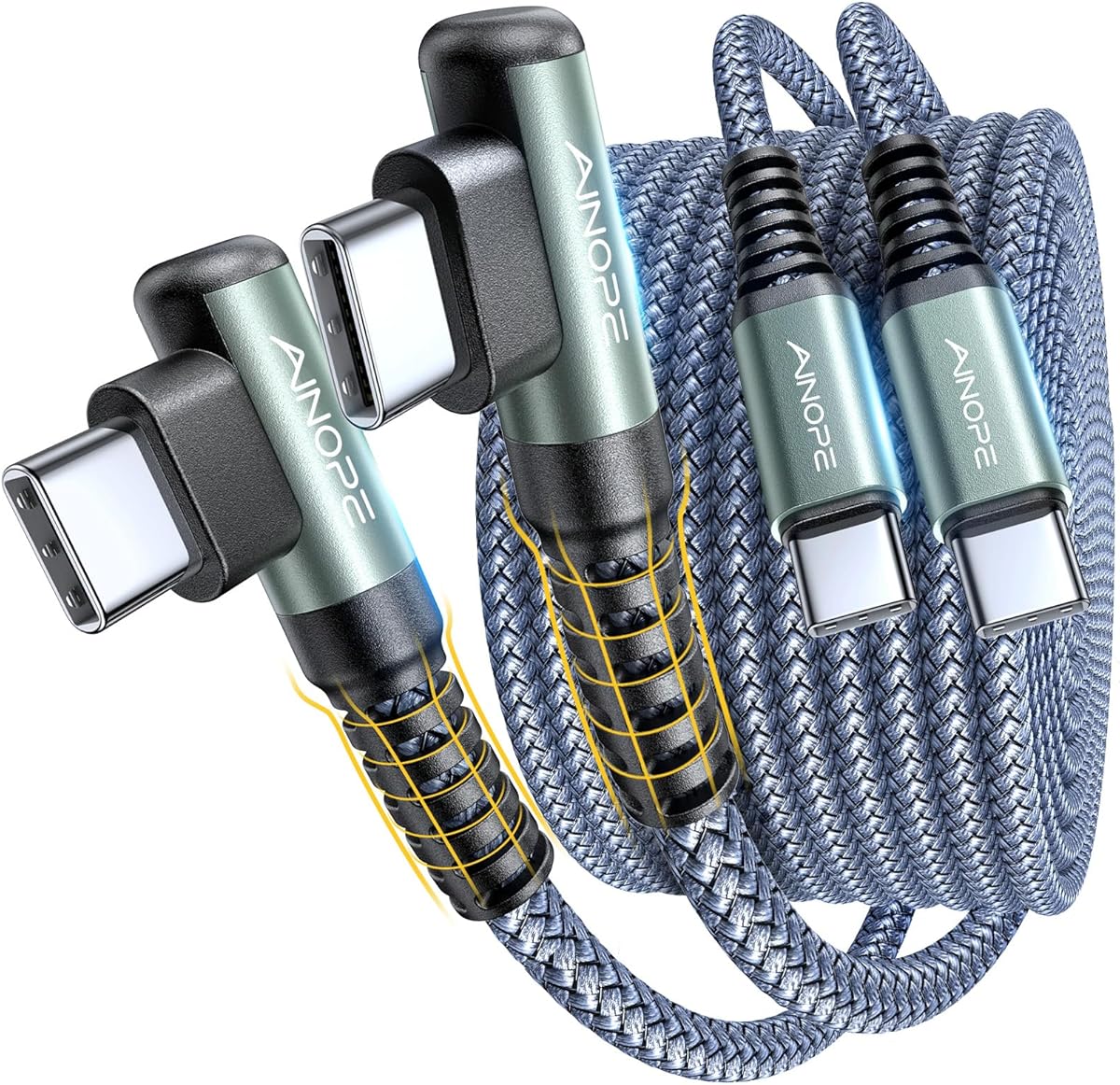
The AINOPE set is the most feature-rich premium selection in the guide, with a 4.7 customer rating, two 6.6-foot cables, USB-C connectors on both ends, and a 90-degree end. The design is intended for users who want long reach, high charging headroom, and a reinforced connection around the cable's most frequently stressed area.
We may earn a commission when you buy through this link, at no additional cost to you.
It supports Power Delivery 3.0, Quick Charge 4.0, and PPS 2.0, with a stated maximum of 60 watts when connected to a suitable USB-C power adapter. Data transfer is specified at up to 480 Mbps, and the product is described as compatible with a broad collection of USB-C phones, tablets, laptops, game systems, and portable devices.
Durability is the distinguishing claim. The manufacturer states that the cable passed more than 400,000 bend tests, uses reinforced nylon braiding and laser-welded metal components, and can withstand 175 pounds of tensile force. These are supplied specifications rather than independent test results, but they indicate a clearly engineered construction.
Buyers should note that this is strictly a USB-C-to-USB-C cable. It will not connect to a USB-A charger, and it cannot charge iPhone models that use a Lightning port. It also does not support video output. For USB-C-heavy setups, however, the combination of length, charging capability, durability claims, and a two-pack makes it an excellent premium choice.
The angled end receives additional structural attention through reinforced braiding, a special joint, and laser welding. These features target the connector area, where ordinary charging cables commonly develop visible wear.
With two 6.6-foot cables, users can keep one at a desk and another in a travel or entertainment area. The shared USB-C-to-USB-C format also avoids needing a separate USB-A lead for compatible USB-C chargers.
We may earn a commission when you buy through this link, at no additional cost to you.
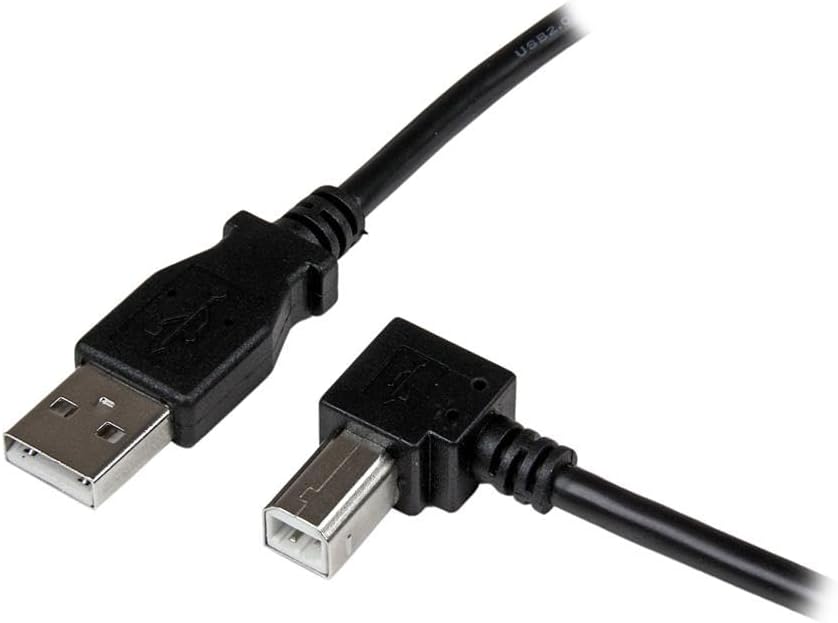
The StarTech cable is a specialized right-angle option for equipment that still uses a USB Type-B male connection. It measures 6.6 feet, uses a USB 2.0 standard, and has a 4.7 customer rating. Rather than competing with modern phone cables, it addresses legacy and industrial-style peripheral connections.
We may earn a commission when you buy through this link, at no additional cost to you.
USB Type-B ports remain found on some printers, scanners, desktop accessories, and specialized equipment. The right-angle end can relieve cable tension when the device sits close to a wall or on a desk with limited clearance. Its male-to-male format makes it straightforward to connect a permanently installed USB-A port to a USB-B peripheral.
The specification sheet is intentionally brief and does not advertise modern fast charging, video capability, or high-speed data standards. Because it uses USB 2.0, users should not treat it as a USB 3.0 solution. The relatively long length also needs proper routing to avoid creating excess slack around the device.
This is the appropriate recommendation for a user who has confirmed a USB-B port and needs an angled connection. It is less relevant to most smartphone buyers, but it offers a focused solution for older or specialized peripherals. Checking the device's connector shape before ordering is essential.
The USB-B plug serves a narrower role than USB-C. Buyers should verify that the target printer, scanner, or accessory uses a male Type-B socket rather than assuming every square USB connector is interchangeable.
The angled connector allows the cable to run closer to the device body. This is especially helpful where a straight Type-B plug would project into a narrow gap or be forced sideways.
We may earn a commission when you buy through this link, at no additional cost to you.
This three-pack of one-foot right-angle USB-A-to-USB-C cables is built for short-distance charging. The 4.5 rating indicates generally favorable feedback, and the supplied details highlight a double-braided nylon exterior, aluminum connector shells, and a 90-degree design intended to protect the cable base from unnecessary bending.
We may earn a commission when you buy through this link, at no additional cost to you.
The one-foot size is ideal for connecting a phone to a nearby power bank, compact USB charging hub, or wall adapter without leaving long loops of unused cable. Multiple cables allow one to remain in a backpack, another in an office drawer, and another at home. This portability-focused format is stronger than a longer lead when the charging source stays beside the device.
USB 2.0 data transfer is supported at up to 480 Mbps, while charging is stated at 3 amps with Quick Charge support. Android Auto is explicitly excluded. The short length may also prove limiting when a wall outlet is several feet from a bed, desk, or other charging point.
The bundle offers good value for users who value compactness and spares over reach. It is particularly well suited to power-bank charging and shared workspaces. Buyers who need more freedom should look for a 3.3-foot model, while those wanting to use a vehicle interface should verify compatibility before purchasing.
A one-foot lead keeps a power-bank setup compact and reduces the chance of snagging the cable. It also avoids storing excess cord that serves no purpose when the charger remains next to the phone.
The three-pack makes it simple to place a cable in multiple everyday environments. It is also convenient for households sharing charging stations or for keeping one dedicated to a particular device.
We may earn a commission when you buy through this link, at no additional cost to you.
This UGREEN 3.3-foot cable offers the most balanced combination of angled design, charging capability, data support, and general device compatibility. It carries a 4.6 rating and supports Quick Charge 2.0 and 3.0 with output up to 3 amps, making it a sensible general-purpose cable for many modern USB-C devices.
We may earn a commission when you buy through this link, at no additional cost to you.
The 90-degree connector makes it comfortable to game, watch video, or read from a phone or tablet while it charges. At the same time, the 3.3-foot length is long enough for common bedside and desk arrangements. Its 480 Mbps transfer rate allows routine data synchronization, while the nylon-braided jacket and aluminum housing are intended to improve everyday durability.
Users should observe two stated limits. The cable does not support video transfer or monitor output, and the angled plug may not fit properly with a case thicker than 2 millimeters. A USB-A port also delivers less negotiating headroom than a USB-C charger for devices capable of accepting higher power levels.
This cable is an excellent general recommendation for a phone, tablet, or other USB-C device that uses a USB-A wall adapter. It avoids unnecessary complexity while providing comfortable placement, fast charging, data transfer, and broad compatibility. It is also one of the strongest choices for users comparing everyday right-angle cables rather than specialized adapters.
The angled plug keeps the connection closer to the device and reduces direct sideways force on the port. That makes the cable easier to use while gaming or consuming media in landscape orientation.
Three feet provides enough reach for many wall outlets and desks without the bulk of a six-foot cable. It is a versatile middle ground between compact one-foot leads and long bedside options.
We may earn a commission when you buy through this link, at no additional cost to you.
This UGREEN 3.3-foot model joins the same brand's other strong performers with an 18-watt charging rating, 480 Mbps data transfer, and a 4.6 customer score. It is a conventional right-angle charging lead aimed at users who need dependable everyday power and synchronization without a specialized adapter.
We may earn a commission when you buy through this link, at no additional cost to you.
The cable is described as available in four lengths, allowing buyers to select a version suited to a compact desk, normal charging distance, or a longer run. The 90-degree connector is intended to reduce stress at the device port, and the stated testing includes more than 20,000 bends and 3,000 plug-and-unplug cycles.
Its charging ceiling of 18 watts is lower than the MEOU and AINOPE alternatives in this guide. That distinction matters for tablets or devices that benefit from a higher negotiated rate. Video transmission is also not supported, and the angled connector may not fit through a particularly thick protective case.
This cable is a strong choice for standard USB-C phone charging, travel, and everyday use with a USB-A wall adapter. It combines a useful length, a comfortable angled end, and a high customer rating without adding unusual requirements. Users needing faster laptop or tablet charging should prioritize a model with a higher stated maximum output.
The stated range of 1.6, 3.3, 6.6, and 10-foot options covers several charging distances. The listed 3.3-foot version provides a versatile middle length for desks and bedside tables.
An 18-watt charging specification and 480 Mbps transfer rate handle common phone and accessory tasks. It remains a USB 2.0 data connection, so video output and monitor use are outside its scope.
We may earn a commission when you buy through this link, at no additional cost to you.
Choosing the right product starts by confirming the connectors, charging requirements, and physical layout. A cable that looks suitable may still be unusable if its ends do not match the charger, device, or available space.
Right angle describes the plug's orientation, not the USB standard carried by the cable. USB-A-to-USB-C leads work with traditional USB-A wall adapters, while USB-C-to-USB-C cables require USB-C ports at both ends. The Oxsubor and StarTech products instead use USB-A-to-USB-A and USB-A-to-USB-B configurations, and the angle adapter retains a male USB-A plug with a female socket.
In summary, match every connector before considering length or charging speed. A physically similar plug can still be electrically or functionally incompatible.
Many right-angle USB-A-to-USB-C cables provide up to 18 watts, which is suitable for many phones but can be conservative for power-hungry devices. Products advertising 60W may charge compatible phones and tablets more quickly and can serve selected lighter laptop charging needs, provided the wall adapter and device negotiate the same protocols.
In summary, choose the highest supported level that matches your charger and device. A larger advertised maximum does not guarantee that every connected combination will receive it.
Quick Charge, Power Delivery, and PPS are protocols that help a phone, tablet, or laptop negotiate an appropriate voltage and current. The MEOU and AINOPE cables list several modern fast-charging protocols, while other products focus on simpler charging. Compatibility with a wall adapter matters because the cable cannot create power that the charger does not supply.
In summary, use the product's listed protocol information to match both the device and adapter. Avoid assuming that the words fast charging guarantee the same result on every phone.
A cable can support charging but not data, or data but not video. Most of the charging cables listed here support up to 480 Mbps, which is suitable for ordinary USB 2.0 file transfers. None should be assumed to carry display or video signals unless the listing explicitly confirms that feature, and several descriptions expressly state that video output is unsupported.
In summary, separate charging, file-transfer, and display requirements. If you need to connect a monitor, use a cable specifically listed for the required video standard rather than relying on USB-C shape alone.
Short one-foot leads are ideal beside a power bank or compact charging hub. A 1.6-foot cable remains easy to carry, while 3.3-foot models suit more desk and bedside arrangements. Longer six-foot options offer reach for furniture and wall outlets but require more careful routing to avoid slack, snags, or an awkwardly angled connector.
In summary, choose the shortest length that comfortably reaches the intended setup. Extra length is not automatically more convenient when the source and device are already beside one another.
A right-angle plug reduces cable leverage but still needs physical room. Several UGREEN products specify a maximum case thickness of 2 millimeters, also described as 0.08 inch. The plug must also approach in the correct orientation because the USB-A side has a fixed direction. Users with reinforced cases or desktop-mounted devices should check clearance before ordering.
In summary, measure the case or gap and compare it with the connector dimensions. A snugly protected port may require removing the case or choosing a slimmer connector design.
The connector-to-cable junction is a frequent failure point, so braided jackets, reinforced strain relief, and bend-test figures are useful comparisons. The AINOPE cable leads with a stated 400,000-plus bend-test figure, while other models cite 10,000-plus or more than 20,000 bending tests. These figures come from product information and should be considered alongside construction details.
In summary, look for a reinforced angled joint and a flexible braid. Avoid sharp folding at the plug, even when a cable has been tested extensively.
A multi-cable pack can be useful for travel, shared offices, or keeping spares in different rooms. The SUNGUY and AINOPE products include two cables, while the short one-foot option includes three. Adapters offer a different economy: they reuse existing cables and are especially helpful when only the plug orientation needs to change.
In summary, compare the practical need for multiple cables against the value of a single more capable lead. Packs are convenient, but extra short cables are not useful if longer reach is required.
Begin by checking the connector orientation and comparing it with the device port. Align the right-angle plug carefully rather than forcing it, particularly if a protective case is fitted. For cables with a fixed USB-A side, note that the USB-A plug only inserts one way, while the angled USB-C end should also be pressed in gently until it feels secure.
Connect the other end to a compatible charger or host and allow the device to negotiate charging and data speeds. Performance depends on the power adapter, device, protocol, cable specification, and port involved. If a fast-charging mode does not activate, test with a compatible charger and confirm that the selected cable and device support the same protocol.
To extend service life, route the cable so the angled joint is not forced sideways or tightly folded. Remove the cable by gripping the connector rather than pulling the cable body, and avoid hanging a heavy device from the plug. Store long cables loosely, clean connectors gently with a dry lint-free cloth, and inspect the braid and molded ends for damage.
A right-angle connector sits closer to the device and reduces sideways pressure on the port. It is especially useful while gaming, watching video, reading, or using a device mounted close to a wall or desk. The improved position can also make a charging setup look and feel less cluttered.
No, not directly. A USB-A-to-USB-C cable needs a USB-A charging source, while most modern USB-C wall adapters have a USB-C port. You would need a USB-C-to-USB-A adapter or use the included cable with a compatible USB-A charger, depending on the adapter's design.
No. The maximum output is only reached when the charger, cable, and device all support the required protocols and power levels. Phones, tablets, and laptops negotiate different rates, and some USB-A chargers cannot provide the voltage and current needed to reach the cable's stated maximum.
Most of the listed charging cables do not support video output, and several descriptions explicitly rule it out. The right-angle shape does not determine display capability. A separate USB-C video cable with support for the required standard is necessary for display use.
That depends on the case. Several UGREEN models specify a maximum case thickness of 2 millimeters, or 0.08 inch. A thicker case may leave insufficient room for the angled housing, so measuring the case and checking the connector's clearance is recommended.
Yes. A USB-A extension connects a male USB-A plug to a female USB-A socket and mainly repositions an existing USB port. A right-angle charging cable has device-specific connectors and carries power according to its charging specifications. The Oxsubor option is best for port access and peripherals rather than direct phone charging.
Most modern phones use USB-C, so a USB-A-to-USB-C cable works with older or lower-power USB-A adapters. If the phone charger has a USB-C plug, a USB-C-to-USB-C cable is more direct and may offer higher charging capability when both the charger and phone support it.
They can reduce mechanical strain by keeping the cable aligned with the device rather than forcing it sideways. However, safety still depends on using a compatible charger, avoiding a loose connector, and not bending the cable sharply at the joint. A right-angle shape does not replace good charging practices.
The UGREEN 3.3-foot USB-A-to-USB-C cable stands out as the most balanced everyday option, combining a comfortable 90-degree connector, up-to-3A charging, data synchronization, and broad compatibility. For a compact budget-oriented solution, the two-pack of USB 3.0 angle adapters provides flexible port positioning without replacing existing cables. The AINOPE two-pack earns the premium recommendation for USB-C-to-USB-C users who value long reach, 60W charging, and unusually strong stated bend durability.
Prioritize connector match before every other feature. Confirm whether the setup needs USB-A-to-USB-C, USB-C-to-USB-C, a USB-B peripheral connection, or simply a change in USB-A plug direction. Then compare charging protocols, data functions, case clearance, and length. A short cable is ideal beside a power bank, while 3.3-foot or longer models are more practical for desks, bedsides, and mounted devices.
Customer ratings and product specifications provide a strong starting point, but prices, promotions, charger bundles, and availability can change. Check the current listing details and compatibility notes before ordering, especially when relying on fast charging, data synchronization, or a particular gaming, vehicle, or display setup.