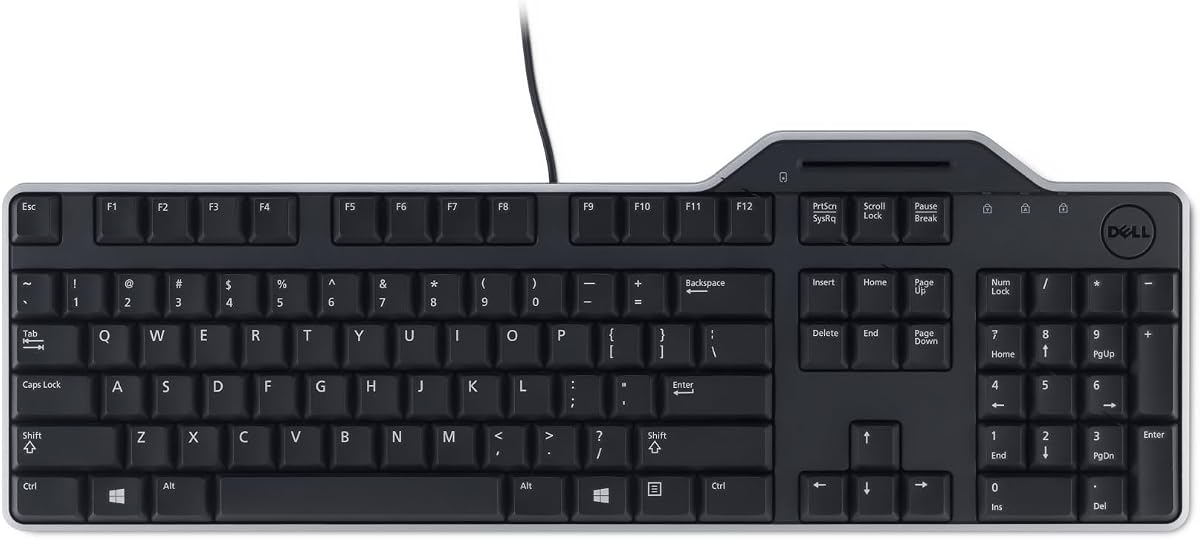
Dell KB813
4.6Editor score
Integrated smart card reader
Spill-resistant construction
Detachable palm rest
Explore and compare 10 of the best Keyboard with Smart Card Reader options for security, comfort, compatibility, durability, and professional everyday use.
A keyboard with a smart card reader combines familiar typing controls with hardware-based authentication, making it useful for government, banking, healthcare, and other security-conscious offices. The best model balances card-reader compatibility, a comfortable layout, durable construction, and straightforward connection to the computer.
We compared ten wired keyboards based on the supplied specifications, including smart card standards, operating-system support, key technology, layout, connectivity, ergonomic features, and physical design. The list covers standard full-size models, ergonomic designs, mechanical switches, compliance-focused options, and boards with support for contactless cards.
Each review identifies the strongest use for its featured keyboard and also notes any compromises. Ratings and product details reflect the supplied listing information, while availability and prices can change. Always confirm reader compatibility, organizational requirements, and system support before making a final purchase.
4.6Editor score

4.6Editor score

4.1Editor score
The comparison below places all ten keyboards side by side, highlighting reader capability, connection method, physical design, and the most important details for secure professional workstations.


The Dell KB813 is a practical all-around choice for offices that want smart card authentication without a specialized or unusually complex keyboard. It carries a supplied rating of 4.6, and its most immediately useful traits are the integrated reader, low-profile keys, detachable palm rest, wired USB connection, and spill-resistant design.
We may earn a commission when you buy through this link, at no additional cost to you.
The broad appeal comes from its familiar full-size format. Low-profile keys should suit users who prefer unobtrusive desktop equipment, while the removable palm rest offers a way to support the hands during extended sessions. Its black finish also allows it to blend easily with conventional monitors, docking stations, and other business peripherals.
The main limitation is that the supplied specifications do not list exact smart card protocols, certifications, or supported operating systems. That matters when a workplace has tightly defined security requirements. A buyer should also accept a wired design, which provides dependable connectivity but does not offer the flexibility of Bluetooth or wireless operation.
Overall, the KB813 is the strongest general recommendation in this list. It suits everyday professional use, shared workstations, and organizations seeking a practical combination of card authentication, spill protection, and comfort. Confirm the exact card and system requirements before deployment, but for typical office needs it is an especially balanced option.
The low-profile key design and detachable palm rest make this keyboard more comfortable for routine typing than a bare security board. Those features are particularly useful for employees who spend most of the day entering information or navigating enterprise applications.
Wired USB connectivity keeps the setup straightforward, while the spill-resistant construction adds resilience in busy offices. It is a sensible combination for institutional desks, service counters, and other environments where equipment must be both approachable and durable.
We may earn a commission when you buy through this link, at no additional cost to you.
The Adesso TruForm AKB-150SB-TAA distinguishes itself through a pronounced ergonomic layout, extensive smart card support, and TAA-compliant positioning. Its supplied rating is 4.1, which is lower than several alternatives, but the specifications make it particularly relevant for government and other formally managed environments.
We may earn a commission when you buy through this link, at no additional cost to you.
The split key zones and gently sloped shape are intended to place the hands, wrists, and forearms in a more natural position. An integrated palm rest supports the same ergonomic goal. Membrane switches provide quiet operation and are specified for a lifecycle of more than five million keystrokes, making the model attractive for long working days.
Its reader supports ISO7816, PC/SC 2.0, Microsoft WHQL, and USB-IF CCID standards, while the product is designed around identification systems, secure web applications, and secure logon. The trade-offs are a 4.1 supplied rating and no explicit operating-system compatibility in the provided information, so buyers should confirm both points with their IT team.
This is the most ergonomically deliberate keyboard in the roundup and a strong choice for long shifts, government procurement, and users who prefer split typing geometry. It may not suit someone seeking a conventional rectangular layout, but for supported professional deployments it offers a rare combination of comfort, reader breadth, and compliance.
The separated key zones and gentle slope are designed to encourage a more neutral hand position during extended use. The attached palm rest complements that geometry, making the model a better fit for long typing sessions than a standard flat security keyboard.
ISO7816, PC/SC 2.0, CCID, and Microsoft WHQL support provide a strong basis for enterprise authentication. The TAA-compliant construction is especially relevant where sourcing rules and government security policies influence procurement decisions.
We may earn a commission when you buy through this link, at no additional cost to you.
The Cherry KC 1000 is the most specification-rich option in the roundup and earns the Editor's Choice distinction for its broad compatibility. It has a supplied rating of 4.6, a PC/SC reader, secure PIN entry, FIPS 201 approval, and EMV 2000 Level 1 approval in a thin wired design.
We may earn a commission when you buy through this link, at no additional cost to you.
Reader capabilities are especially notable. The keyboard supports T=0, T=1, S=8, S=9, and S=10 protocols, works with ISO7816-compliant cards, and is CCID compatible. Driver support is listed for Windows, macOS, and Linux, allowing the same board to fit mixed personal and professional environments.
The low smart card contacting unit preserves a relatively thin profile, while one-handed operation simplifies card insertion. The missing contactless specification is the clearest caveat: users who need NFC or RF card support should not assume that standard contact-card capabilities cover their workflows.
For organizations seeking a clearly documented and cross-platform security keyboard, the KC 1000 is difficult to overlook. It is best for government, enterprise, and technically informed users who can confirm the appropriate card protocols and drivers for their systems.
Support for ISO7816, multiple listed protocols, PC/SC, and CCID gives administrators more information to work with when selecting cards. FIPS 201 and EMV approval further strengthen its suitability for controlled professional environments.
Windows, macOS, and Linux driver support is unusual in this category and makes the keyboard attractive to technical users. It can move between managed workstations and personal systems without being tied to one operating environment.
We may earn a commission when you buy through this link, at no additional cost to you.
The Adesso EasyTouch 130SB brings mechanical red switches to a smart card keyboard while retaining a supplied rating of 4.6. It is designed for secure office and workstation environments, combining a 104-key US layout, a certified reader, USB connectivity, and a generous set of dedicated hotkeys.
We may earn a commission when you buy through this link, at no additional cost to you.
The red switches provide tactile feedback, and the stated lifecycle of 50 million keystrokes suggests a long service life for intensive use. Two large-print keycaps improve visibility, which may benefit users who need clearer legends during long sessions or in lower-light conditions.
Its certifications are a major selling point: the reader is certified to EMV 4.0 Level 1, PBOC2.0 Level 1, ISO7816, PC/SC 2.0, Microsoft WHQL, and FIPS Publication 201. The trade-off is a stated USB compatibility focus on Windows, and no specific contactless standard is listed.
This keyboard is best for Windows-based professional environments that value mechanical feedback and want more than basic card authentication. Its dedicated Copilot AI key may be convenient for some workflows, but organizations should assess whether that feature fits their policies and whether the mechanical layout suits their users.
Red mechanical switches offer a pronounced tactile response while remaining suitable for office work. The 50-million-keystroke rating supports use in intensive settings where membrane switches may be replaced sooner.
The broad certification list includes financial, smart card interface, and federal standards. That makes the model a compelling option for organizations that need documented interoperability rather than a basic card-reader attachment.
We may earn a commission when you buy through this link, at no additional cost to you.
The Dell Keyboard Smartcard USB has the highest supplied rating in the collection at 4.7, making it a strong option for straightforward professional use. Its core benefits are an integrated reader, full-size layout, low-profile keys, wired USB connectivity, spill resistance, and a detachable palm rest.
We may earn a commission when you buy through this link, at no additional cost to you.
This is a conventional enterprise keyboard rather than a feature-heavy enthusiast board. That simplicity can be an advantage because it should integrate more readily into a standard office workflow. The quiet, low-profile keys also support shared workspaces where constant mechanical noise would be distracting.
The supplied information does not enumerate reader certifications, protocols, or supported operating systems. It also emphasizes everyday comfort rather than advanced layout geometry. Those omissions limit the model for a highly specialized security purchasing process, where exact compliance and card requirements must be confirmed.
For a standard business desk, this Dell is a confident recommendation because it combines the category's highest listed rating with practical durability features. It is especially attractive to users who want a full-size keyboard with palm support and quiet operation without a complicated design.
Low-profile keys and a smooth, quiet typing experience make this suitable for shared or open offices. The detachable palm rest gives users an additional comfort option without changing the keyboard's fundamental full-size format.
Wired USB removes the need for batteries and provides a stable connection to the host computer. Spill resistance adds practical protection for a device expected to remain on the desk throughout the workday.
We may earn a commission when you buy through this link, at no additional cost to you.
The Kensington KB201C is built for organizations where formal compliance and broad platform support matter more than specialized typing features. Its supplied rating is 3.8, the lowest here, but the listed TAA compliance, FIPS-201 certification, PIV support, and three-year warranty make it a serious institutional option.
We may earn a commission when you buy through this link, at no additional cost to you.
The full-size 104-key board includes a numeric keypad and dedicated six-row layout, which benefits data entry and familiar desktop workflows. Its wired USB-A connection requires no batteries or software installation, and compatibility is listed for Windows, macOS, and ChromeOS.
The principal trade-offs are the 3.8 rating and the large footprint created by the numeric keypad. Buyers should also verify that the stated quiet-click behavior and reader certifications align with their particular CAC cards and policies. The model does not provide the sophisticated secure mode described for some competing security keyboards.
The KB201C is best for federal, government, and regulated offices that explicitly need TAA-compliant sourcing and broad operating-system compatibility. It is less compelling for a small desk or for users who prioritize advanced encryption and contactless-card features over warranty-backed compliance.
FIPS-201, PC/SC, USB CCID, PIV, and ISO/IEC 7816 support give administrators a clear standards baseline. The CAC reader is positioned for reliable authentication and data protection in managed environments.
Compatibility with Windows, macOS, and ChromeOS makes the keyboard suitable for mixed deployments. A three-year limited warranty also adds institutional reassurance that many buyers will value alongside TAA compliance.
We may earn a commission when you buy through this link, at no additional cost to you.
The Lenovo Smartcard Wired II-US English is a straightforward choice for users who want a familiar Lenovo business keyboard with card-reader functionality. It has a supplied rating of 4.4 and an integrated smart card reader, supported by a wired design and US English configuration.
We may earn a commission when you buy through this link, at no additional cost to you.
The listed package dimensions are 18.78 by 8.15 by 1.54 inches, and the package weighs 2.27 pounds. Those details suggest a conventional desktop form that should integrate with existing Lenovo peripherals and standard office workstations.
The supplied data provides limited technical detail. It does not specify reader standards, certifications, key-switch construction, operating-system support, or special features such as a palm rest. Those details matter for procurement, but the lack of information also makes the keyboard easier to understand as a traditional enterprise accessory.
This Lenovo is best for a straightforward office refresh or for users already comfortable with its standard keyboard design. Buyers who need documented CCID, FIPS, PIV, or operating-system requirements should request those confirmations before purchasing. As a general smart card keyboard, it remains a practical and well-rated option.
The full-size standard format and US English layout make the model approachable for employees who do not want to learn a new keyboard shape. It is designed to supplement a professional workstation rather than become a specialized input device.
Its wired construction offers a stable connection without charging or wireless pairing. This is particularly convenient in offices where many devices share a fixed desk and security policy favors a direct peripheral connection.
We may earn a commission when you buy through this link, at no additional cost to you.
The HP USB Business Slim Smartcard Keyboard combines a slim professional chassis with an integrated card reader. Its supplied rating is 4.5, and the core specifications include a six-foot cable, USB interface, membrane keyswitches, 104 keys, LED backlight type, and a built-in spill drain.
We may earn a commission when you buy through this link, at no additional cost to you.
The slim profile can make it easier to fit beside compact laptops and docking stations than a deeply sculpted ergonomic board. A full 104-key layout preserves familiar navigation and numeric keypad access, while key-light indicators may help users identify important commands in low-light settings.
The supplied listing does not identify exact smart card certifications, supported protocols, or operating systems. Membrane construction may also feel different from mechanical or scissor-style alternatives. As with the rest of the category, potential buyers should verify that the reader matches their authentication cards and application requirements.
The HP is best for office users who prioritize a slim footprint, full-size layout, cable reliability, and spill-drain protection. It is a particularly good visual match for compact professional desks, while buyers needing a detailed security specification should consult the manufacturer's current documentation.
The low-profile business design preserves a standard 104-key arrangement without taking up as much visual space as a deeply contoured model. It suits modern desks where users want clear access to function and number-pad keys.
The attached six-foot cable provides ample reach for varied desk arrangements. A built-in spill drain adds a layer of everyday resilience, while membrane switches keep the overall design consistent with conventional office equipment.
We may earn a commission when you buy through this link, at no additional cost to you.
The Cherry Secure Board 1.0 is the roundup's most advanced dedicated security keyboard. It has a supplied rating of 4.2 and stands apart through a smart card and RF/NFC reader, a secure mode with authentication and encryption, and explicit support for thin-client environments.
We may earn a commission when you buy through this link, at no additional cost to you.
Its reader is PC/SC compatible and supports T=0, T=1, and T=CL protocols. It can read and write ISO 7816 and ISO 14443 A/B compliant cards, giving it broader capabilities than models that are limited to one common contact-card interface. The RF/NFC support also extends the board to contactless cards and tags.
These capabilities also create the main trade-off. A dedicated security keyboard is more complex than a standard office model and may require careful deployment, user training, and card management. The supplied information does not detail every supported operating system or installation requirement, so administrators need to verify the complete setup.
Choose the Secure Board 1.0 when security architecture matters more than convenience or low-profile styling. It is best suited to controlled environments using thin clients, contactless credentials, or a need for authenticated encryption. For basic smart card login only, a simpler model may be more economical.
Support for ISO7816, ISO14443 A/B, and RF/NFC interfaces allows the board to work with a wider mix of credentials. Read and write functions also make it more useful where administrators need to manage card data rather than only authenticate.
The authenticated and encrypted secure mode is designed for sensitive deployments, especially thin-client use. It adds a specialized layer of protection that conventional office keyboards with card readers do not necessarily provide.
We may earn a commission when you buy through this link, at no additional cost to you.
The Dell KB813t is a black USB English keyboard with an integrated smart card reader and a supplied rating of 4.4. It is positioned as an OEM-style model, making it relevant to offices replacing compatible Dell equipment or seeking a familiar enterprise keyboard format.
We may earn a commission when you buy through this link, at no additional cost to you.
The basic design is simple: wired USB connectivity, an integrated reader, and a US English configuration. That simplicity can make it attractive to administrators who want to standardize peripherals without adopting a complex security keyboard with many advanced modes.
The supplied information is notably limited. It identifies the item as new and unopened but does not provide reader protocols, certifications, key layout details, operating-system support, or ergonomic specifications. Those omissions are significant for regulated procurement, where documentation is often as important as the hardware.
The KB813t is best for buyers who already know their Dell environment and have independently verified card compatibility. It can serve as a familiar replacement, but a model with fuller published specifications may be easier to justify in a formal purchasing process.
The Dell name and conventional full-size appearance can make this keyboard an easy choice for organizations that already use similar equipment. A standard USB connection also reduces the learning curve for installation and daily use.
Because the supplied listing offers few technical details, procurement teams should confirm reader standards, supported cards, and operating-system requirements. The keyboard may fit a Dell-focused deployment, but documentation should support the decision.
We may earn a commission when you buy through this link, at no additional cost to you.
Selecting the right smart card keyboard involves balancing authentication standards, device compatibility, layout, comfort, and regulatory requirements. The most important first step is to identify the card, application, operating system, and organizational policies that the keyboard must support.
A keyboard can include a smart card reader without supporting every card type or protocol used in your organization. Look for PC/SC and CCID compatibility, along with the specific ISO7816, ISO14443, PIV, EMV, FIPS, and other standards required by your authentication system. The Cherry KC 1000, for example, lists several protocols and broad operating-system support, while the Cherry Secure Board 1.0 adds RF/NFC and read-and-write support for contactless credentials.
Basic card insertion can handle a straightforward login, but security-focused deployments may require PIN entry, protected key entry, authenticated operation, or encryption. Check whether the keyboard offers a dedicated secure PIN pad, how the reader communicates with the host, and whether the product supports the security modes required by your applications. More advanced features are most relevant in government, defense, financial, and tightly managed thin-client environments.
The hardware may work through a standard USB connection while still needing the correct driver, service, or middleware to communicate with the operating system. Windows support appears across several options, but broad deployments should also consider macOS, Linux, and ChromeOS. The Cherry KC 1000 explicitly lists drivers for Windows, macOS, and Linux, whereas the Kensington KB201C states compatibility with Windows, macOS, and ChromeOS.
TAA compliance can be essential for United States government sourcing and may influence which products are eligible for an installation. The Adesso TruForm AKB-150SB-TAA and Kensington KB201C both explicitly identify TAA-compliant positioning. Compliance is more than a label, however, so buyers should review the full procurement requirements, supported cards, reader certifications, warranty terms, and any internal standards that apply to their organization.
A card reader is only one part of daily usability. Full-size boards provide a numeric keypad, while split or sloped layouts can reduce wrist and forearm strain during long shifts. The Adesso TruForm uses separated key zones and an integrated palm rest, whereas the Dell KB813 and Dell Smartcard USB offer detachable palm rests. The HP Business Slim prioritizes a thinner footprint, and the Adesso EasyTouch uses tactile mechanical red switches for users who prefer more pronounced feedback.
Membrane switches are common in business keyboards because they offer quiet, consistent operation without a complex mechanical profile. The Adesso TruForm specifies a lifecycle of more than five million keystrokes, while the Adesso EasyTouch uses red mechanical switches rated for 50 million keystrokes. These figures are not directly interchangeable because test methods can differ, but they offer useful context for procurement and expected replacement cycles.
Every product in the roundup uses a wired connection, eliminating battery charging and wireless pairing. Wired operation can also reduce the attack surface compared with an unmanaged wireless peripheral, which may appeal to security teams. Check connector type, cable length, and docking arrangements; the HP is specified with a six-foot cable, while the Kensington explicitly uses USB-A. Full-size models also require enough desk depth, especially when they include a numeric keypad.
Hotkeys, large-print legends, backlighting, indicators, and palm rests can improve daily workflow, but unnecessary features may add complexity. The Adesso EasyTouch includes a dedicated Copilot AI key, internet and multimedia hotkeys, and large-print keycaps; the HP lists LED key-light indicators; and the Adesso TruForm offers thirteen hotkeys. The Kensington adds a three-year limited warranty, which can be particularly valuable for institutional deployments. Prioritize the features that solve a documented need rather than simply adding more controls.
Begin by connecting the keyboard to the appropriate USB port on the managed computer and allowing the operating system to identify it. If authentication software prompts for a driver or service, install only the version supplied or approved by your IT department. Test the card reader with an approved credential before beginning normal work, and confirm that the expected account, certificate, and smart card application open correctly.
Insert and remove cards only when the system prompts you to do so. Follow the orientation instructions for the reader and avoid forcing a card, bending its contact area, or pulling it sideways. Users who need PIN entry should understand the keyboard's secure-entry behavior and use the organization-approved login sequence. If a card is not detected, move it slightly and retry before escalating the issue rather than repeatedly reinserting it.
For care, disconnect the keyboard before cleaning it and use a soft microfiber cloth lightly dampened with an appropriate cleaner. Do not pour liquid into or directly onto the reader. Keep crumbs and debris away from the card slot, protect the keyboard from spills, and have worn or questionable equipment inspected by the responsible IT team. Periodic authentication tests can help identify reader or driver problems before they interrupt a secure workflow.
It combines normal keyboard input with a built-in reader for identity or access cards. Employees can use the card with approved applications to authenticate a login, access protected data, or satisfy organizational security requirements. The exact use depends on the card, driver, middleware, and authentication system configured on the computer.
No. Banks, healthcare providers, contractors, educational institutions, and private enterprises may also use card-based authentication. Government-focused models are simply more likely to emphasize TAA compliance, PIV support, or other government procurement requirements. A smaller business can still choose one if its software and credential system require the hardware.
It depends on the model and computer configuration. Some keyboards rely on standards such as PC/SC and CCID that the operating system can recognize, while others may require installation of a vendor driver or a separate smart card management service. The Kensington and Cherry KC 1000 provide useful platform information, but administrators should confirm the exact setup for their environment.
Only if the reader explicitly supports the contactless technology and protocol used by the card. Most contact-card readers use ISO7816, while contactless credentials may require ISO14443, PC/SC, T=CL, or RF/NFC support. The Cherry Secure Board 1.0 explicitly lists RF/NFC and ISO14443 A/B support, making it a more relevant option for contactless workflows.
PC/SC is a widely used interface for communicating with smart cards through a reader, while CCID is a USB device class designed to support those readers. Support for both indicates that the keyboard's reader can work with common software and operating-system services. Still, broader interface support does not guarantee that every card, certificate, or authentication application is compatible.
A split layout can reduce awkward wrist and forearm positioning for users who adapt well to it. The Adesso TruForm goes further with separated key zones, a gently sloped shape, and an integrated palm rest. Adjustment takes time, however, so organizations may prefer to let employees try a similar layout before standardizing it across a department.
Mechanical switches provide more pronounced tactile feedback and may suit users who prefer a strong keystroke sensation. Membrane switches are quieter, simpler, and common in conventional office models. The Adesso EasyTouch offers red mechanical switches, while the HP and Adesso TruForm use membrane construction, giving buyers distinct choices based on preference and environment.
Ask the IT or security team for the credential type, card standard, authentication protocol, and approved hardware specifications. Include operating-system details and any TAA, PIV, FIPS, or organizational requirements in the request. This prevents a superficially similar keyboard from being selected even though its reader cannot support the deployed authentication system.
The Dell KB813 offers the best general balance for typical offices, combining a smart card reader, quiet low-profile keys, a detachable palm rest, spill resistance, and a supplied 4.6 rating. The Cherry KC 1000 is the strongest choice when detailed reader standards and cross-platform driver support matter, while the Adesso TruForm AKB-150SB-TAA stands out for split ergonomics and TAA-focused procurement.
For organizations needing contactless credentials, the Cherry Secure Board 1.0 deserves particular attention because it supports RF/NFC and ISO14443 A/B cards. Government buyers may prefer the explicitly TAA-compliant Kensington KB201C, and Windows users who value tactile mechanical switches can consider the Adesso EasyTouch 130SB. In every case, the card, protocol, operating system, and compliance rules should drive the decision before style or special features.
Finally, check current availability, seller details, warranty terms, and the latest technical documentation before purchasing. Prices and listings can change, and a keyboard that appears similar may have meaningful differences in reader certifications or platform support. Confirming those requirements will lead to the most reliable fit for a secure professional workstation.